Visualizing remote onboarding isn’t just a nice-to-have, it’s a key factor in successful team integration. Done well, it helps new hires understand their role, connect with teammates, and become productive quickly. Done poorly? It can lead to confusion, isolation, and slow engagement.
This article explores how visualizing onboarding can improve team integration, the methods and Core elements, and why it’s essential for building cohesive remote teams in a hybrid work environment.
The Importance of Effective Remote Onboarding
The process of onboarding a new employee remotely has a tremendous impact on their first impression, and their ultimate success, at a new company. The first few months of an employee’s experience is a critical period for engagement, productivity, and retention, but remote work can lead employees to feel isolated and unclear about what their work and their role mean.
Remote work makes it hard for employees to get a feel for the team dynamics and organizational culture when they have no face-to-face interactions, and even the onboarding tools themselves, can foster a disjointed employee experience. A successful onboarding process helps to mitigate these types of challenges, but perhaps more importantly, it helps new hires feel supported, aligned, and ready to contribute, which enhances their integration into a team and organization from day one.
Why is Visualization Key in Remote Onboarding?
When organizations imagine remote onboarding, they take complex processes and express them visually and intuitively while providing a welcoming structure for new employees. Rather than pulling the information together in a text-heavy format, or pulling together a packet of resources from different places, organizations can build engagement and clarity using tools like interactive flowcharts, step-by-step dashboards, video tours, visual schedules, and digital whiteboards.
Examples of Visualized Onboarding
1. Team Maps and Org Charts
Illustrating team structure provides new hires with an understanding of who they will work with, the reporting relations, and what each does. It lessens confusion about who to ask for support and helps foster relationships more easily.

For example, a new marketing associate joins a remote team. On their first day, they are able to view a team mapping that depicts the role, photo, and contact information of each member of the team. This new hire can see who manages content, campaigns, and analytics, and they know who to contact for questions. A new hire is now connected and feeling secure from the very first day!
2. Task Progress Boards (like Kanban Boards)
Visual boards help to organize tasks, deadlines, and project phases, which increases clarity on responsibility and workflow. Visual boards are beneficial to new hires in understanding project priorities, and fit within the context of the team’s intended goals.
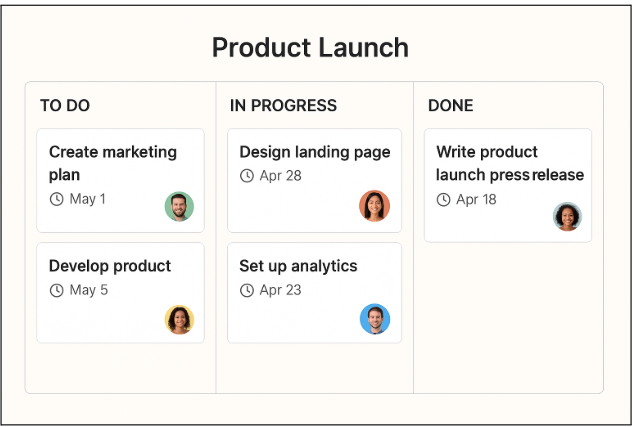
The new product manager is assigned to the launch project. The Board shows team member tasks under the Kanban board of, “To Do,” “In Progress,” and “Completed,” with deadlines attached to each task. The visual board provides immediate context about expectations without requiring repeated clarifications.
3. Interactive Training Modules
Active modules enable employees to learn by doing instead of passively reading instructions. They often have simulations, quizzes, or guided practices, which are more active and stimulating learning experiences.
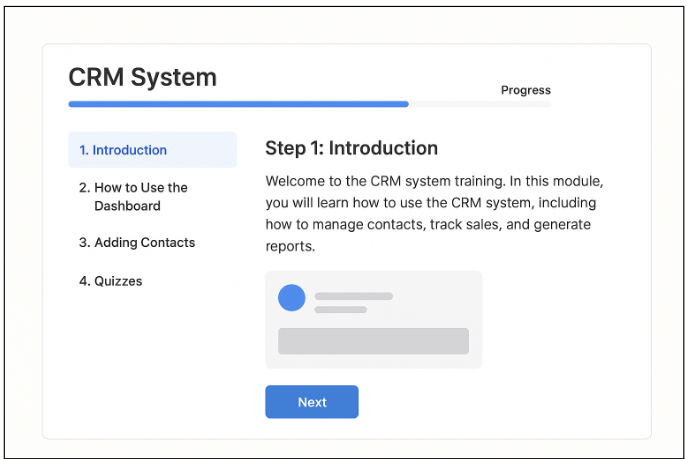
For example, a new sales staff must learn the company’s CRM. So instead of reading a manual, they navigate an interactive module that takes them step-by-step, provides practice, and quizzes them on important tasks. By the end of the module, they feel comfortable using the system for real purposes.
Core Elements to Visualize in a Remote Onboarding Plan
Remote onboarding is now much beyond a checklist. Beginning from day one, onboarding is an essential step in developing a sense of connection, confidence, and productivity for new employees. Let’s take a closer look at the fundamental elements that you might want to visualize in an effective plan for remote onboarding:
1. Company Overview & Culture
As new employees begin their work, learning the company’s mission, values, and culture is critical in helping them feel connected and engaged. Remote employees tend to miss the informal cues of culture in the office environment, so seeing the mission, values, and culture will help them understand the context quickly.
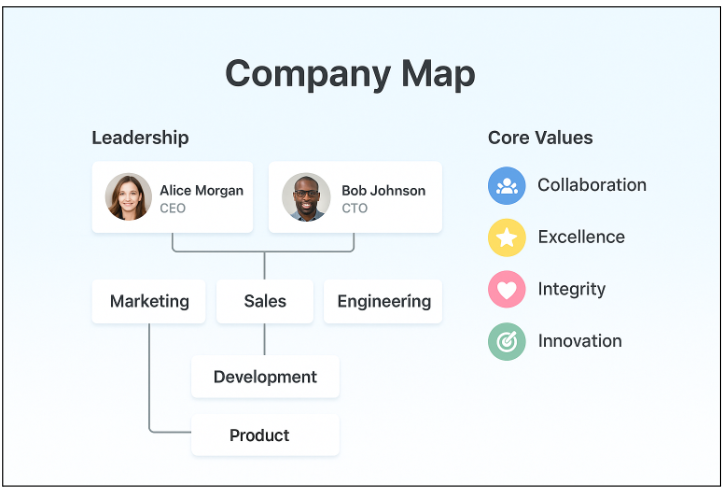
On day one, another new employee sees an organ organizational chart that incorporates team structures, leadership roles, as well as company values; they can click on different teams to learn about team’s missions and projects that are key to the company’s success, which will help them feel a sense of belonging very early in their new role.
2. Role Responsibilities
Effectively communicating role expectations is essential to mitigate confusion and ensure productivity from the start. Role visualizations such as dashboards, KPIs, and tasks boards, make the responsibilities real to new hires and illustrate how their work fits into the team goals and the broader company goals.
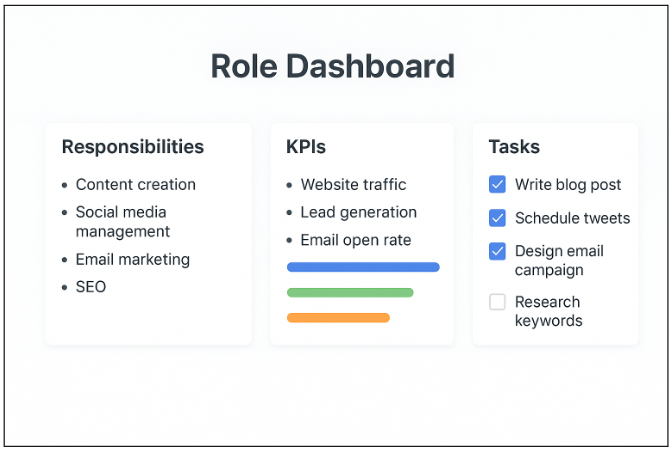
A product analyst who is new to the organization looks at a visual dashboard that articulates their role responsibilities, KPIs, and work in the first 90 days. They will be able to monitor their progress, understand the contribution their role makes to team objectives, and build confidence and clarity.
3. Process & Workflow Maps
Remote employees often struggle to understand operational processes without guidance. Step-by-step flowcharts, workflow maps, and visual SOPs clarify procedures, minimize mistakes, and make complex tasks easier to follow.
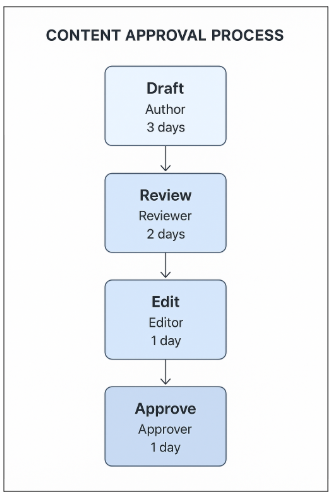
A remote marketing coordinator follows a visual flowchart of the content approval process, detailing each stage, reviewers, and deadlines. This reduces confusion and ensures tasks move smoothly through the workflow.
4. Tech Stack & Tools
New employees need to grasp the company’s software environment as quickly as possible in order to contribute to productivity. Visual diagrams that show connections among tools, their primary capabilities, and how to apply them, can lower the learning curve and mitigate frustrations.
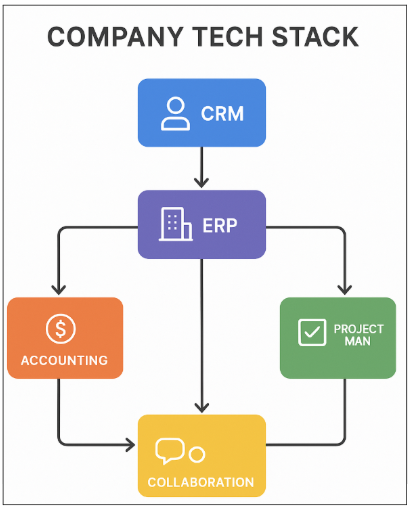
For example, a new sales associate reviews a visual diagram that shows how our CRM, email & SMS platform, analytics application, and area communication apps work together. They can also review quick-start visual documents for using each tool effectively so they can quickly begin contributing to the team without needing continuous hand-holding.
5. Team Collaboration & Communication
As remote teams work to integrate new staff members, it is essential that the new employee knows who to contact (and how) for team integration. Visual team directories, communication maps, and team member photos that communicate appropriate workflows, can create contextual understanding and feel collaborative and connected.
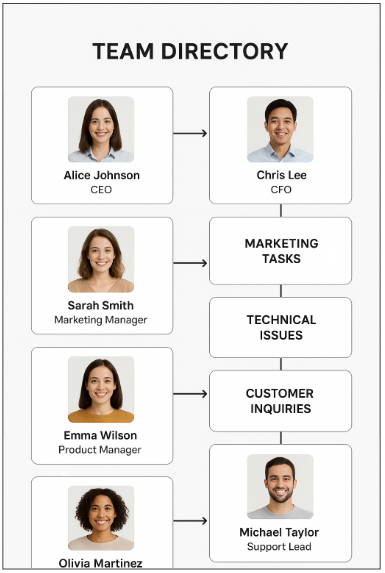
For example, a remote designer who can access a visual team directory with photos of team members, their role, and a visual map for communication about their work and questions, can see who to go to for an approval or a question in an expedited timeline. This removes ambiguity and delays and creates a smooth flow for the employee’s integration.
Step-by-Step Framework to Implement Visual Remote Onboarding
Remote work has reached its tipping point as a normal practice for many workers, making onboarding a smooth experience for new hires even more critical. Visual remote onboarding transforms a complicated process into clear, enjoyable, visual content, so new hires can connect, understand their roles, and start contributing confidently in a faster timeframe. Here’s a simple framework for doing it.
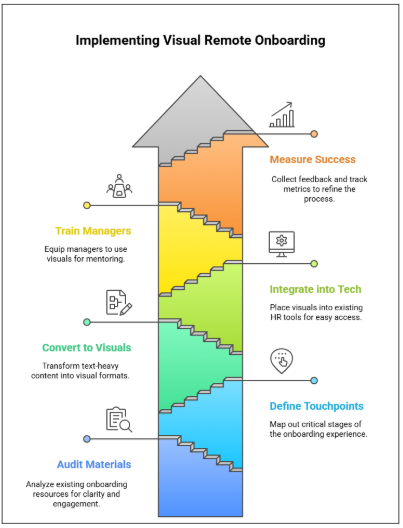
1. Audit Existing Onboarding Materials
The first step is to conduct an analysis of any existing onboarding-related materials you currently have, including but not limited to manuals, guides, and/or digital content/resources. You will want to ask yourself where there is a lack of clarity, engagement, accessibility, or where the materials may benefit from the addition of any visuals or other methods. This step will help lay the groundwork for a more curated and effective onboarding process.
2. Define Key Touchpoints
Once you have an understanding of the resources that you currently have (and/or the intended gaps), map out the critical touchpoints of the onboarding experience (for example: pre-boarding, Day 1, Week 1, and 90 days). Once your touchpoints are established, you can ensure that visual content is provided during the appropriate stage to help guide new employees through their onboarding experience.
3. Convert Information into Visual Formats
With touchpoints established, create visual formats to replace the text-heavy manuals, guides, and other content. The visual formats could include any of the following: flowcharts, diagrams, checklists, or infographics, etc. The intent is to make the processes simple, easy to understand, retain, and to help make the information relevant for daily application to new work skills.
4. Integrate Visuals into Your HR Tech Stack
Next, place those visuals into the existing tools employees use, such as LMSs or onboarding software. Positioning visual content in one place allows new hires to easily access the material, and receive and follow along, in the best way possible.
5. Train Managers and Buddies
The onboarding or project manager and “buddies” can further embed the visuals by using them to check in, mentor, and provide progress towards the next piece of material. By guiding them to use the visuals, consistency of support is maximized.
6. Measure Success & Iterate
Finally, collect feedback from new hires and track key performance metrics such as engagement levels, task completion, and time-to-productivity. Use these insights to refine and improve the visual onboarding materials continuously, ensuring that each step of the process remains effective and connected.
How Visualization Improves Team Integration
The process of visualizing remote onboarding substantially aids in greater team integration due to the challenges we face in working in a distance and having little interaction. It helps to facilitate relationship building by providing new hires with an understanding of team structures and a means of identifying collaborators, mentors, and other points of contact. Interactive org charts or “meet the team” maps are excellent tools to help new hires build connections with the right people in a timely manner.
Visualization adds clarity and minimizes confusion. With increased clarity around tasks, responsibilities, and expectations, new employees refer to step by step workflows, task boards, and other visual guides to minimize time inefficiency caused by repeated questions or miscommunication. New hires would clearly see what they need to do, how that fits into the team’s objectives, and the flow of work within the organization.
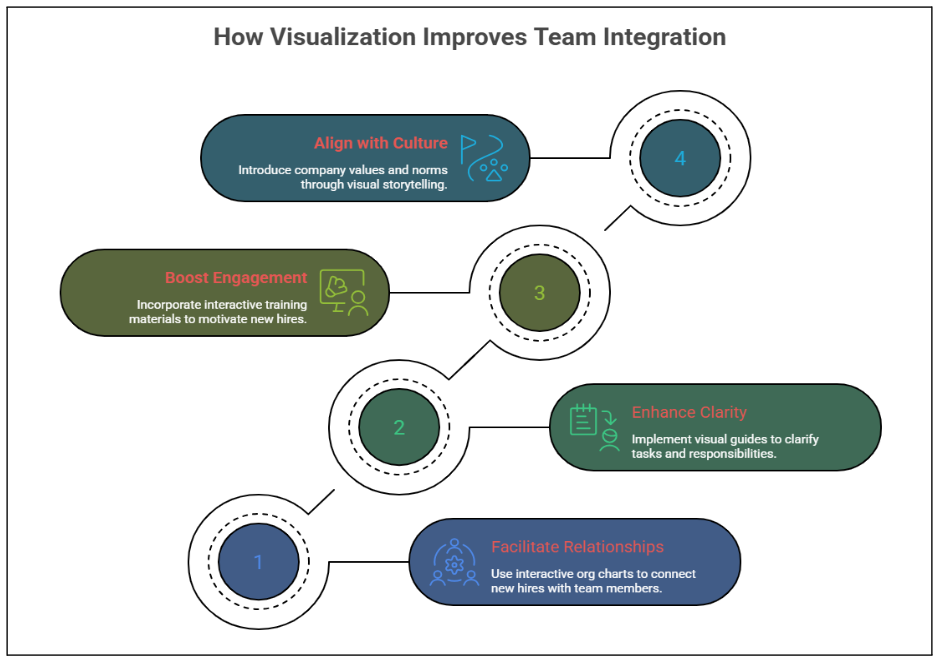
It also increases engagement and motivation. Training materials have interactive features like quizzes, simulations, and progress trackers that make learning quicker and enjoyable. For example, gamification features can track progress and reward completion, continuing to promote activity and engagement from new employees as they begin their onboarding.
Lastly, visualization assists employees in getting an alignment with company culture from day one. Through visual storytelling, including culture maps, infographics of values, accompanied by examples of rituals or social norms, remote employees are introduced to the identity of the organization, and included, valued in identity, as part of the team, even though they are not working in person. The combination of these benefits will create a cohesive, confident, and connected workforce.
Conclusion
To maximize the speed at which new employees get up to speed in their roles, begin developing connections with coworkers and start to feel like a part of the team, utilizing visual prompts in remote onboarding is a powerful tool to take advantage of this opportunity.
Using a Creately template, HR leaders and managers can turn workflows, team structures, and role responsibilities into simple, clear, beautiful visualizations that make onboarding easier and deliver rich information effectively via visual presentation. The best place to start today is by reformatting a single piece of your onboarding process to a visual presentation, and then continue to develop a fully integrated visual onboarding process.
Author Name: Philip Portman
Author Bio:
Philip Portman is the Founder and CEO of Textdrip, a business texting platform catering to industries such as Solar, Travel & Tourism, E-Commerce, Insurance, Hotels & Hospitality, Car Dealerships, Real Estate, and Healthcare. He has successfully launched several startups including landlineremover.com and argosautomation.com. With expertise in SMS marketing and digital automation, Philip is also an esteemed member of the Forbes Technology Council.