Sprint planning is essential for web development teams because it keeps projects organized, predictable, and aligned with business goals.
According to Parabol’s Agile Statistics, 27 percent of teams report that the absence of clear metrics slows down their agile progress, which further complicates sprint planning.
Traditional tools make the situation worse because developers, designers, and QA usually work in separate documents, leading to outdated statuses, inconsistent handoffs, and gaps in user story details that slow the entire sprint.
Visual sprint boards resolve these issues by bringing everything into one clear and interactive workspace.
They make tasks easier to understand, accelerate decision making, and help teams stay aligned throughout the sprint.
What Are Visual Sprint Boards?
Visual sprint boards are interactive, digital workspaces that help teams plan, track, and manage tasks throughout a sprint.
They organize work into columns that represent different stages such as backlog, in progress, review, and completed. Tasks appear as cards that can be moved as the work progresses.
These boards go beyond the limitations of typical sprint tools by providing real-time visibility, built-in collaboration, and an intuitive structure that reflects how development teams actually work.
Visual collaboration platforms have become essential because teams need faster communication, clearer workflows, and a shared environment where everyone can understand project status at a glance.
Why Web Development Teams Need Visual Sprint Boards
Clearer workflow visualization
Web development projects often involve many moving parts, and it becomes difficult to track progress when tasks are buried inside lists, emails, or disconnected tools.
A visual sprint board shows the entire workflow in one place so teams can instantly see what is being worked on, what is pending, and what is blocked. This level of clarity helps prevent confusion and ensures that everyone is aligned on priorities.
Faster sprint planning and prioritization
Teams frequently lose time trying to gather information from different sources during sprint planning. Visual boards speed up the process by displaying backlog items, estimates, dependencies, and priorities together.
For distributed teams, visual boards also simplify coordination. If you work with a remote or hybrid team, you may find these remote sprint planning techniques helpful.
This makes sprint planning smoother and helps teams select realistic workloads without wasting time reconciling scattered data.
Better cross-team communication for design, development, and QA
Miscommunication often occurs when design, development, and QA teams work in their own isolated tools.
Visual sprint boards create a shared space where every role can view updates, leave comments, and clarify requirements.
This reduces back-and-forth messages, prevents misunderstandings, and keeps all stakeholders on the same page.
Real-time updates and progress tracking
Teams working with static documents or offline files struggle to keep track of accurate progress.
Visual sprint boards update instantly as tasks move forward, which helps everyone see real-time progress without asking for status reports. This immediate visibility supports better decision-making and makes daily standups more productive.
Reducing bottlenecks through visual backlog grooming
Unorganized backlogs often cause delays because tasks are unclear, large, or missing critical details.
Visual backlog grooming helps teams refine tasks by breaking them into smaller, actionable items and mapping dependencies visually.
This reduces bottlenecks during development and improves the flow of work throughout the sprint.
Key Features of an Effective Visual Sprint Board
Drag-and-drop tasks and swimlanes
One of the most powerful elements of a visual sprint board is the ability to drag tasks across swimlanes as work progresses.
In web development teams, tasks often shift between design, development, review, and testing.
I have seen that when teams can move cards instantly between these stages, it eliminates confusion around task owners and reduces delays caused by unclear transitions.
Swimlanes also help separate frontend, backend, and QA workflows so nothing gets buried inside a long list of items.
Backlog and sprint planning in one view
A single consolidated view of backlog items and sprint commitments removes the friction teams face when switching between multiple tools.
From my experience leading solution architecture, having the entire product backlog visible on the same canvas improves prioritization and reduces unnecessary context switching.
Teams can pull in tasks for the upcoming sprint while evaluating capacity and dependencies in real time, which creates far more realistic sprint planning.
Dependencies and task relationships
Web development work often involves interlinked components such as APIs, UI screens, backend logic, and third-party integrations. A visual sprint board that shows dependencies helps teams catch risks early. When tasks are connected visually, professional web developers can immediately see which items must be completed first. This prevents mid-sprint blockers and supports cleaner, more predictable delivery.
Customizable templates for web development
Every development team structures their workflow differently, which is why customizable templates are essential.
Whether a team follows Scrum, Kanban, or a hybrid web development workflow, templates allow them to set up their own stages, definitions of done, and review cycles.
In our projects, having templates tailored for frontend, backend, and DevOps tasks has always reduced setup time and ensured consistency across sprints.
Collaboration tools such as comments, mentions, and real-time editing
Effective sprint execution requires constant communication between design, development, and QA. Real-time comments and mentions help teams clarify requirements instantly without cluttering Slack or email threads.
I’ve noticed that when discussions happen directly on the relevant task card, decisions become easier to track and developers spend less time searching for context.
Integration with development tools like GitHub and Jira
An effective visual sprint board connects seamlessly with repositories, issue trackers, and CI/CD tools. When commits, pull requests, and automated checks appear directly on task cards, it brings transparency to the whole sprint.
Integrations reduce manual updates and help teams maintain accurate task statuses, which is crucial for planning and daily standups.
How to Plan a Web Development Sprint Using a Visual Sprint Board in 8 Steps?
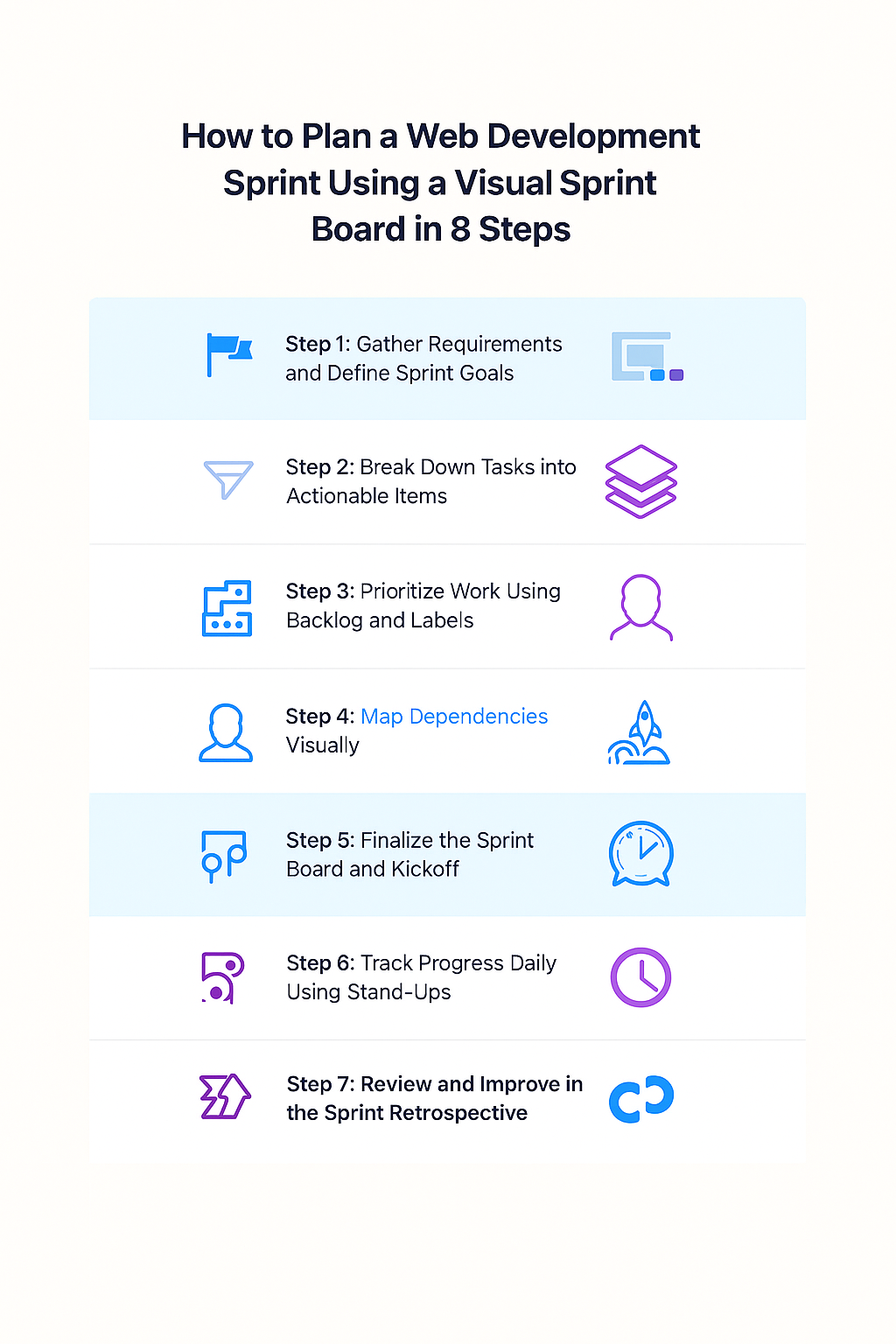
Step 1: Gather requirements and define sprint goals
Before setting up the sprint board, the team needs clarity on user stories, technical requirements, and the desired outcomes. I always encourage teams to start by identifying one or two clear sprint goals. This helps filter out noise and ensures the sprint remains focused on delivering real value.
Step 2: Break down tasks into actionable items
Large user stories must be broken into smaller, actionable tasks. In my experience, tasks that clearly describe the expected output lead to faster development and fewer revisions. A visual sprint board makes this easier by letting teams create subtasks, acceptance criteria, and design references directly inside the task card.
Step 3: Prioritize work using backlog and labels
Prioritization often becomes chaotic when items are scattered across tools. With a visual board, teams can use labels for priority, complexity, or component type. This makes it easier to pull the right tasks into the sprint and avoid overcommitting. The board also helps ensure high-impact items are handled first.
Step 4: Assign responsibilities and estimate time
Once tasks are selected, responsibilities must be assigned clearly. Each card should have an owner along with a realistic estimate. I’ve learned over the years that transparent ownership prevents tasks from stalling and keeps team members accountable throughout the sprint.
Step 5: Map dependencies visually
Dependencies influence how work flows across the sprint. Mapping them visually ensures that frontend tasks are not started before backend APIs are ready, or QA does not begin testing before staging builds are available.
When everything is visually connected, the team can foresee potential delays and plan accordingly.
Step 6: Finalize the sprint board and kickoff
After confirming estimates, responsibilities, and dependencies, the sprint board becomes the team’s single source of truth.
During sprint kickoff, the team reviews every card to ensure understanding and alignment. This step sets the tone for the entire sprint and eliminates uncertainty from day one.
Step 7: Track progress daily using stand-ups
Daily stand-ups revolve around the visual sprint board. Instead of verbal status updates, team members simply walk through the board and review the flow of cards from left to right.
In my experience, this keeps the meeting short, factual, and focused on resolving blockers rather than discussing unrelated issues.
Step 8: Review and improve in the sprint retrospective
At the end of each sprint, the board becomes a valuable reference for evaluating what went well and what slowed the team down.
Reviewing it during the retrospective helps identify bottlenecks, improve workflows, and create better templates for future sprints.
Continuous improvement becomes easier when the entire sprint is visually documented.
Web Development Sprint Planning: 8 Step Summary Table
| Step | Action | Purpose |
| Step 1 | Gather requirements and define sprint goals | Ensures clarity and gives the sprint a focused direction |
| Step 2 | Break down tasks into actionable items | Reduces complexity and prevents rework through well-defined tasks |
| Step 3 | Prioritize work using backlog and labels | Helps teams pull the right tasks into the sprint and avoid overcommitment |
| Step 4 | Assign responsibilities and estimate time | Creates accountability and realistic expectations |
| Step 5 | Map dependencies visually | Prevents blockers by aligning frontend, backend, and QA timelines |
| Step 6 | Finalize the sprint board and kickoff | Makes the sprint board the single source of truth for the team |
| Step 7 | Track progress daily using stand-ups | Enables fast and factual updates while identifying blockers quickly |
| Step 8 | Review and improve in the sprint retrospective | Encourages continuous improvement and smoother future sprints |
Visual Sprint Board Templates (With Examples)

Visual sprint boards become even more effective when teams start with templates designed for real development workflows. Platforms like Creately offer premade structures that reduce setup time and help teams maintain consistency across sprints.
These templates give developers, designers, and QA teams a shared language and a unified visual space to plan, track, and refine every stage of the sprint.
Basic Kanban Sprint Board
A basic Kanban board is ideal for teams that want a clear, visual flow from backlog to completion. It usually includes stages such as To Do, In Progress, Review, and Done.
I often recommend this template for smaller dev teams or for projects where work is continuous rather than tied to strict sprint cycles. It helps teams focus on limiting work in progress and ensuring that nothing stays stuck for too long.
Web Development Backlog Template
A backlog template tailored for web development includes user stories, technical tasks, design assets, refactoring items, and bug fixes. This template gives teams a structured way to document acceptance criteria, priority tags, component labels, and estimates.
With everything in one place, teams can pull items directly into the sprint without spending hours reorganizing requirements.
UX and Development Joint Sprint Template
Design and development teams often work in parallel, but misalignment usually slows progress. A joint template combines UX tasks, mockups, wireframes, and development stories on the same board.
I’ve personally seen this approach reduce rework because designers and developers stay synced on requirements and can visually track how design decisions impact development timelines.If your team runs rapid UX cycles, you will find the design sprint process extremely useful. You may also like: How to conduct a design sprint.
DevOps-Integrated Sprint Workflow
Modern web development relies heavily on deployments, automated testing, builds, and monitoring. A DevOps-enabled sprint template includes CI/CD stages such as Build, QA Verification, Staging, and Production Release.
This structure gives the team a complete view of where each feature stands in the deployment pipeline and helps developers coordinate with DevOps without constant status checks.
Sprint Retrospective Template
A retrospective board gives teams a visual space to reflect on the sprint. Categories typically include What Went Well, What Didn’t Go Well, Improvements, and Action Items.
I find that visual retrospective templates make conversations more focused because the team can point directly to cards and discuss them with clarity and context.
Common Mistakes Teams Make in Sprint Planning
Overloading the sprint
Teams often commit to more work than they can realistically complete. This happens when estimates are rushed or when teams rely on gut feeling instead of data.
An overloaded sprint increases stress, creates unnecessary context switching, and usually results in unfinished work that rolls over. A visual board exposes workload imbalances early and helps teams avoid this mistake.
Not defining “Done” clearly
Without a clear Definition of Done, tasks move to the next stage prematurely and create extra QA cycles.
This leads to confusion about what is ready for testing or deployment. A well-designed visual sprint board allows teams to embed the Definition of Done directly into task cards so there is no ambiguity.
Missing dependency mapping
When dependencies are not mapped, teams often discover blockers mid-sprint. For example, frontend developers might begin working on a component before the backend API is ready.
Visual boards that show connections between tasks help prevent these situations. I have seen significant time savings simply by mapping dependencies before the sprint even starts.
Poor communication between design, dev, and QA
Misalignment between teams is a common reason tasks get delayed or reopened. When each role works in a different tool, updates slip through the cracks.
A shared visual sprint board improves communication because every team member can see the exact status of work and review comments or clarifications in real time.
Not updating the board regularly
A sprint board loses value when it is not maintained. Inconsistent updates lead to unreliable progress tracking and wasted time during standups. Daily use ensures that the board remains accurate and continues to support the sprint instead of slowing it down.
Best Practices for Getting the Most Out of Visual Sprint Boards

Keep everything in one visual workspace
When requirements, tasks, assets, and comments stay in one place, teams avoid the chaos of switching between multiple tools. Keeping everything unified makes the sprint board the single source of truth.
I have always encouraged my teams to bring all sprint-related resources into one workspace because it dramatically reduces confusion.
Use color codes for priority levels
Color-coded labels help teams identify high-priority tasks instantly. This reduces planning time and ensures that critical issues get attention first. A consistent color system also allows designers, developers, and QA to understand task urgency at a glance.
Hold daily syncs using the board
Daily standups become more effective when the board is used as the central reference point. Instead of verbal updates, the team reviews the movement of cards across stages, which gives a more accurate representation of progress and blockers.
Automate task movement and notifications
Automation is essential for keeping sprints running smoothly. Automatic updates from GitHub commits, pull requests, or CI/CD pipelines ensure that task statuses stay accurate. Automations reduce manual effort and prevent bottlenecks caused by outdated information.
Review and optimize board layout regularly
Sprint boards evolve as the team’s workflow changes. Adjusting columns, swimlanes, or template structures after retrospectives helps teams improve continuously. Small layout improvements often lead to noticeably smoother sprint execution.
Future of Sprint Planning: Visual Collaboration Workspaces
AI-driven sprint planning is becoming more common as teams look for ways to reduce repetitive tasks. Intelligent systems can analyze historical velocity, predict workload capacity, and even recommend realistic sprint goals.
Automated backlog grooming helps teams keep user stories refined without dedicating hours each week to manual cleanup. Predictive workload balancing ensures that no developer is overloaded while others remain underutilized.
As visual systems continue to evolve, they are quickly replacing static tools like spreadsheets or task lists because teams need dynamic, interactive environments that match the pace of modern development.
Conclusion
Visual sprint boards transform the way web development teams plan, execute, and refine their work. They simplify task management, improve communication, and give teams a clear, real-time picture of progress. After working with many development teams, I have seen how visual systems lead to more predictable delivery and stronger collaboration.
For teams aiming to modernize their workflow, visual sprint boards offer a smarter and far more intuitive approach to sprint planning. I encourage teams to explore visual collaboration platforms and experience how much easier sprint planning becomes when everything is aligned in one interactive workspace.
Author Bio:
Arsalan Tariq is the Co Founder and CEO of Halo Digital and an experienced Solution Architect who specializes in building scalable digital systems and improving development workflows. With deep expertise in web technologies and hands-on experience leading cross functional teams, he helps brands streamline processes, strengthen collaboration, and achieve measurable digital growth.