
UML stands for Unified Modeling Language. It’s a rich language to model software solutions, application structures, system behavior and business processes. There are 14 UML diagram types to help you model these behaviors.
You can draw UML diagrams online using our software, or check out some UML diagram examples at our diagramming community.
List of UML Diagram Types
So what are the different UML diagram types? There are two main categories: structural diagrams and behavioral diagrams. Click on the links to learn more about a specific diagram type.
- Structural Diagrams
- Behavioral Diagrams

Structural diagrams show the things in the modeled system. In a more technical term, they show different objects in a system. Behavioral diagrams show what should happen in a system. They describe how the objects interact with each other to create a functioning system.
Structural Diagrams
Structural diagrams in UML represent the static architecture of a system, the elements that make up its structure, and how they’re connected. They focus on the organization and relationships between different components such as classes, objects, interfaces, and nodes. By visualizing these static aspects, structural diagrams help teams understand how a system is built, maintained, and scaled.
Class Diagram

Get More UML Class Diagram Examples >>
Component Diagram
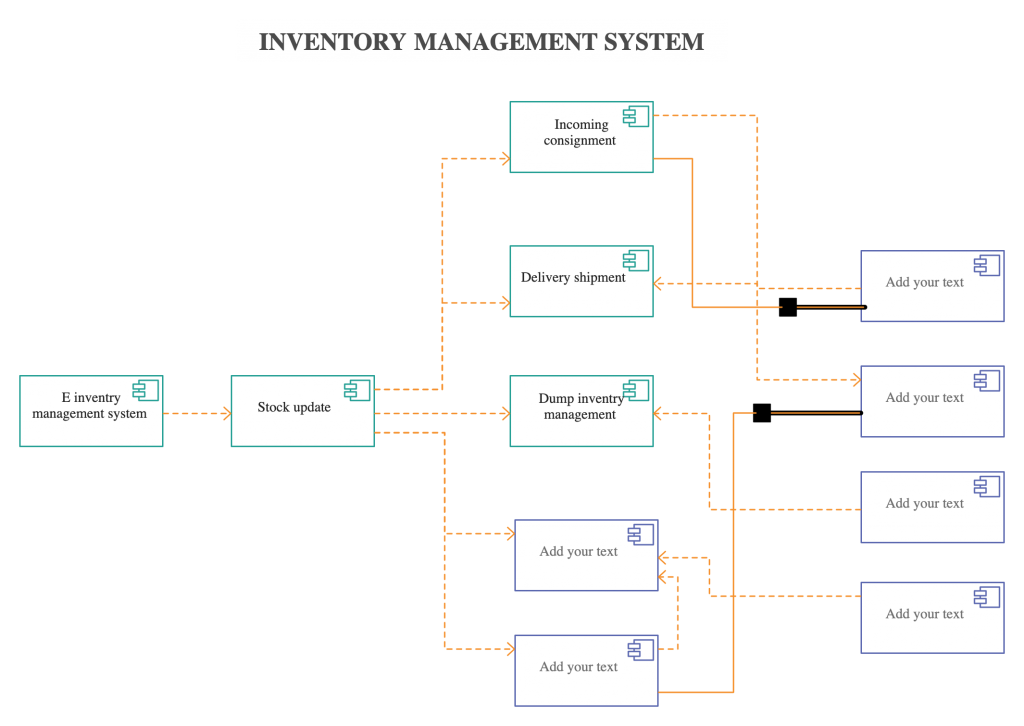
A component diagram displays the structural relationship of components of a software system. These are mostly used when working with complex systems with many components. Components communicate with each other using interfaces. The interfaces are linked using connectors. The image below shows a component diagram.
Get More Component Diagram Examples>>
Deployment Diagram
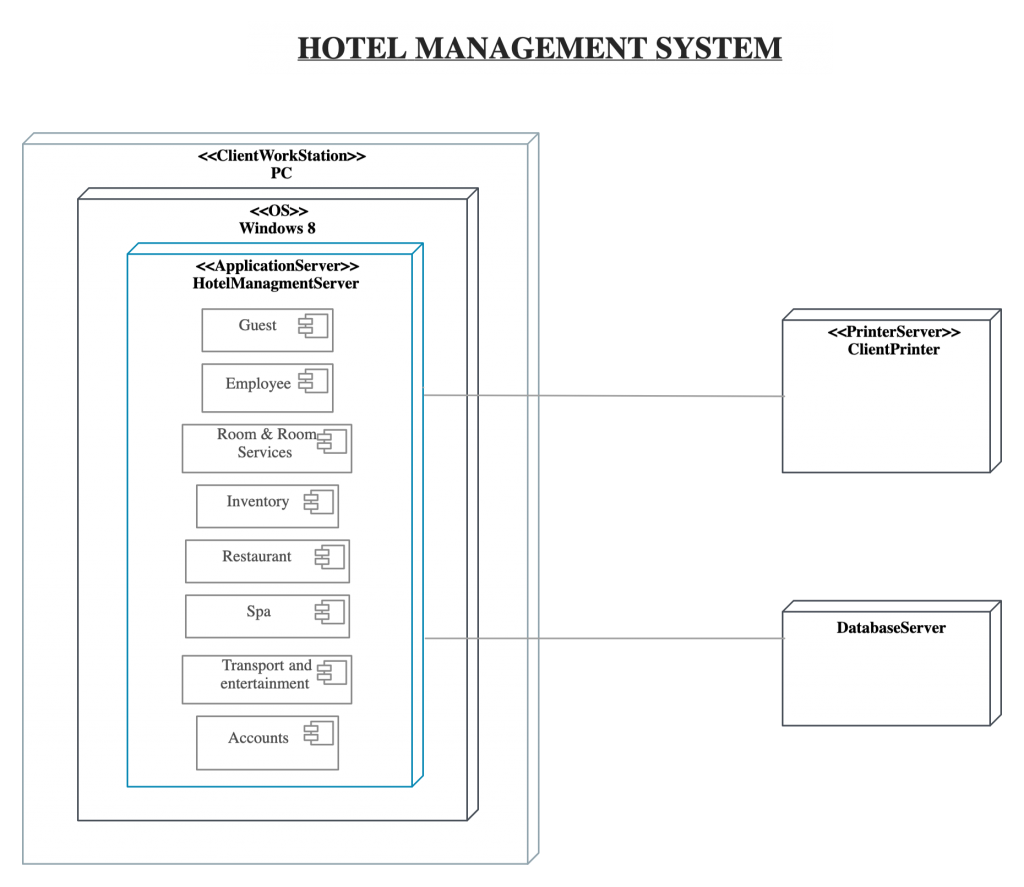
A deployment diagram shows the hardware of your system and the software in that hardware. Deployment diagrams are useful when your software solution is deployed across multiple machines with each having a unique configuration. Below is an example deployment diagram.
Get More Deployment Diagram Examples>>
Object Diagram
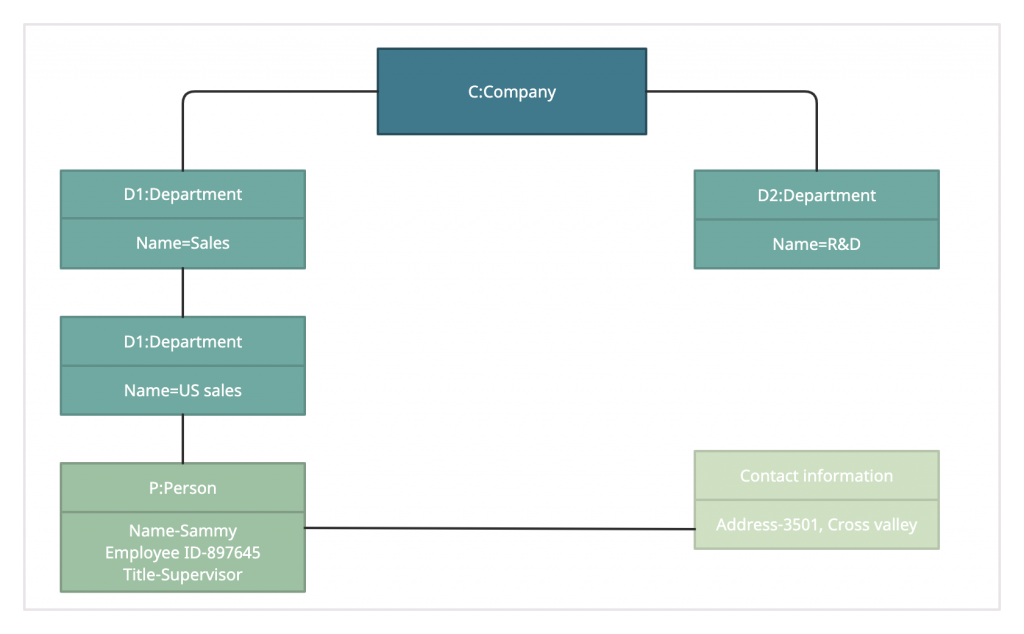
Object Diagrams, sometimes referred to as Instance diagrams, are very similar to class diagrams. Like class diagrams, they also show the relationship between objects, but they use real-world examples.
They show what a system will look like at a given time. Because there is data available in the objects, they are used to explain complex relationships between objects.
Get More Object Diagram Examples>>
Package Diagram
As the name suggests, a package diagram shows the dependencies between different packages in a system.

Get More UML Package Diagram Examples >>
Profile Diagram
Profile diagram is a new diagram type introduced in UML 2. This is a diagram type that is very rarely used in any specification. For more profile diagram templates, visit our diagram community.

Composite Structure Diagram
Composite structure diagrams are used to show the internal structure of a class. Some of the common composite structure diagrams.

Get More UML Composite Structure Diagram Examples >>
Behavioral Diagram
Behavioral diagrams in UML illustrate the dynamic aspects of a system — how its components interact, change state, and collaborate to perform specific functions. They focus on the flow of control and data, showing how a system behaves in response to internal and external events. These diagrams are vital for modeling system logic, user interactions, and process workflows.
Use Case Diagram
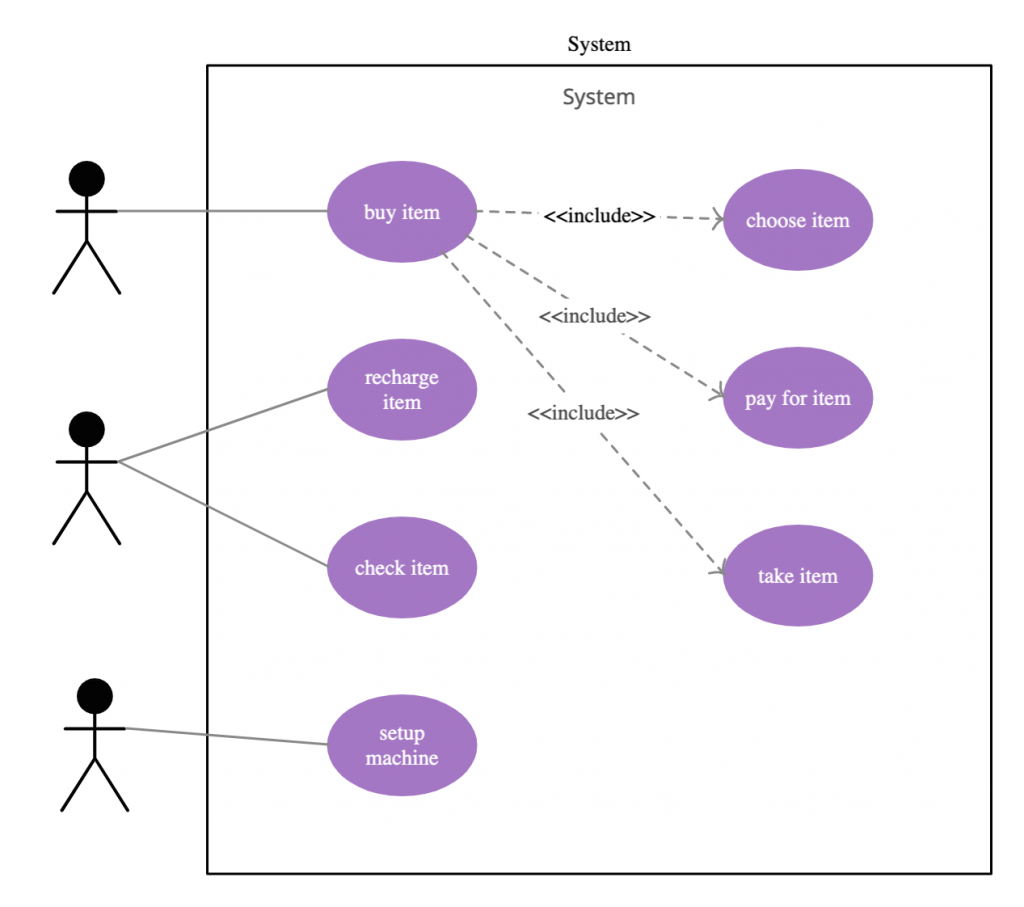
As the most known diagram type of the behavioral UML types, Use case diagrams give a graphic overview of the actors involved in a system, different functions needed by those actors, and how these different functions interact.
It’s a great starting point for any project discussion because you can easily identify the main actors involved and the main processes of the system. You can create use case diagrams using our tool and/or get started instantly using our use case templates.
Use Case Diagram Relationships Explained with Examples
Get More Use Case Diagram Examples >>
Activity Diagram
Activity diagrams represent workflows in a graphical way. They can be used to describe the business workflow or the operational workflow of any component in a system. Sometimes activity diagram examples are used as an alternative to State machine diagrams. Check out this wiki article to learn about symbols, and you can also refer to this easy guide to activity diagrams. You can easily draw an activity diagram using an online activity diagram tool.
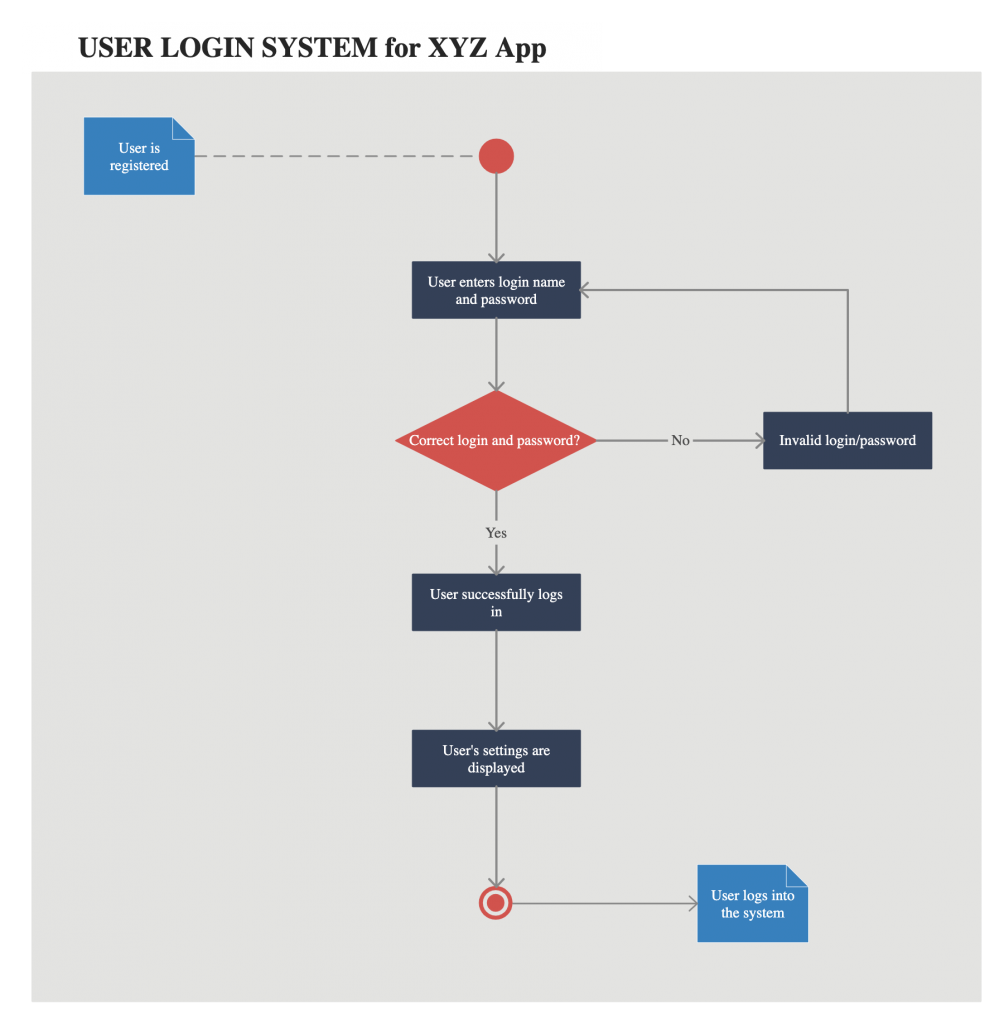
Get More Activity Diagram Templates >>
State Machine Diagram
State machine diagrams are similar to activity diagrams, although notations and usage change a bit. They are sometimes known as state diagrams or state chart diagrams as well. These are very useful to describe the behavior of objects that act differently according to the state they are in at the moment. The State machine diagram below shows the basic states and actions.

Get More State Chart Diagram Examples >>
Sequence Diagram
Sequence diagrams in UML show how objects interact with each other and the order those interactions occur. It’s important to note that they show the interactions for a particular scenario. The processes are represented vertically and interactions are shown as arrows. This article explains the purpose and the basics of Sequence diagrams. Also, check out this complete Sequence Diagram Tutorial to learn more about sequence diagrams.
You can also instantly start drawing using our sequence diagram templates.
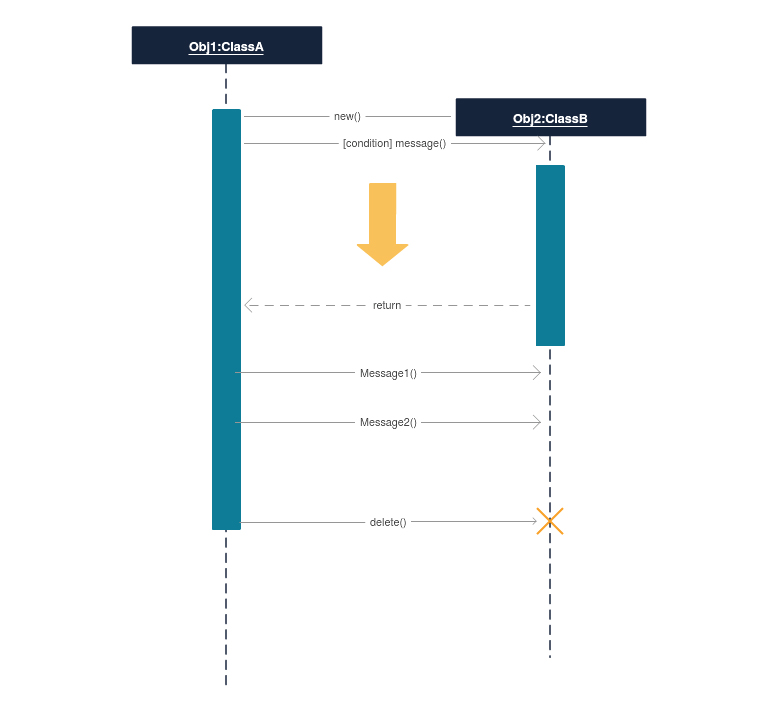
Get More Sequence Diagram Examples >>
Communication Diagram
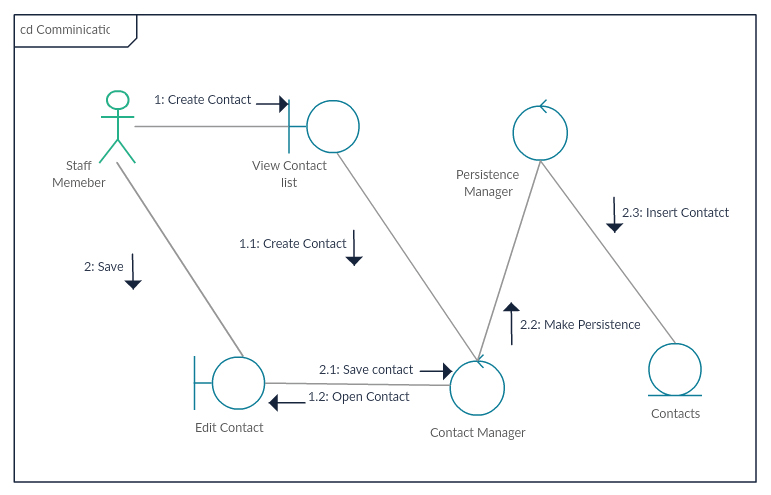
In UML 1 they were called collaboration diagrams. Communication diagrams are similar to sequence diagrams, but the focus is on messages passed between objects. The same information can be represented using a sequence diagram and different objects. Click here to understand the differences using an example.
Interaction Overview Diagram
Interaction overview diagrams are very similar to activity diagrams. While activity diagrams show a sequence of processes, Interaction overview diagrams show a sequence of interaction diagrams.
They are a collection of interaction diagrams and the order they happen. As mentioned before, there are seven types of interaction diagrams, so any one of them can be a node in an interaction overview diagram.
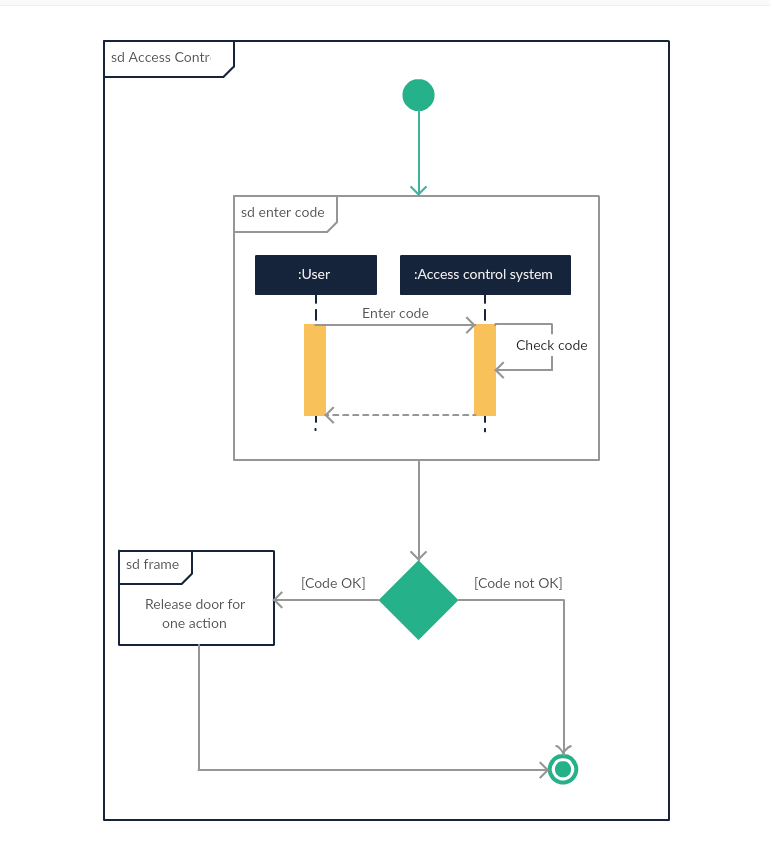
Get More Interaction Overview Diagram Examples >>
Timing Diagram
Timing diagrams are very similar to sequence diagrams. They represent the behavior of objects in a given time frame. If it’s only one object, the diagram is straightforward. But, if there is more than one object is involved, a Timing diagram is used to show interactions between objects during that time frame.
Click here to create your timing diagram.

Mentioned above are all the UML diagram types. UML offers many diagram types, and sometimes two diagrams can explain the same thing using different notations.
Check out this blog post to learn which UML diagram best suits you. If you have any questions or suggestions, feel free to leave a comment.



This is amazingly helpful. I’ve been trying to read and learn enough about UML to use it for some complex areas in some software I’m developing and have found it hard to grasp quickly, until I found this page. Thank you for taking the time to do it!
plz send me uml diagram for online bus reservation system
Hi Priya, check our community for various UML diagram types examples. Here’s the link https://creately.com/diagram-community/popular
Thanks!!!
Is there a UML model that exemplifies a nightclub system?
it is very nice but there is no clear idea in database design and physical design
aspect where models are used. can someone answer
Information is brief and helpful for basic knowledge of UML diagrams. Thank you.
First comment was in 2012. Ahh, where’re I at that time …
Thank you! It’s very useful and easy to study. If I find this earlier …
Thanks you!
Wow it is very use full and easy to study…
???
Thnkq lot…
which UML version does this tool currently support?
Hi Janie,
We currently support most of the features in UML 2. Is there any specific feature that you require ?
I need help in sequence diagram for smart city app..can anyone help me
I need chart which summarizes the history of the evolution of UML until 2016?
Valuable discussion ! I loved the information . Does someone know if my business can get ahold of a sample AZ SOS Recall Petition document to fill in ?
it help to easy to study it………….. thanqqqqqqqqq. …………..
thank you very much, before midterm its like heaven
Any idea how a MF/legacy system will use UML diagrams…or what is the best way to use some of these diagrams for this environment.
simple and clear, thanks.
So educative, more grease to your elbow.
it help to easy to study it
This this very supportive for me. I just wa to know is there a way to see the UML diagram from multiple python source files. We have a hierarchy of classes spread in a package. How can I see the diagram for entire package?
It’s very help the learner, thank u much.
Hurrah! After all I got a webpage from where I can really get
useful facts regarding my study and knowledge.
Brilliant article!
Thanks a lot!
Very easy to understand!
Keep it going on mate!
Nice article. Only if there was use for all of these in real software projects. Seriously, who is using all of these, NASA? In reality maybe sequence and class diagrams are used (at most).
help in studt thanks
a good article. was very helpful thanks
very easy to understand thanks
thank you very much brother hope through hard work every thing is possible
helpful in did, thank you.
wow !!!!!!!!!
ITS TOOO GOOOOOOOOOOOOOOOODDDDDDDD……………
very useful article … thanks for sharing
There’s an error here: “In large systems with many classes related classes are grouped together to to create class diagrams.”
Thanks for the article.
Hi Francesco, can you please explain the error there? A class diagram is a collection of classes so I feel the sentence is correct. Do think its confusing or misleading? Thanks for the feedback.
Maybe it’s just confusing because you’re not using any punctuation. Please correct me if I’m wrong but I guess this is what you wanted to say: “In large systems with many classes related, (comma) classes are grouped together to (the second “to” here should be removed) create class diagrams.”
Hi Francesco, agree that it is misleading and confusing. Thanks for pointing it out and I have modified the article. Hope you enjoyed the article.
Yes I did, it’s definitely useful 🙂
Hi,
This is a very helpful and compact article. Thank you boss..:)
Thanks a lot dear! Much Appreciated!
This is really a splendid job
I am an Engineering Student This Arun Kumar Notes U have Gives is very informative Sir…
hi, this is wonderful job keep up.
Hi Nishada,
what a very helpful note you have given! I have a question. Pls can UML diagrams be used for the understanding of problem domain? if yes, please explain.
Thanks.
Kind regards
This is really an awesome article.. thanks buddy
Quite useful even if we don’t need all schemas
Very nice and clean explanation. UML made easy!
Thank you.
tomorrow is my exam .. n it helps me a lot ..stay blessed 🙂
it’s very useful for me, Thanks a lot
Hi
very help in business plan and safe time.
Thank you. Nice Article.
Hi Nishadha ,Have seen many UML diagram before, however, the way to put it all together and characterize them is very important as the author has done it here. Very nice way to represent and identify them.thanks very thanks…of iran kelardasht good time
its very useful….without book we easily got …idea
i love your piece on UML, hope it help me with my exams tomorrow. Really appreciate your generousity
Have seen many UML diagram before, however, the way to put it all together and characterize them is very important as the author has done it here. Very nice way to represent and identify them. Enjoyed it…
much impressive task for learning
This site is very helpful! 🙂 🙂 🙂
Thank You very much!!!!!
hi man, very nice job. thx a lot~
Very helpful for beginners and easy to include in interview facing process.
this very useful for the understanding the uml concept
Most Effective notes
many types of UML diagrams
information contained highly detailed easy to understand
very helpful, u made my day!!!
Great stuff,Thanks a lot.
thksss a lottt
many types of UML diagrams
information contained highly detailed easy to understand
That was pretty informative stuff, and you sire explained it pretty easily!
Receive your great thanks.This is great work ,thank you!!!
continue posting others articles like this.
YOUR CUSTOMER
thanks this article is very helpful and easy to understand…great work
Hi Fabio,
As I have listed down in the article, there are 14 UML diagram types in UML 2.0
Hi Nishadha , I find this very helpful and easy to understand, but I have a question about the number of Diagram, I read this http:/www.omg.org/gettingstarted/what_is_uml.htm and I found ” ..representing the results using UML 2.0’s thirteen standard diagram types.” 13 or 14 ?
many types of UML diagrams
information contained highly detailed easy to understand
Simple and easy to understand
superb.this page is eye catching.kudos quality stuff
Hi,
what would you suggest if you want to build a diagram in which would be displyed a student grades; minimum grades to to pass a exam; final result pass or fail
Great explanation! My compliments. Simple and expressive.
thank u very much 4 ur article… its very helpful
Its very helpful site
its very helpful uml diagram
thank u lots…its v helpful to understand:-)
really helpful… thank yu so much :):)
🙂 🙂
thanks
very helpful
Thank you so much….
😀
Hello Nishadha,
Thank you for the very nice article.
Cheers!!
PP
hi nishadha,
its very useful and very easy for understanding..
Thanks
Hi Varun,
I haven’t used MATLAB so not sure what exactly you mean by develop logic using UML. Can you explains it a bit further ?
Hello Nishadha,
Thank you for the very nice article.
I have a question, is it possible in any way that we can develop logic using UML for example we can develop a logic using MATLAB.
Thanks.
nice one…really useful
its really helpful … thanks
Good morning, Clark. I apologize for the mistakes. Thanks for taking the time to point them out. I have corrected them now. Enjoy the article and hope you got some value from it.
By using 1 case study if you make these 14 diagrams then it will very helpful now it is although good but if you do like i say you then it much be better …! nice work
Good morning, Nishadha. I like the presentation of this information since it provides brief explanations and examples and links to greater detail.
I did notice that a few of your shortcut links up top are broken. Near the very beginning of your UML diagram types page you provide a numbered list of diagram types. Each link is supposed to take me to the brief explanation and example, but numbers 7, 10, and 14 don’t work. Number 13 actually takes me to the location for number 14.
Overall, this is a convenient presentation. Thanks.
super and easy to understand
super,its easy to understand for student
it is good to see
thankzzzz…vry informative and quick to learn!!!!
very good explained
like the way u in 🙂
Thank you for the clear diagrams and explanations.
very well explained
awesome
it’s simple and understandable
it’s easy to understand
Thankz its usefull 4 my studies.. thankz u….
its very helpful to me……….
simple and helpfull………Thanks a lot.
Looking for such documents for a long. Will also help me to conduct the training programs as well.
Thanks a lot.
very helpful …
It’s easy to understand… Thanks a lot…
very helpful n eseasy to underatand
This is a very helpful overview with manyuseful links. Thanks alot for your effort.
[…] The Completed Guide with UML Diagrams and examples by Creately (flowcharts, wireframes, UML, mindmaps, and more) […]
its really helping us to provide a lot of info we are gaining from it….
very helpful to me, thankzzzzzzzz
Good job I like it….
very helpful…………could have been better for beginners if each symbols were explained first….
its very helpful n easy 2 understand,thanx a lot…………
[…] particular system using the conventions set by the Unified Modeling Language (UML). Out of all the UML diagram types it is one of the most used ones. System designers use class diagrams as a way of simplifying how […]
Very Helpful Thanks……