Business Process Modeling (BPM) is a critical practice for organizations striving to improve efficiency, streamline operations, and ensure continuous improvement across all departments. By providing a visual representation of business processes, BPM helps organizations understand how work flows, identify bottlenecks, and optimize processes for better performance.
In this article, we will explore the definition of business process modeling, its evolution over time, the various techniques used, and the numerous benefits it offers. Additionally, we will look at the tools available, with a focus on Creately, a tool that can significantly enhance BPM efforts. Whether you are new to BPM or looking to refine your processes, this article will serve as a comprehensive guide.
What Is Business Process Modeling?
Business process modeling (BPM) is a structured and systematic approach to visualizing, analyzing, and improving business processes to achieve greater efficiency and alignment with organizational goals. By creating detailed representations of workflows, BPM helps organizations identify bottlenecks, redundancies, and inefficiencies that may hinder productivity. This approach involves breaking down complex processes into manageable steps, defining roles and responsibilities, and mapping decision points to ensure clarity and precision in execution.
BPM goes beyond simply documenting processes—it serves as a foundation for strategic improvements by enabling stakeholders to visualize the flow of activities, identify areas for automation, and standardize operations across departments. Whether for improving customer experiences, reducing costs, or accelerating time-to-market, business process modeling is an essential tool for achieving operational excellence and adapting to dynamic business environments.
Definition of Business Process Modeling
While various definitions exist, here are some of the most impactful interpretations:
- BPM is a mechanism for describing and communicating the current or intended future state of a business process.
- BPM is a means of representing the steps, participants, and decision logic in business processes.
- BPM is a method for improving organizational efficiency and quality. Its beginnings were in capital/profit-led business, but the methodology is applicable to any organized activity.
- BPM aims to improve business performance by optimizing the efficiency of connecting activities in the provision of a product or service.
- BPM is a set of activities for representing business processes in a formal way enabling analysis and further improvement of these processes.
- Business Process Modeling is a combination of various process related steps such as Process Mapping, Process Discovery, Process Simulation, Process Analysis, and Process Improvement.
Additionally, business process modeling is an integration of multiple activities, such as:
- Process Mapping: Creating visual representations of workflows.
- Process Discovery: Identifying and documenting current processes.
- Process Simulation: Testing and analyzing processes in a simulated environment.
- Process Analysis: Evaluating workflows to pinpoint inefficiencies.
- Process Improvement: Implementing changes to enhance performance and outcomes.
In essence, business process modeling is about understanding and refining how work gets done within an organization. By breaking down complex workflows into manageable steps, businesses can achieve greater efficiency, improved collaboration, and long-term success.
How Business Process Mapping Evolved
Over the recent years, business process modeling (BPM) has rapidly developed into a core organizational practice, effectively replacing older efficiency frameworks such as Time and Motion Study (TMS) and Total Quality Management (TQM). This evolution reflects the growing need for more dynamic and adaptable approaches to managing complex business operations.
Several factors have driven the rise of BPM as a preferred methodology:
- Increased Transparency and Accountability: The demand for greater visibility into operations, especially in public services and government sectors, has necessitated tools like BPM that offer clear documentation and analysis of workflows.
- Advancements in Information and Communication Systems: The integration of technology into organizational processes has made it possible to model, analyze, and optimize workflows with precision and efficiency.
- Growing Business Complexity: Modern organizations operate in increasingly intricate environments, requiring methods that can adapt to and simplify complex processes.
In many ways, BPM serves as a quality management tool, owing to its:
- Technical Nature: Leveraging software and frameworks to design and simulate processes.
- Process Emphasis: Focusing on detailed mapping and understanding of workflows.
- Analytical Approach: Utilizing data-driven insights to identify areas for improvement and ensure quality outcomes.
Beyond quality management, BPM has proven to be instrumental in change management. It helps organizations navigate transitions by providing a clear roadmap for transforming existing processes while maintaining alignment with strategic objectives. This adaptability makes BPM an invaluable asset for organizations aiming to remain competitive in today’s dynamic markets.
History of Business Process Modeling
The roots of business process modeling (BPM) stretch back centuries, evolving through several key stages:
Early Stages
In ancient times, production in the cottage industry happened by one person making one item from the beginning to the end. When factories became a standard, many employees making one item at a time proved time-consuming and inefficient.
1776: Division of Labor
Adam Smith introduced the concept of breaking down production into smaller, specialized tasks, significantly improving efficiency. This laid the groundwork for understanding business processes.
Early 1900s: Time and Motion Studies
Frederick Winslow Taylor combined his ‘time study’ with Frank & L. Gilbreths’ motion studies to analyze and streamline workflows. This scientific approach focused on reducing inefficiencies but faced criticism for being overly mechanistic.
Early to mid-1900s: Process Flow Documentation
Frank Gilbreth pioneered process charts, emphasizing the search for “the one best way” to perform tasks. By 1947, his process notation became an industry standard.
1930s: Disenchantment with the Assembly Line By the 1930s, the optimism surrounding time and motion studies began to wane, as reflected in Charlie Chaplin’s Modern Times. The film critiqued the monotony of assembly lines, symbolizing the growing disillusionment with mass production during the Great Depression.
Mid-1970s: Emergence of Workflow Between 1975 and 1985, office automation research gave rise to workflow technologies. While BPM shares its roots with workflow, BPM focuses on both people and system processes, and spans entire organizations, unlike workflow, which is more department-centric.
1980s: Total Quality Management (TQM) TQM, rooted in continuous improvement (Kaizen), emphasizes enhancing quality, cost, and speed. This era introduced principles still seen in modern BPM, such as Lean and Six Sigma.
1990s: Business Process Re-engineering (BPR)
In the early 1990s, Business Process Re-engineering (BPR) gained prominence as a radical approach to improving organizational efficiency. Unlike Total Quality Management (TQM), which focused on incremental improvements, BPR aimed for drastic changes. Spearheaded by Michael Hammer and James Champy, BPR was designed to streamline operations by rethinking business processes from the ground up. Their 1993 book, Re-engineering the Corporation, emphasized the need to rethink workflows entirely, eliminate unnecessary steps, and leverage technology to achieve quantum leaps in performance.
BPR was embraced by many organizations seeking quick, large-scale improvements, but its implementation often faced challenges. The approach’s drastic nature sometimes led to resistance and backlash, as it could disrupt established structures and lead to workforce reductions. Despite its initial success, BPR eventually fell out of favor by the late 1990s due to its complexity, high costs, and negative impacts on company culture, particularly when associated with downsizing. Nonetheless, key principles from BPR, such as the focus on process innovation and technology integration, have been adapted and incorporated into modern BPM practices.
2000s: Modern BPM
In the 2000s, Business Process Modeling (BPM) evolved from the lessons learned through earlier methodologies like BPR and TQM. Modern BPM offers a more balanced, flexible approach to process improvement. Rather than advocating for radical change, BPM focuses on optimizing existing processes by identifying inefficiencies and areas for improvement through systematic analysis. It aims to create a harmonious balance between people, technology, and organizational structure.
By this time, BPM became more software-driven, leveraging technology to model, simulate, and automate processes across various departments. This evolution enabled organizations to map out workflows visually, making it easier to understand, analyze, and optimize them. Unlike BPR, which often focused on top-down restructuring, modern BPM is more inclusive, often involving employees at various levels of the organization in the process improvement journey.
Today, BPM is used to streamline processes, improve customer experiences, reduce costs, and boost overall organizational agility. While its principles continue to draw from earlier methodologies, modern BPM is more adaptable and better suited to the fast-paced, technology-driven business world.
Notable Business Process Modeling Features
Business Process Modeling (BPM) offers a wide range of features that help organizations visualize, analyze, and optimize their workflows. Below is a summary of the key features that make business process modeling an essential practice for improving operational efficiency:
1. Process Representation through Diagrams
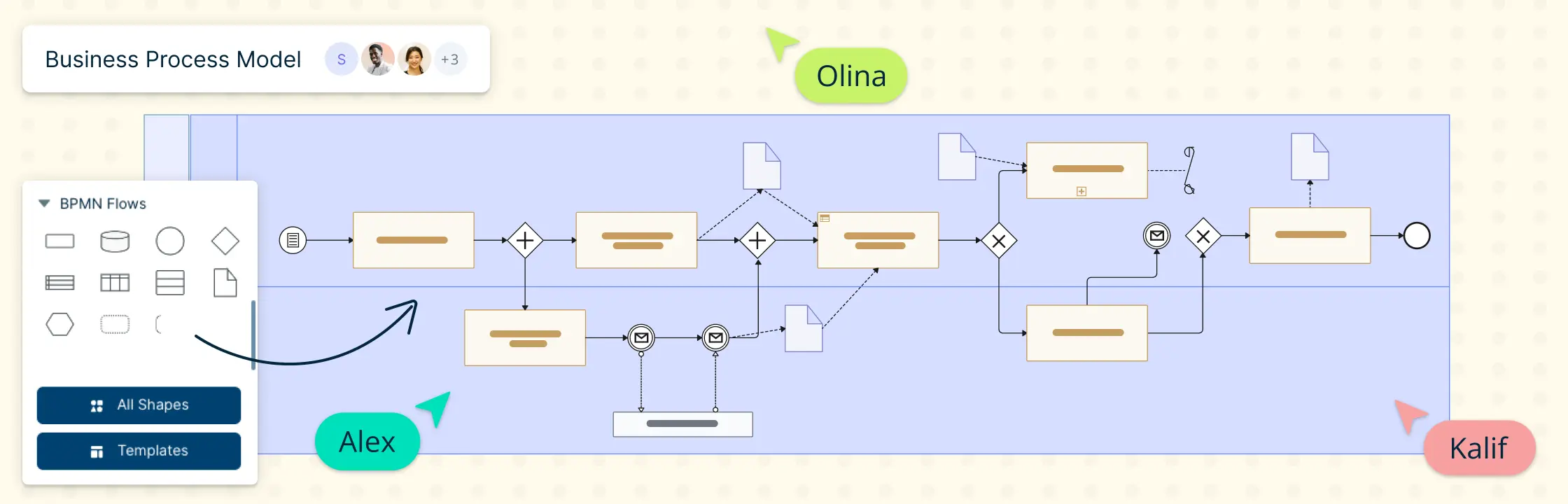
At its core, business process modeling is represented by diagrams that outline the sequence of activities within a process. These BPM diagrams typically display events, actions, decision points, and connections in a step-by-step flow from start to finish. The diagrams help visualize how work is completed and provide clarity into the overall business processes.
2. Focus on Processes, Actions, and Activities
Business process modeling primarily focuses on depicting processes, actions, and activities. This includes both people processes and IT processes, ensuring a holistic view of how work is carried out across an organization. Whether mapping simple or complex workflows, BPM is designed to identify inefficiencies and opportunities for improvement within each activity.
3. Integration of IT and People Processes
A business process model combines both IT processes and people processes. This integration ensures that business process modeling considers the roles of teams, departments, and technology in achieving optimal workflow. By showing how people and systems interact, BPM provides insights into improving both human resources and technological systems within the business.
4. Cross-Functional Collaboration
Business process modeling is inherently cross-functional. It often involves the work and documentation of multiple departments within an organization, reflecting how various functions collaborate to complete complex processes. This collaborative nature ensures that BPM helps break down silos and fosters greater transparency across departments.
5. Resource Management in BPM
Within business process modeling, resources are an essential element. BPM shows how resources—such as materials, equipment, or information—are processed throughout the workflow. Managing resources effectively through BPM ensures that the right assets are available at the right time, improving efficiency and reducing waste in the process.
6. People and Their Roles in BPM
BPM highlights the role of people—whether teams, departments, or external stakeholders—in executing processes. By illustrating who is responsible for each action and when they perform it, business process modeling clarifies roles and responsibilities. This transparency ensures that all parties involved understand their contribution to the process and how different paths or options might unfold in a process flow diagram.
7. Inclusion of External Processes
An essential feature of business process modeling is its ability to incorporate activities from external organizations, systems, or suppliers that impact the primary process. This broader scope ensures that BPM reflects the full ecosystem of operations, giving businesses a complete view of how external factors affect internal processes.
8. Detailing in Larger Organizations
In larger organizations, business process models are typically more detailed than in smaller businesses due to the increased complexity and scale of operations. Larger businesses often require more intricate BPM diagrams to accurately map and optimize their processes, ensuring efficiency across multiple departments and teams.
9. Evolving Tools and Software
Business process modeling is defined and enhanced by the tools and software used to implement it. As the field of BPM continues to evolve, new tools are developed to make the modeling process more intuitive and powerful. It’s crucial for organizations to stay updated with the latest BPM tools to take advantage of new features and capabilities that support continuous improvement in business processes.
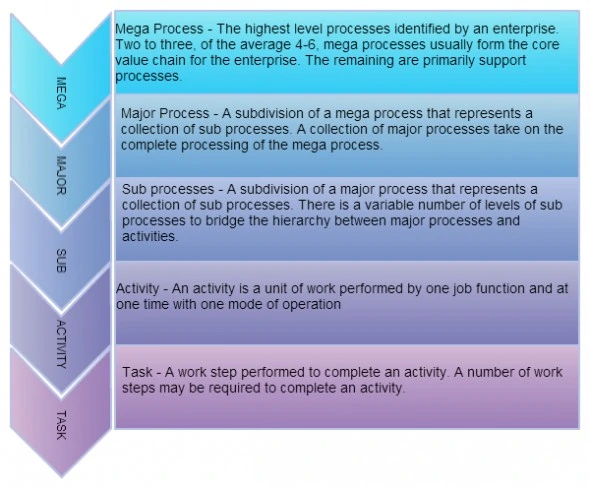
Business Process Model Hierarchy
Following hierarchy is mainly used in process modeling for large enterprises. It categorizes all the processes of an organization into five levels so that it is easier to streamline the outcome.
12 Business Process Modeling Techniques
When implementing Business Process Modeling (BPM), several techniques have been developed and refined over the years. Each method offers unique benefits, and organizations often choose one based on their specific needs and objectives. Below are some of the most widely used BPM techniques:
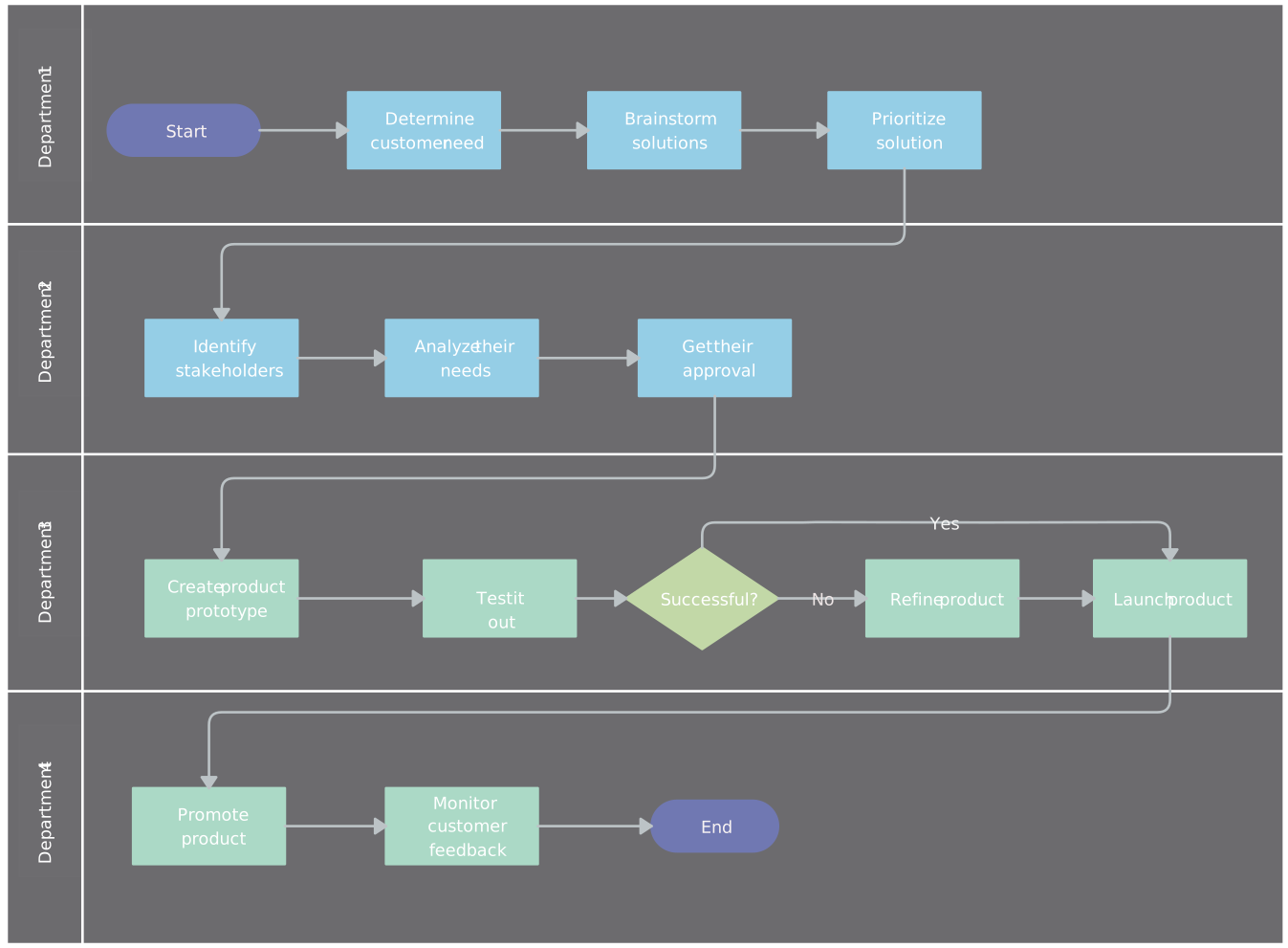
1. Flowchart Technique
The flowchart is one of the most straightforward BPM techniques, ideal for mapping out simple processes. It uses symbols like rectangles, diamonds, and arrows to represent steps, decisions, and flow direction. Though effective for basic processes, flowcharts can become too simplistic for more complex workflows.

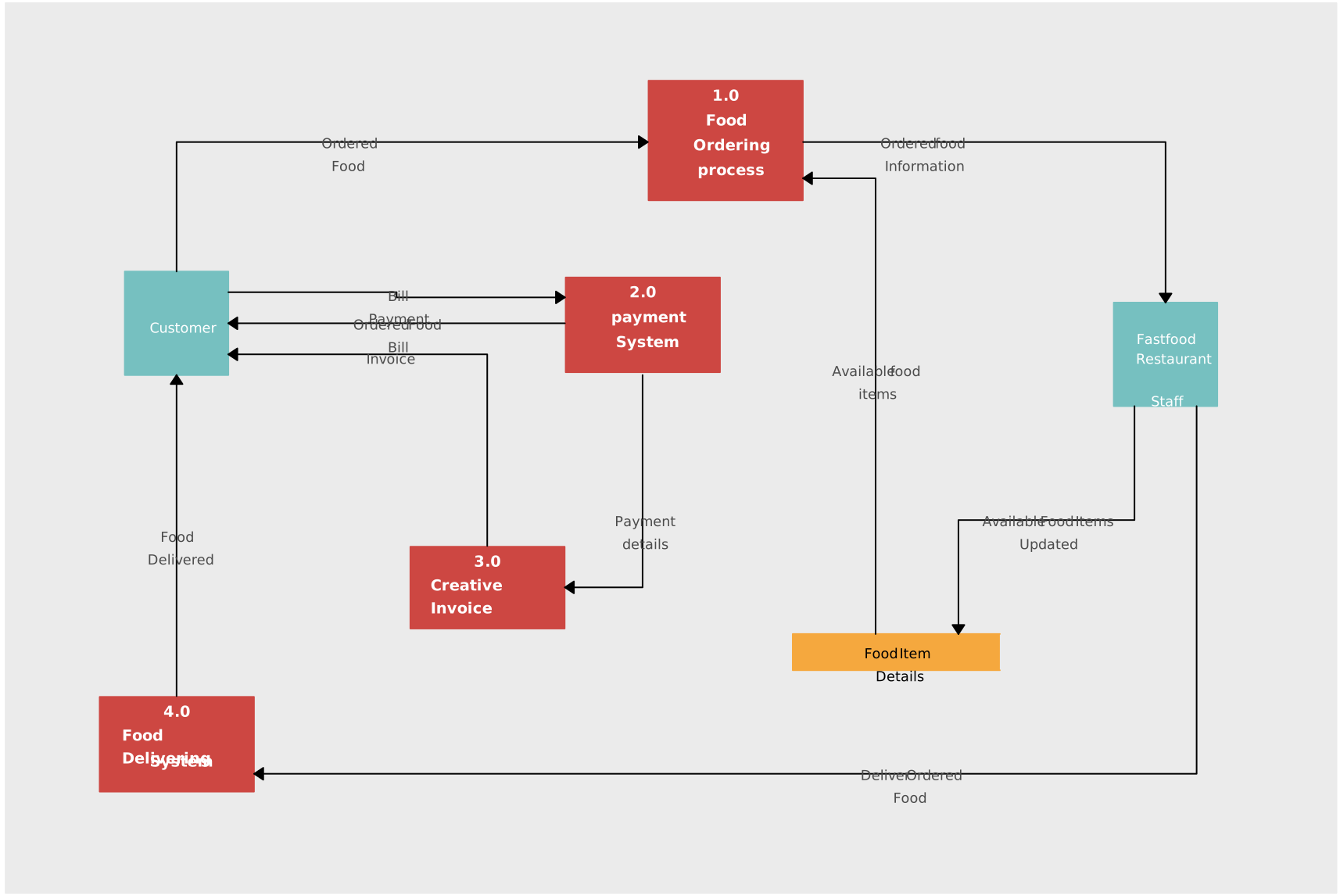
2. Data Flow Diagrams (Yourdon’s Technique)
Developed by Edward Yourdon, data flow diagram maker (DFD) tools help teams focus on how information moves through a system, illustrating how inputs are transformed into outputs through various processes. This technique is especially useful for software development and systems analysis, though it still needs to be paired with broader process context when teams are documenting end-to-end operations.
3. Role-Activity Diagrams (RAD)
Role-activity diagrams represent the roles involved in a process and the specific activities each role performs. RAD helps clarify who is responsible for each task, ensuring clear accountability. This method is effective for improving coordination but may not fully capture the sequence of tasks or decision points.
4. Role-Interaction Diagrams (RID)
Similar to RAD, role-interaction diagrams (RID) focus on the interactions between different roles rather than just activities. RID is particularly useful in understanding how roles collaborate within a process, highlighting communication flows and dependencies.
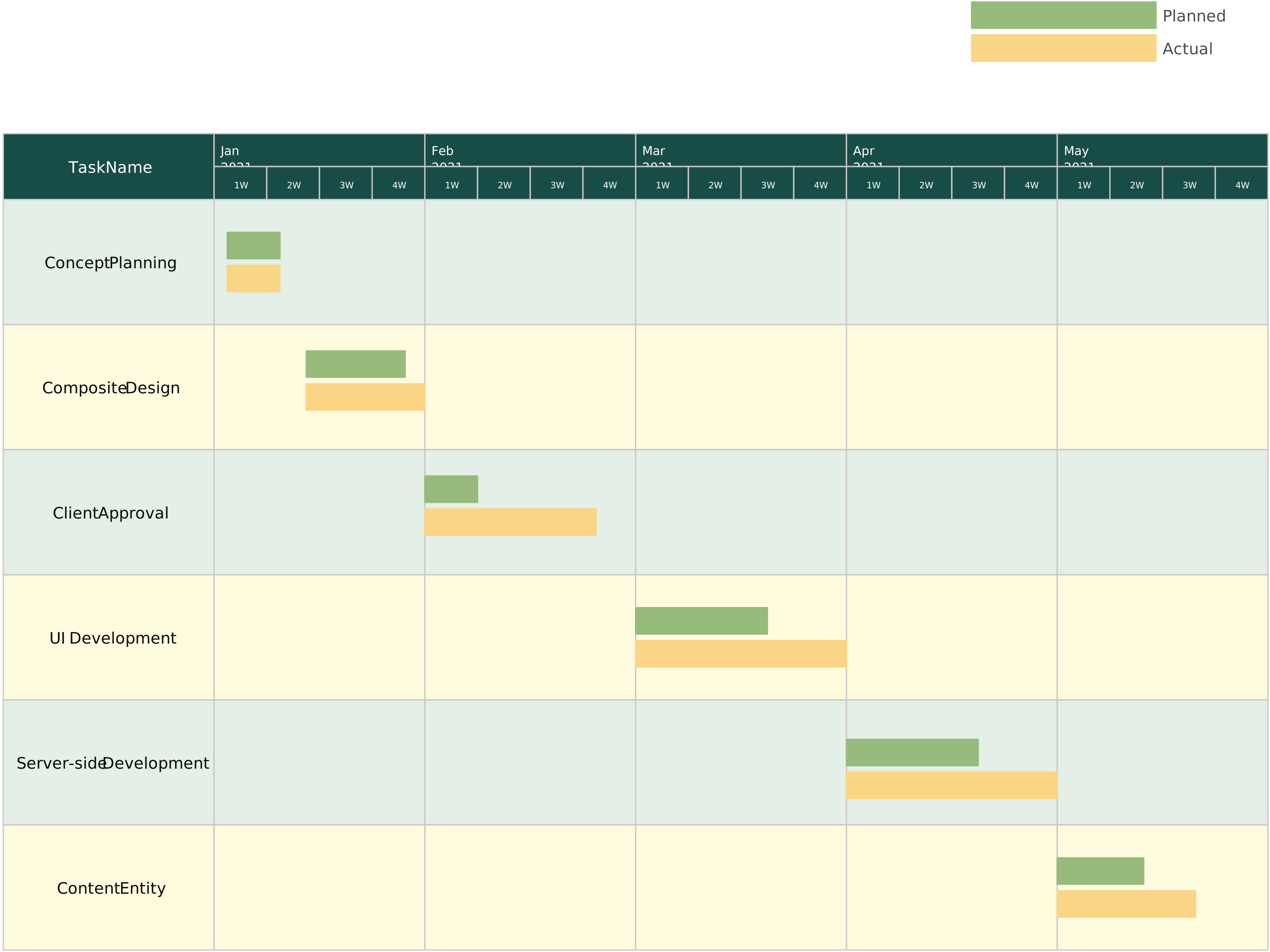
5. Gantt Chart
A Gantt Chart Maker is a popular project management tool used to visually represent tasks over time. While it is useful for scheduling and tracking progress, it doesn’t capture ownership, handoffs, or decision logic as deeply as BPM, which makes it better suited for timeline management than full process modeling.
6. Integrated Definition for Function Modelling (IDEF)
IDEF is a family of modeling methods used for systems engineering and process analysis. IDEF0 models functional processes, while IDEF3 focuses on dynamic processes. This technique is highly detailed and suited for complex systems, but it can be difficult to implement and understand without technical expertise.
7. Colored Petri-nets (CPN)
Colored Petri-nets (CPN) extend traditional Petri-net models by incorporating different types of tokens (colors), which represent various objects or states in a system. CPN is used for modeling concurrent systems and complex processes, offering a detailed view of resource management and workflow, though it can be challenging for non-experts to interpret.
8. Object-Oriented Methods (OO)
Object-Oriented Methods (OO) apply object-oriented programming concepts to process modeling. This technique emphasizes the modeling of business objects (such as customers or products) and their interactions, making it suitable for process analysis in software development and digital systems. However, it may be too focused on the technical side for non-technical users.
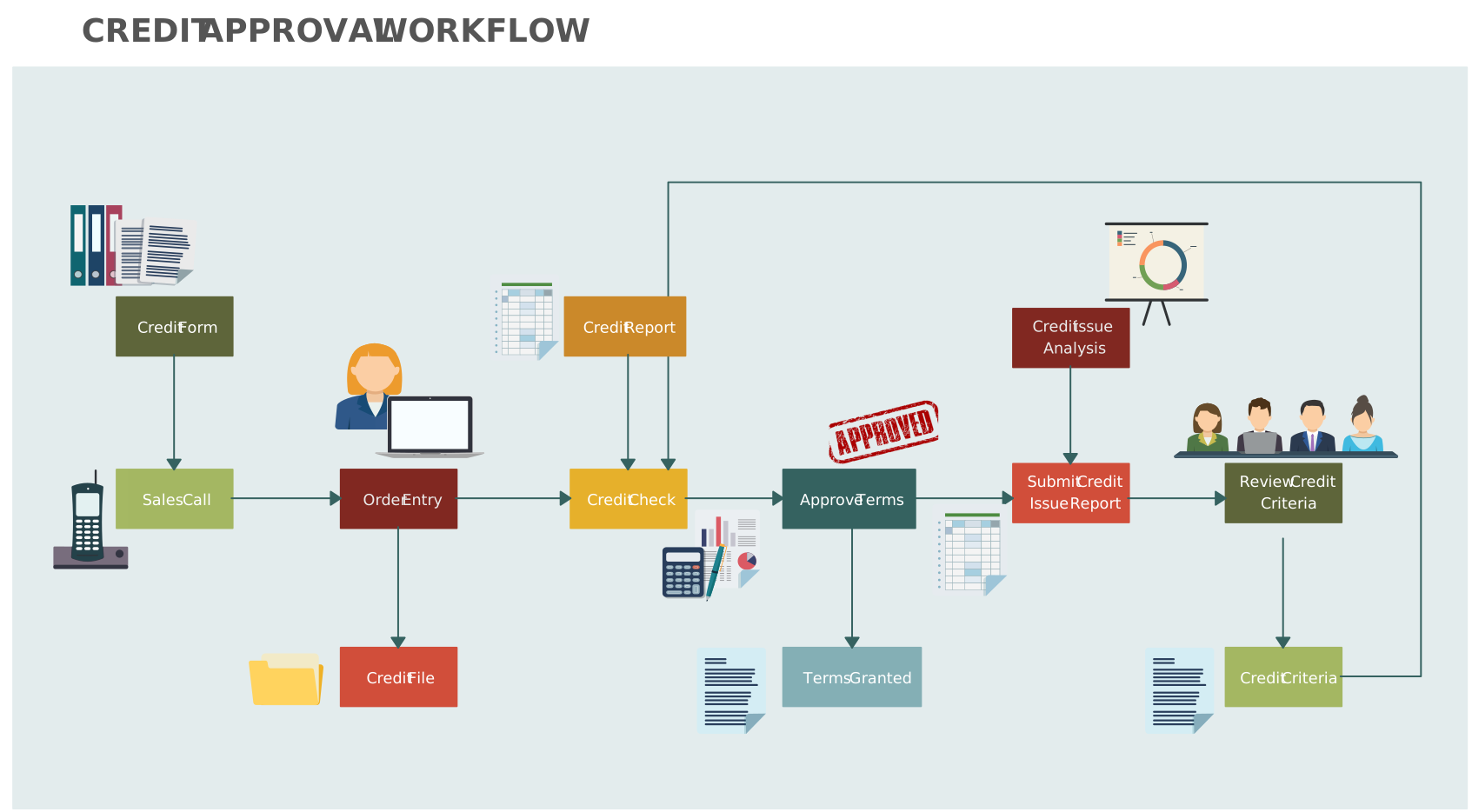
9. Workflow Technique
The Workflow Technique focuses on automating and streamlining the movement of documents and tasks across departments. It helps visualize process flow and automate repetitive tasks. While effective for document-centric processes, it might not capture all the nuances of human-driven decision-making.
10. Simulation
Simulation involves modeling a process to mimic real-world operations, allowing for testing and optimization in a virtual environment. It is particularly useful for testing “what-if” scenarios and understanding the potential impacts of process changes. However, simulation can be resource-intensive and may require specialized software.
11. Business Process Modeling Notation (BPMN)
BPMN is one of the most widely adopted BPM techniques, providing a standard graphical notation for representing processes. It allows organizations to map out both high-level and detailed processes using a consistent set of symbols. BPMN is versatile and can be easily understood by both technical and business users, making it a favorite for process documentation and communication.
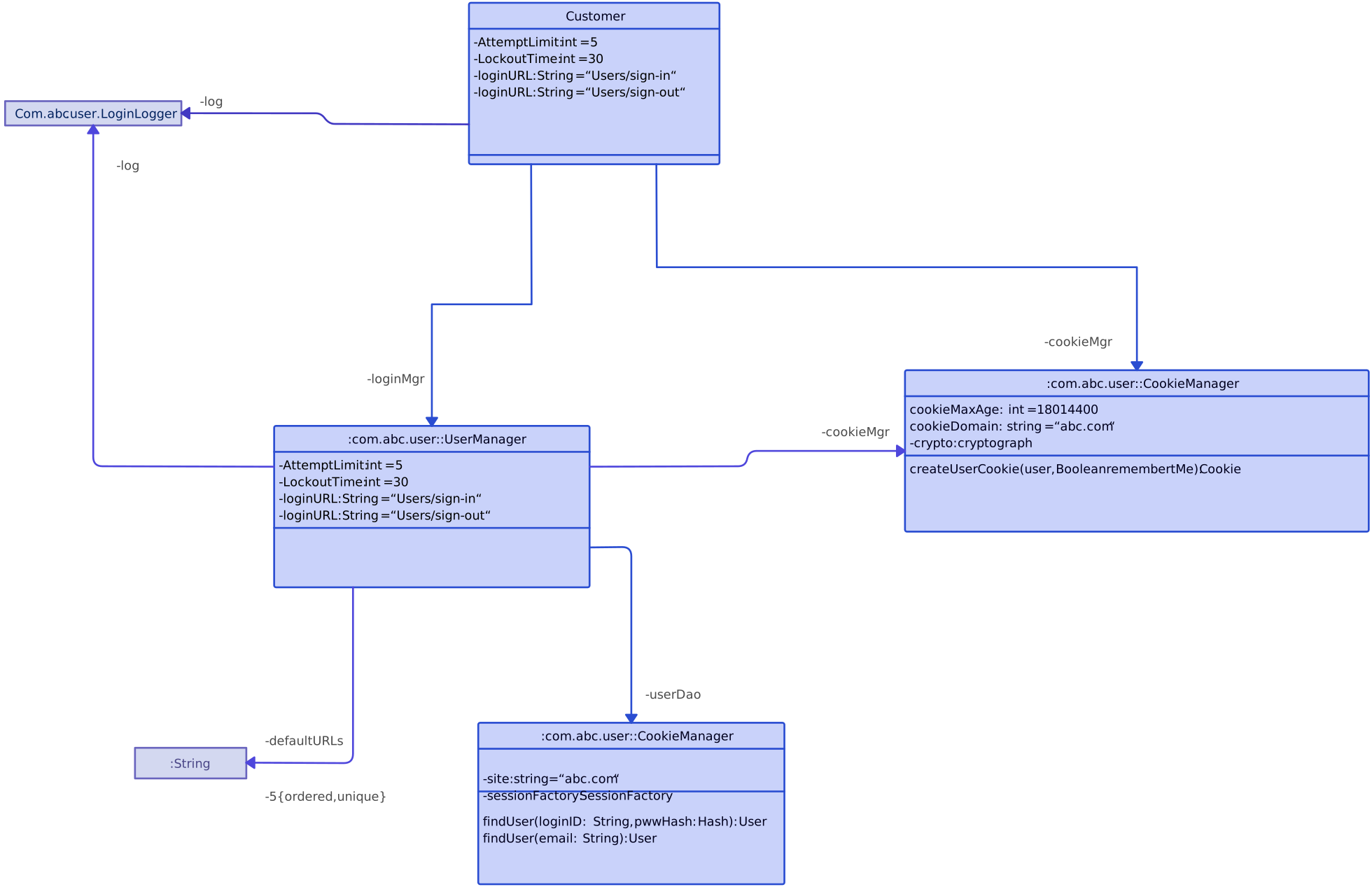
12. UML Activity Diagram
Unified Modeling Language (UML) activity diagrams represent workflows in a system, focusing on the sequence of activities and decision points. This technique is widely used in software design and is great for illustrating complex, multi-step processes. However, it may lack the clarity of BPMN for business users.
Benefits of Business Process Modeling
Business Process Modeling (BPM) offers a wide range of advantages for organizations looking to improve efficiency, optimize workflows, and achieve better outcomes. By visually representing business processes, BPM provides clarity and insights that can drive continuous improvement across the organization. Here are some of the key benefits of Business Process Modeling:
Improved Efficiency
BPM helps organizations identify inefficiencies, bottlenecks, and redundancies in existing processes. By analyzing workflows, businesses can streamline operations, reduce unnecessary steps, and automate repetitive tasks, leading to significant time and cost savings.
Enhanced Communication and Collaboration
BPM facilitates better communication between different teams and departments. By creating visual representations of processes, stakeholders can easily understand each other’s roles, responsibilities, and contributions. This leads to improved collaboration, as everyone has a clear understanding of how their work fits into the larger organizational goals.
Clear Process Documentation
BPM provides a standardized and detailed way to document processes, making it easier for teams to follow and replicate best practices. Well-documented processes ensure consistency in operations and help in onboarding new employees quickly and effectively, reducing training time.
Better Decision-Making
BPM gives organizations the ability to analyze and evaluate processes from a holistic perspective. By modeling and simulating different scenarios, businesses can make more informed decisions regarding process changes, improvements, and resource allocation, reducing the risks associated with untested modifications.
Facilitates Continuous Improvement
Business processes are rarely static; they need to evolve to remain competitive. BPM supports continuous improvement by identifying areas for optimization and providing a framework for iterative changes. Process modeling allows organizations to regularly monitor, assess, and refine their workflows to meet changing demands.
Regulatory Compliance and Risk Management
For businesses operating in regulated industries, BPM ensures compliance with industry standards, legal requirements, and internal policies. By modeling processes, organizations can identify areas where they may be at risk of non-compliance and take proactive steps to address those concerns before they lead to penalties or other risks.
Increased Agility and Flexibility
In today’s fast-paced business environment, agility is essential. BPM enables organizations to quickly adapt to changes in the market, customer demands, or internal operations. By clearly mapping out processes and identifying key performance indicators (KPIs), businesses can make swift adjustments without disrupting overall operations.
Cost Reduction
By optimizing processes and eliminating inefficiencies, BPM helps organizations reduce operational costs. Whether it’s cutting down on labor costs by automating tasks or reducing waste in production processes, BPM provides valuable insights into cost-saving opportunities across the entire business.
Improved Customer Experience
Efficient processes often result in better service delivery, leading to an enhanced customer experience. By improving response times, reducing errors, and ensuring consistent product or service quality, BPM can significantly contribute to customer satisfaction and retention.
Alignment with Strategic Goals
BPM ensures that business processes are aligned with the organization’s strategic objectives. By mapping processes to organizational goals, businesses can ensure that every task and workflow contributes to the overall mission, vision, and value proposition.
Key Differences Between Process Mapping and Process Modeling
While both process mapping and process modeling focus on understanding and improving workflows, they serve slightly different purposes and have distinct characteristics:
Process Modeling | Process Mapping | |
| Purpose | Goes beyond mapping by incorporating in-depth analysis, decision points, and optimization, making it ideal for process improvement and system integration. | Provides a straightforward visual representation of a process, often focusing on basic steps and sequences to ensure clarity and communication. |
| Detail Level | More complex, involving detailed workflows, data analysis, and simulations. | Simpler and more accessible, often used for quick overviews or training purposes. |
| Tools Used | Employs advanced techniques such as BPMN, UML activity diagrams, or simulation tools for deeper insights. | Often utilizes basic tools like flowcharts or diagrams. |
| Outcome | Aims to analyze, improve, and optimize processes for enhanced efficiency and performance. | Aims to document processes for better understanding and communication. |
Helpful Resources
Online BPMN diagram tool to quickly visualize, model, analyze, & document business processes to manage them more effectively.
Dive into the fundamentals of Business Process Modeling Notation (BPMN). Learn what is BPMN and steps to creating a business process modeling notation diagram.
Learn about different business process modeling methods, with practical examples to help you visualize, evaluate, and enhance workflows for greater efficiency and insight.
Unlock the potential of business process analysis with this in-depth guide. Discover essential strategies, best practices, and tools to refine workflows and drive organizational improvement.
Business Process Modeling Tools and Software: Why Creately Is a Must-Have Tool
Effective business process modeling (BPM) requires a tool that helps teams do more than draw diagrams. Creately supports process modeling as an ongoing operational practice by helping teams visualize workflows, connect supporting context, and keep process knowledge current as work changes.
Here’s how Creately helps improve business process modeling:
1. Intuitive Drag-and-Drop Interface for Business Process Modeling
Creately makes business process modeling accessible to both business and technical teams. You can start with BPMN, flowchart, or swimlane structures, extend models quickly, and keep large diagrams readable as they evolve.
2. Real-Time Collaboration in Business Process Modeling
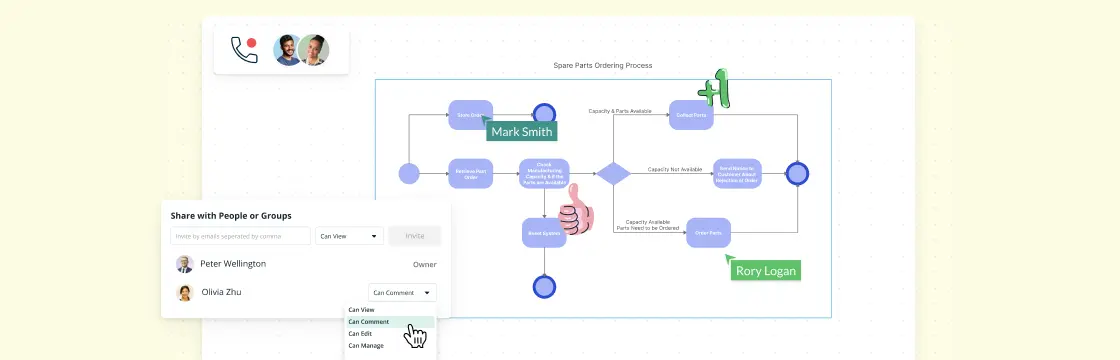
Modeling is rarely a solo activity. Creately gives teams a shared workspace for reviewing process flows, clarifying handoffs, and aligning on how work actually happens. Live editing and contextual comments help teams discuss specific steps and refine models without losing context.
3. Cloud-Based Accessibility for Business Process Modeling
Because Creately is cloud-based, teams can access process models from anywhere and keep them available to the people who need them. This is especially useful when process owners, analysts, and operators need to review the same model across departments or locations.
4. Comprehensive Template Library for Business Process Modeling
Creately offers ready-to-use templates for business process modeling, including flowcharts, BPMN diagrams, and value stream maps. These templates help teams get started faster and standardize how processes are documented across the organization.
5. Support for Multiple Business Process Modeling Notations (BPMN)
Creately supports BPMN, standard flowcharts, swimlanes, and related process diagrams so teams can choose the notation that matches the process and audience. That flexibility is valuable when one process needs a high-level business view in one place and a more detailed operational model somewhere else.
6. Version Control and History Tracking in Business Process Modeling
Process models need to stay current to remain useful. Creately provides plan-dependent version history for reviewing and restoring earlier work, while live editing and contextual comments help teams discuss changes when responsibilities, systems, or decision paths evolve.
7. Advanced Shape Libraries and Customization for Business Process Modeling
Creately provides BPMN 2.0, flowchart, and swimlane shape libraries for representing decisions, roles, events, and cross-functional handoffs. Teams can customize labels, colors, styles, and structured data fields so the model fits its audience while retaining a consistent notation.
8. Integration with Other Tools for Business Process Modeling
Business process models are more useful when they stay connected to the rest of the work. Creately supports integrations with tools including Microsoft Teams, Slack, Google services, Confluence, Jira, and GitHub, with availability varying by plan. Teams can also link process steps to related documents, notes, and supporting resources so the model acts as a practical operating reference.
9. Powerful Automation and Simulations for Business Process Modeling
Creately’s AI flowchart generator can create an editable first draft from a natural-language description, and automatic layout helps keep the structure readable. Creately documents the process model; it does not simulate or execute the workflow. Teams can compare current and future states, add ownership and supporting context, and discuss proposed improvements with comments.
10. Secure and Scalable Business Process Modeling Solution
Creately supports secure sharing controls and enterprise administration options, with availability depending on the selected plan. Teams can organize and reuse process models across functions while keeping access appropriate for employees, guests, and stakeholders.
Creately brings together the essentials for effective business process modeling: clear diagramming, real-time collaboration, linked process documentation, and a shared workspace teams can keep improving over time. Whether you’re mapping a straightforward workflow or coordinating a more complex operational model, it helps teams turn process knowledge into something usable, reviewable, and easier to maintain.
Conclusion: The Power of Business Process Modeling for Organizational Success
In conclusion, Business Process Modeling (BPM) is a vital tool for any organization aiming to boost productivity, improve operational efficiency, and drive long-term growth. By understanding the history, techniques, and benefits of BPM, businesses can implement strategies that enhance collaboration, resource management, and decision-making across teams. The right BPM tools, such as Creately, empower organizations to visualize complex workflows, optimize processes, and achieve better results. Whether you’re managing small projects or large-scale operations, BPM can help unlock your organization’s full potential, providing the clarity and insights needed to succeed in a competitive market.
FAQs About Business Process Modeling
What are the four phases of Business Process Modeling?
What is business process modeling?
What are the five steps in Process Modeling?
What is the primary goal of Business Process Modeling?
Is Business Process Modeling still relevant today?
Resources:
Becker, J., Rosemann, M. and von Uthmann, C. (2000). Guidelines of Business Process Modeling. Lecture Notes in Computer Science, pp.30–49. doi:www.doi.org/10.1007/3-540-45594-9_3.
Indulska, M., Recker, J., Rosemann, M. and Green, P. (2009). Business Process Modeling: Current Issues and Future Challenges. Notes on Numerical Fluid Mechanics and Multidisciplinary Design, pp.501–514. doi:[www.doi.org/10.1007/978-3-642-02144-2_39] (https://doi.org/10.1007/978-3-642-02144-2_39 “{target=’_blank’}”).
Recker, J., Rosemann, M., Indulska, M. and Green, P. (2009). Business Process Modeling- A Comparative Analysis. Journal of the Association for Information Systems, 10(04), pp.333–363. doi:www.doi.org/10.17705/1jais.00193.