The right EA and strategy-alignment tool is the one that supports your next decision without creating more repository work than your team can sustain. Use a collaborative visual tool when the job is alignment, scenario comparison, and executive communication. Choose a traditional enterprise architecture suite when you need governed metamodels, portfolio analytics, lifecycle controls, and formal traceability across a large technology estate.
That distinction matters more than the length of a vendor feature list.
Quick Verdict: Lightweight Tool or Traditional EA Suite?
| Choose a collaborative visual tool when… | Choose a traditional EA suite when… |
|---|---|
| Leaders need a shared view of strategy, capabilities, initiatives, and dependencies | Architects need a governed system of record for applications, technologies, standards, and lifecycles |
| Workshops and cross-functional editing are frequent | Formal review, approval, and audit workflows are mandatory |
| The output must be clear to executives and non-architects | The repository must enforce a detailed metamodel or architecture notation |
| Teams need to test scenarios before committing to a roadmap | Teams need automated impact, obsolescence, cost, or portfolio analysis |
| Adoption speed matters more than exhaustive repository depth | Repository depth and consistency matter more than casual participation |
Creately fits the left-hand column. It gives enterprise architects, strategy leads, and business analysts a shared visual workspace for capability maps, strategy maps, roadmaps, decision matrices, and related planning artifacts. It does not claim the full repository governance depth of a specialist EA suite.
Start With the Decision, Not the Software Category
Write down the decisions the platform must help your organization make. A useful evaluation statement is specific:
- Which capabilities should receive investment next quarter?
- Which applications create risk for a strategic initiative?
- What changes if a merger, market shift, or funding constraint alters the plan?
- Which dependencies could block execution?
- What does the executive team need to approve?
- Which architecture records must remain governed after the meeting?
Then identify the people involved. Enterprise architects may need formal models and traceability. Strategy leaders need scenarios, measures, and a coherent narrative. Business analysts need process and requirement detail. Executives need a decision they can understand in minutes.
If the tool serves only the architecture team, alignment will still happen in slides and meetings. If it serves only the workshop, the architecture record may decay as soon as the session ends.
Seven Criteria for Evaluating EA and Strategy-Alignment Tools
1. Modeling depth
Test the models you actually maintain. Do not award points for notations or object types your team will never use.
Look for support at the level your use case requires:
- Strategy, outcomes, objectives, measures, and initiatives
- Business capabilities and value streams
- Processes, roles, and information flows
- Applications, interfaces, data, and technologies
- Current-state, transition-state, and target-state views
- Standards, risks, controls, and lifecycle status
The ArchiMate 3.2 Specification defines an open, independent language for describing, analyzing, and visualizing relationships across enterprise architecture domains. If ArchiMate conformance is mandatory, verify the vendor’s supported elements, relationships, validation rules, and export behavior in a hands-on test.
2. Traceability from strategy to change
A diagram is useful. A connected decision model is better.
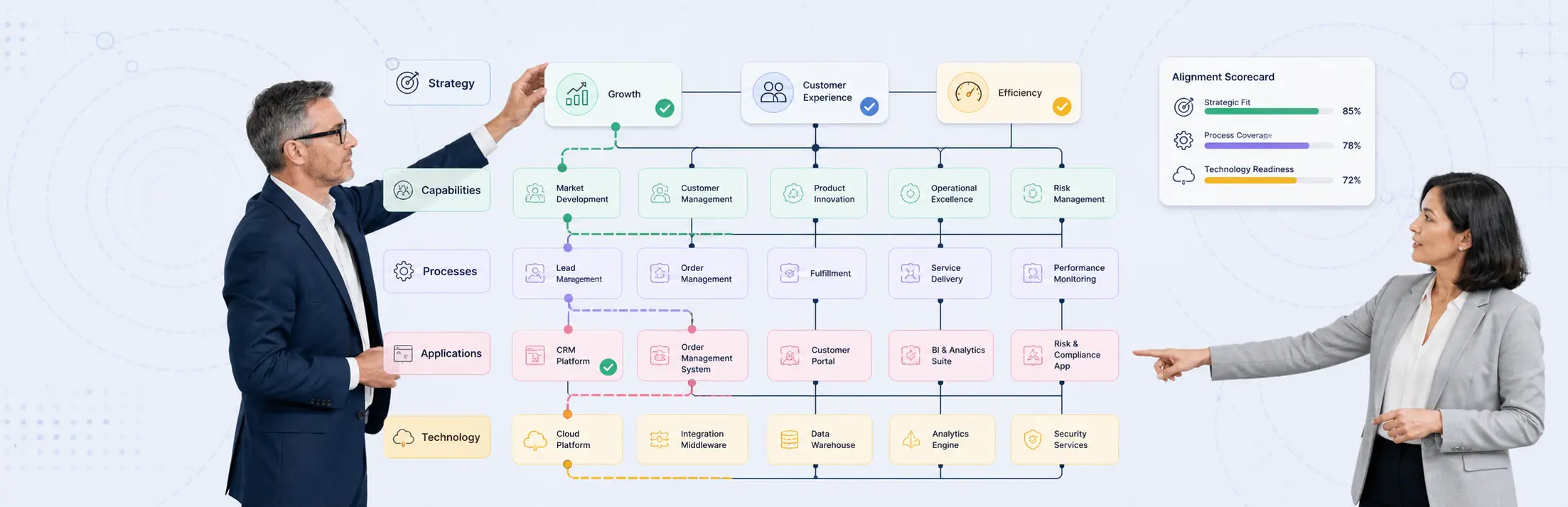
Ask each vendor to trace one strategic objective through capabilities, initiatives, applications, dependencies, owners, and measures. Change an assumption and observe what the tool reveals. Strong traceability should answer:
- Which initiatives support this objective?
- Which capabilities must improve?
- Which systems enable or constrain the change?
- Who owns each decision and dependency?
- What evidence supports the recommendation?
3. Collaboration across architecture and strategy teams
Run a working session with the people who will use the output, not just the administrators who will configure the platform. Test simultaneous editing, comments, review cycles, permissions, presentation, and asynchronous feedback.
Creately’s strength is this shared working surface. Teams can map a current state, compare options, attach supporting context, and refine the recommendation together. That makes it useful before a decision enters a formal governance workflow.
4. Governance and repository control
Governance requirements separate many visual tools from dedicated EA suites. Score the controls your operating model needs:
- Configurable metamodel and relationship rules
- Required fields and naming standards
- Review and approval workflows
- Version history and audit trail
- Role-based access and publishing controls
- Lifecycle, standard, and exception management
- Duplicate detection and repository stewardship
Traditional EA suites usually win this category. Treat that as a valid reason to select one, not a problem to explain away.
5. Integration and data exchange
Architecture data becomes stale when every update depends on manual re-entry. Test the systems that matter to your environment: service management, configuration data, project portfolios, cloud inventories, identity systems, spreadsheets, and reporting tools.
Check both directions. Import is not enough if teams cannot export their work in a durable, reusable format. Also ask who owns mappings, how failed syncs are surfaced, and whether a source system or the EA platform remains authoritative.
6. Executive communication and board-ready output
Board-ready output should make the recommendation, trade-offs, dependencies, ownership, and next decision visible without an architecture tutorial.
Creately workspaces can be shared by link, presented directly, or exported in four common formats: PNG, JPEG, SVG, and PDF. PNG and JPEG are available across plans, while SVG and PDF require a premium plan. Test the exact output your governance forum uses, including page size, legibility, branding, and linked evidence.
7. Total operating effort
License price is only one part of cost. Estimate the work required to configure the metamodel, migrate data, integrate sources, train contributors, govern quality, and keep the repository current.
A platform with more depth can still be the wrong choice if the team cannot maintain it. A lightweight tool can also become expensive when analysts manually reconcile dozens of disconnected diagrams. Score both options against a 12-month operating model.
Comparison Scorecard
Weight each criterion based on the decision scope, then score vendors from 1 (poor) to 5 (strong).
| Criterion | Suggested weight | Evidence to request |
|---|---|---|
| Modeling depth | 15% | Model a representative capability-to-technology view |
| Strategy traceability | 20% | Trace one objective through initiatives, capabilities, and systems |
| Collaboration | 15% | Run a live cross-functional workshop |
| Governance | 15% | Demonstrate approval, audit, standards, and exception handling |
| Integration | 10% | Connect or import one real source and export the result |
| Executive output | 15% | Produce the document used by an actual decision forum |
| Operating effort | 10% | Provide a 12-month setup and stewardship estimate |
Do not use these weights unchanged if repository governance is the primary goal. In that case, increase governance, integration, and modeling depth. For strategy alignment and scenario workshops, increase collaboration, traceability, and executive output.
How Formal EA Standards Affect the Choice
The TOGAF Standard is a methodology and framework, not a requirement to buy a particular software category. The TOGAF Standard, 10th Edition separates fundamental content from topic-specific guidance in a modular structure. That allows organizations to configure an EA practice around their context instead of treating every possible artifact as mandatory.
Use standards to define the method, vocabulary, deliverables, and controls you need. Then evaluate whether a collaborative tool, a traditional suite, or a combination best supports that practice.
A common hybrid pattern is:
- Explore scenarios and align stakeholders in a collaborative workspace.
- Approve the architecture decision through the organization’s governance process.
- Record governed applications, standards, dependencies, and lifecycle data in the EA repository.
- Publish a simplified decision view for executives and delivery teams.
A Six-Step Evaluation Process
Step 1: Define the decisions
List three to five recurring decisions and the people accountable for them. Exclude broad goals such as “improve alignment.”
Step 2: Set minimum evidence
Translate each decision into required models, data, controls, and outputs. Mark every requirement as mandatory, valuable, or optional.
Step 3: Build one realistic scenario
Use a current change with imperfect data and real dependencies. A polished vendor dataset hides the effort required to maintain your environment.
Step 4: Run a cross-functional pilot
Include an enterprise architect, strategy lead, business analyst, delivery representative, and executive consumer. Observe who can contribute without specialist assistance.
Step 5: Produce the decision output
Create the architecture review pack, steering-committee view, or board slide your organization actually uses. Test links to evidence and the exported result.
Step 6: Score the operating model
Estimate configuration, migration, integration, training, and monthly stewardship. Document which system owns each data type.
Where Creately Fits
Creately is a strong candidate when the core job is collaborative diagramming, strategy analysis, option comparison, workshops, and clear decision communication. Teams can keep maps, notes, links, and planning context together on an infinite canvas, then share or export the result.
Choose a specialist EA suite when your success depends on deep repository analytics, formal metamodel enforcement, automated lifecycle reporting, or architecture governance across a large application and technology portfolio. Creately can still support the collaborative decision layer around that repository.
For a practical starting point, use strategy mapping software to connect objectives, measures, and initiatives, or review strategic planning tools and templates for broader planning workflows. The business architecture template can help teams map capabilities and operating context before selecting a platform.