HR professionals and managers need a reliable way to compare role-based training requirements with each employee’s current status. A training matrix organizes that information in one view, helping teams identify gaps, plan learning, monitor renewals, and prepare training records for review. Its value depends on clear criteria, accountable ownership, appropriate access controls, and regular updates—not simply on creating the table.
What is a Training Matrix?
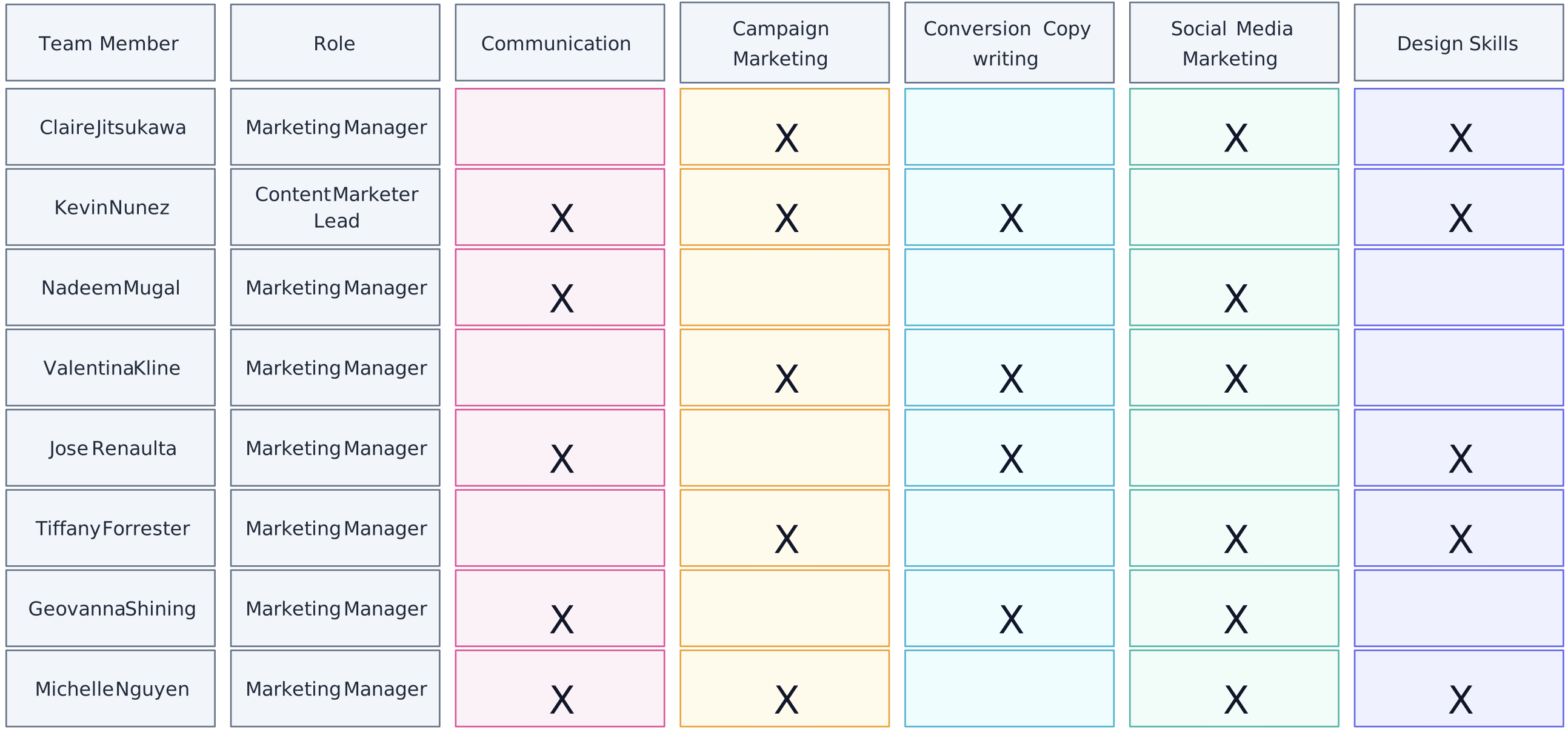
A training matrix is a structured table that compares employees or roles with required training. It usually records assigned courses, completion status, due dates, certification expiry dates, and other evidence needed to plan and review training.
Its main purpose is to show whether required training has been assigned, completed, or needs follow-up. It can help organizations identify training gaps and support compliance documentation, but completion alone does not prove competence or guarantee compliance. Where proficiency must be assessed, pair the training matrix with defined competency criteria and evidence of performance.
Training matrices can complement skills inventories and talent mapping, but they serve a different purpose. A training matrix focuses on learning requirements and completion, while a skills or competency matrix records the proficiency needed for a role and the level demonstrated by each person.
For regulated or safety-critical work, a maintained training matrix can provide an index of required training and related records. The organization must still verify course suitability, completion evidence, competency where required, and any jurisdiction-specific obligations.

Why Use a Training Matrix?
A training matrix goes beyond a list of completed courses by connecting role requirements with training status. The following uses explain where that visibility can support workforce planning and governance.
1. Strategic Workforce Development
Skill Gap Analysis: A training matrix provides a clear visual representation of the current skills within your workforce and highlights areas where improvement is needed. This allows for targeted training initiatives that address specific organizational needs.
Proactive Skill Building: Teams can add future training requirements identified through workforce planning, then use the matrix to coordinate upskilling or reskilling priorities.
Customized Learning Paths: The matrix facilitates the creation of personalized development plans for each employee, aligning individual growth with organizational needs and fostering a culture of continuous learning.
2. Enhanced Compliance and Risk Management
Regulatory Training Records: In regulated industries, a matrix helps teams monitor required training, due dates, and evidence. Compliance still depends on the applicable rule, course content, completion, competence, and documented controls.
Safety Training Oversight: The matrix helps teams track required safety training and identify overdue or missing records for follow-up.
Audit Readiness: A well-maintained training matrix provides readily available documentation of employee training, simplifying the process of internal and external audits.
3. Improved Operational Efficiency
Resource Optimization: By clearly identifying training needs, organizations can allocate their learning and development resources more effectively, avoiding redundant or unnecessary training programs.
Streamlined Onboarding: The matrix gives managers a structured way to assign and follow up on required onboarding training.
Cross-functional Capabilities: The matrix can highlight opportunities for cross-training, enhancing workforce flexibility and improving operational resilience.
4. Enhanced Employee Engagement and Retention
Career Progression Visibility: When linked to defined role requirements, the matrix can show which training supports a development path without treating course completion as an automatic promotion decision.
Recognition of Learning: The matrix provides evidence of completed training. Skill development should be confirmed through the relevant assessment or work evidence.
Empowerment Through Learning: By linking training to career paths, employees feel more in control of their professional development, leading to higher job satisfaction and loyalty.
5. Data-Driven Decision Making
Performance Evaluation Context: Training records can be compared with appropriate performance measures when evaluating a program, while accounting for other factors that may influence results.
Succession Planning: By identifying high-potential employees and their skill sets, the matrix aids in effective succession planning and leadership development.
Training Investment Review: The matrix supplies completion and coverage data that can contribute to an ROI evaluation alongside program costs, outcomes, and an agreed measurement method.
6. Agility and Competitive Advantage
Rapid Skill Deployment: In fast-changing industries, a training matrix allows organizations to quickly identify and deploy employees with specific skills to new projects or challenges.
Innovation Support: Visibility into emerging training needs can help teams plan learning that supports new tools, methods, or services.
Market Responsiveness: Organizations can swiftly adapt their training focus to address new market demands or technological changes, maintaining a competitive edge.
7. Improved Communication and Transparency
Clear Expectations: Both managers and employees have a shared understanding of the skills required for various roles and the pathways to acquire them.
Facilitates Dialogue: The matrix provides a structured framework for discussions about professional development between employees and their supervisors.
Organizational Clarity: Leadership gains a bird’s-eye view of the organization’s collective capabilities, informing strategic decisions about growth, expansion, or restructuring.
8. Support for Quality Management Systems
Continuous Improvement: The training matrix aligns well with quality management principles, supporting ongoing improvement in workforce capabilities.
Standardization: Shared requirements and status definitions support a consistent approach to training across departments or locations.
Process Integration: The matrix can be integrated with other organizational processes, such as performance reviews and quality audits, creating a more holistic approach to organizational development.
In summary, a training matrix provides structured visibility into learning requirements, status, deadlines, and evidence. It supports workforce and compliance decisions when the underlying requirements are valid, the records are maintained, and access to employee information is controlled appropriately.
When to Use a Training Matrix
A training matrix is most useful when teams need to coordinate defined training requirements across multiple people, roles, locations, or renewal cycles. Common scenarios include:
Rapid Workforce Expansion: During growth, a matrix can show which onboarding or role-based training each new employee has completed and what remains outstanding.
Regulatory Requirements: Teams can use a matrix to monitor assigned compliance training, deadlines, renewals, and supporting records.
Change in Business Strategy: As organizations pivot their strategies, a training matrix allows HR managers to realign employee skills with new business objectives effectively.
Identification of Skill Gaps: A training matrix is particularly useful when there is a need to pinpoint skill deficiencies within a team or department, allowing for targeted training interventions.
- Project Staffing Context: Managers can use current training and certification records as one input when assessing whether people meet project requirements. They should also verify demonstrated competence, availability, and any authorization requirements.
These development plan templates can help managers connect identified learning needs with individual development actions. Before implementing a matrix, agree on its scope, owner, review cadence, privacy controls, source records, and the decisions it will support.
Skill Matrix vs Training Matrix

While both the skills matrix and the training matrix play crucial roles in employee development strategies, they serve distinct functions that can complement each other effectively.
| Aspect | Skills Matrix | Training Matrix |
| Purpose | Maps specific competencies required for a role, focusing on employee proficiency levels. | Lists and tracks necessary training for employees, aiming to improve or acquire skills. |
| Components | Contains detailed evaluations of competencies, often linked to job performance criteria. | Includes training courses, current status, and completion dates for each employee. |
| Application | Used for strategic HR planning, aligning capabilities with organizational objectives. | Primarily assesses training requirements and progress, often used by L&D teams. |
| Outcome | Provides a snapshot of current skill coverage to inform workforce decisions. | Provides a record of training requirements and status for planning and follow-up. |
The two matrices can be used together: the skills matrix identifies proficiency requirements and gaps, while the training matrix records the learning assigned to address relevant gaps. A Skill Will Matrix serves a separate coaching purpose by comparing current ability with willingness or motivation; it should not be treated as evidence of competence or training completion.
Choose each matrix according to the decision it supports, and define who is responsible for reviewing and updating the records.
Competence Matrix vs Training Matrix

Though often used interchangeably, it’s important to distinguish between a competency matrix and a training matrix. Both serve vital roles in organizational development, yet they diverge in scope and focus. Here’s how they compare:
| Aspect | Competency Matrix | Training Matrix |
| Purpose | Maps specific competencies required for a role, focusing on employee proficiency levels. | Lists and tracks necessary training for employees, aiming to improve or acquire skills. |
| Components | Contains detailed evaluations of competencies, often linked to job performance criteria. | Includes training courses, current status, and completion dates for each employee. |
| Application | Used for strategic HR planning, aligning capabilities with organizational objectives. | Primarily assesses training requirements and progress, often used by L&D teams. |
| Outcome | Provides a snapshot of current competency coverage to inform workforce decisions. | Provides a record of training requirements and status for planning and follow-up. |
For a visual representation of role-based competencies, explore this competency matrix example. Adapt the criteria and proficiency scale to the roles and evidence used by your organization.
A well-structured training matrix centralizes the status of defined learning requirements. Include only the employee and training information needed for the matrix’s purpose, and restrict access according to organizational privacy and security policies. Core elements include:
What to Include in a Training Matrix
Employee Information: Include only the employee identifiers, departments, roles, and managers needed to support accurate assignment and review.
Training Programs: List all required training programs or courses that employees need to complete, clearly distinguishing between mandatory and optional training.
Training Status: Use consistent statuses such as “Not Started,” “In Progress,” “Completed,” or “Overdue,” and record when and from which source the status was updated.
Competency Levels: Specify the required skills or competencies and record the proficiency levels of employees before and after training.
Completion Dates: Record due and completion dates, plus renewal or expiry dates where applicable, so owners can identify records that need follow-up.

These elements give HR, learning and development, managers, and employees a shared view of training requirements and progress. With Creately’s training matrix template, teams can organize the matrix visually, connect relevant notes, links, or files, and add ownership or status context without introducing an unrelated portfolio-planning framework.
How to Create an Effective Training Matrix
1. Identify Training Needs
The foundation of an effective training matrix lies in a thorough training needs analysis. This critical first step involves assessing the current skills and competencies within your workforce and comparing them to the required standards for each role. Conduct a comprehensive skills gap analysis by reviewing job descriptions, performance evaluations, and industry trends. Don’t forget to consider compliance requirements and align your analysis with the organization’s long-term strategic goals.
Gather input from employees, department heads, and managers to understand perceived needs, role requirements, and relevant development goals. Compare that input with documented standards rather than treating any single source as definitive. This approach helps the matrix reflect both individual and organizational needs.
Key actions:
Conduct a skills gap analysis
Review compliance requirements
Gather input from employees and managers
2. Create a Database of All Employees
Create the list of employees or roles covered by the matrix. Include only identifiers and job information needed to assign and review training, such as employee name or ID, role, department, location, and manager. A training matrix should not become a general employee database.
Record relevant certifications, qualifications, completion dates, and renewal requirements when they belong in scope. Keep sensitive career, performance, or personal information in the appropriate HR system and expose it only to authorized users. Document the system of record so matrix owners know where to verify updates.
Essential components:
Basic employee information
Job-related data and skill profiles
Training history and career development plans
3. Map Your Skills Matrix
Utilizing a skills matrix provides a visual representation of existing competencies for each employee, enabling you to quickly identify areas of strength and opportunities for development. Begin by defining skill categories relevant to your organization, breaking down job roles into specific areas such as technical skills, soft skills, and leadership capabilities. Establish clear proficiency levels to measure these skills, using a scale that’s easy to understand and apply consistently across the organization.
With categories and levels defined, assess each employee’s proficiency using agreed evidence. Compare current levels with those required for each role, then present the results with clear labels, a legend, or consistent color-coding. A table, spreadsheet, HR system, or visual workspace can display the skills matrix; the assessment method determines the reliability of the data.
Key steps:
Define skill categories and proficiency levels
Assess current skills and identify gaps
Create a visual representation of the skills matrix
4. Develop Courses and Training Programs
With skills mapped and gaps identified, it’s time to develop appropriate training methods and programs. Opt for a diverse range of learning approaches to cater to different learning styles and practical constraints. This might include in-person workshops for hands-on skills, online courses for flexible learning, on-the-job training for role-specific skills, mentoring programs for leadership development, and microlearning modules for quick skill acquisition.
Align each training program with the relevant organizational objective, role requirement, or employee development goal. Decide whether to develop training internally or use an external provider based on expertise, resources, scale, and compliance needs. Define measurable learning objectives and an evaluation method; demonstrating ROI requires separate cost and outcome evidence.
Important considerations:
Offer diverse learning approaches
Align programs with organizational and individual goals
Define measurable learning objectives
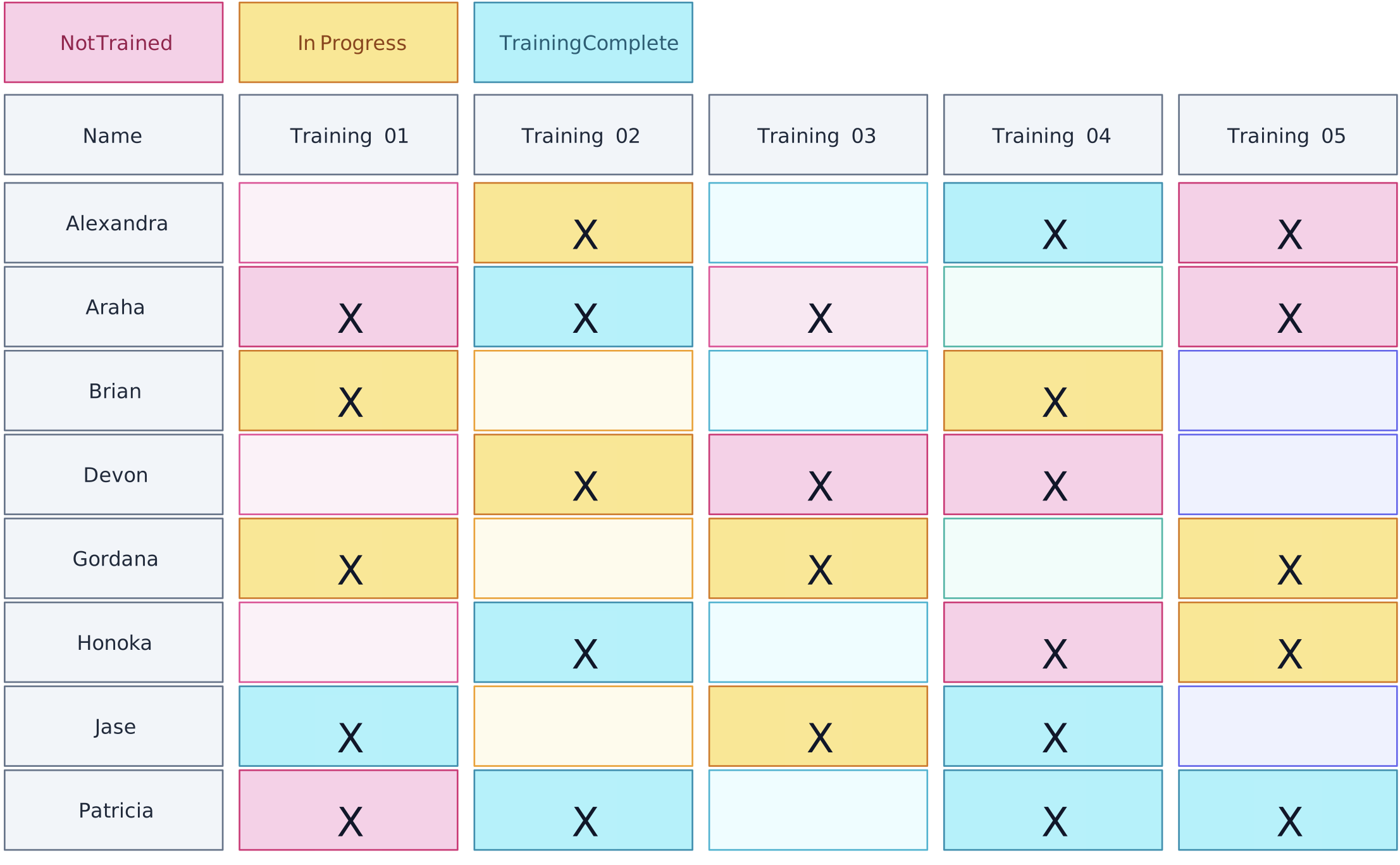
5. Create a Structure to Track Completion Status
Use clear status categories such as “Not Started,” “In Progress,” “Completed,” and “Overdue” to summarize training progress. If a learning platform supplies completion data, verify the integration and update behavior before describing the matrix as automatically synchronized. Otherwise, assign responsibility for manual updates and record the source.
Include due dates and, where the chosen system supports them, reminders for upcoming or overdue training. Give employees and managers the access appropriate to their roles, and include certification expiry and renewal dates when required. A matrix should identify what needs attention; follow-up still depends on the assigned owner and operating process.
Key features:
Clear status categories and automated tracking
Accessibility for employees and managers
Reporting and certification management capabilities
6. Monitor and Update the Matrix
Set a review cadence based on the pace of change and compliance risk rather than assuming quarterly review suits every organization. Update completed programs, new requirements, role changes, and expiring certifications. Employee-submitted records should follow the organization’s verification process before being treated as current evidence.
Collect feedback from employees and managers about training relevance and application. Stakeholders can review the matrix together, add contextual comments, and agree on updates; the matrix owner should then incorporate verified changes. Where integrations are used, document their scope and refresh behavior rather than assuming real-time updates.
Essential activities:
Conduct regular reviews and updates
Collect and incorporate feedback
Monitor trends and reassess alignment with business needs
7. Evaluate and Adjust
Evaluate both the usefulness of the matrix and the effectiveness of the training it tracks. Gather feedback, review completion and coverage, and use appropriate performance or competency evidence to assess whether learning is being applied. Define the cost and outcome measures before making an ROI claim.
Where appropriate, compare pre-training and post-training evidence while accounting for other factors that may affect performance. Use the findings to refine course content, assignments, assessment methods, and the matrix itself. Retain supporting context and version history so reviewers can understand why requirements or statuses changed.
Key evaluation methods:
Conduct performance assessments and gather employee feedback
Analyze ROI and skill application in the workplace
Use insights to continuously improve the matrix and training programs
Following these steps creates a training matrix that functions as living documentation rather than a static snapshot. Clear ownership, verified source records, stakeholder review, and an agreed update process help keep it useful for workforce development and training governance.
How to Structure Training Plans for Employee Growth
A well-implemented training matrix is a cornerstone for fostering individual growth and advancing professional skills. By tracking the training trajectory of each team member, the matrix uncovers growth opportunities that align with both personal aspirations and organizational goals.
For example, a company may use a training matrix to identify gaps in data-analysis training and assign appropriate learning. Whether this leads to improved proficiency or performance should be assessed with relevant evidence rather than inferred from course completion alone.
Personalized Development Plans: Use the matrix as an input when creating personalized training plans based on role requirements, demonstrated gaps, and employee goals.
Continuous Skill Enhancement: Regular updates to the training matrix provide a framework for ongoing skill assessment and development, fostering a culture of continuous learning.
Career Advancement Opportunities: By systematically tracking employee progress, the matrix highlights opportunities for career advancement and leadership roles within the organization, supporting career path development.
For related planning resources, explore these training and development templates.
A training matrix is most effective when it is connected to a defined training process. Teams identify requirements, assign learning, retain appropriate evidence, review gaps and renewals, and update the matrix as roles or obligations change. Combined with a professional development plan, it can connect organizational requirements with individual growth while keeping the distinction between training completion and demonstrated competence clear. In Creately, notes, links, files, ownership details, comments, and version history can keep this context connected to the visual matrix. The responsible owner should incorporate agreed updates and verify records against the relevant HR, learning, or compliance system so the matrix remains current and trustworthy.