September 29, 2026


Succession Planning, Personalized Colors, and Smoother Collaboration
Plan Ahead with Succession Planning for Enterprise
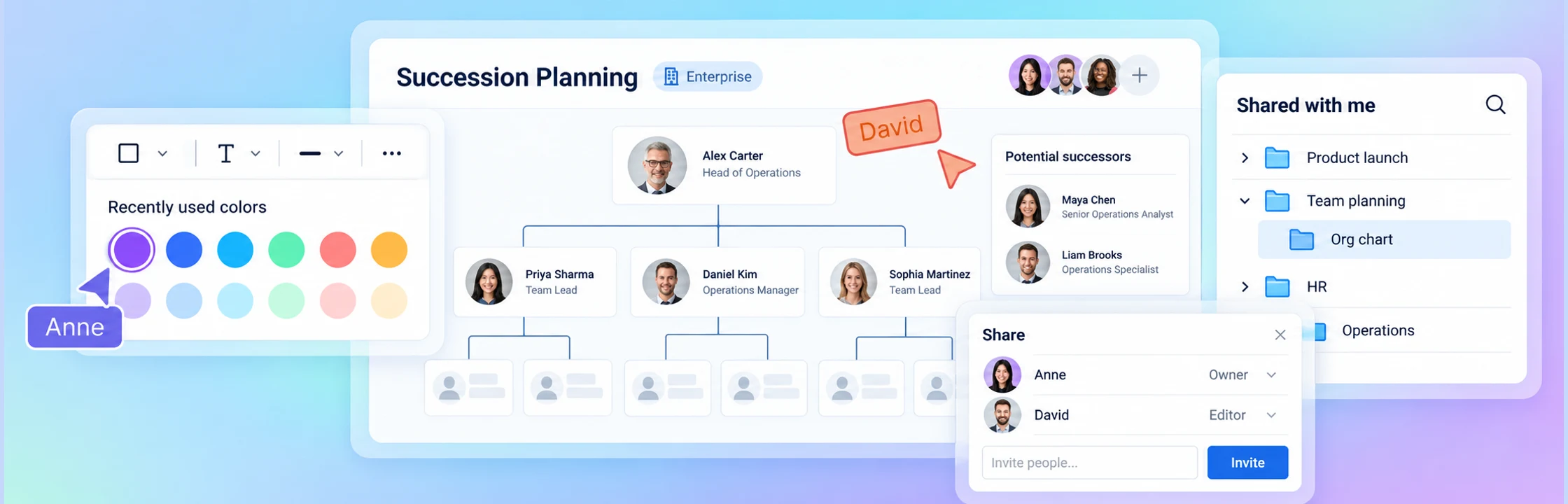
Prepare for your team’s next chapter with succession planning in Creately Atlas, available to Enterprise users. Add future roles and potential successors within your permitted organizational hierarchy, and work through proposed changes in a planning draft before applying them to your live org chart.
With a dedicated Succession Planning view, you can keep leadership transitions in context and give your team a shared visual space to discuss what comes next.
Save and Share Focused Org Charts with Custom Live Views
Bring the right people into focus with Custom Live Views in Creately Atlas. Apply filters to your People Chart, then select “Save as custom view” to keep that focused view ready to revisit. Find your saved views in the “Custom live views” dashboard section and update their filters whenever your needs change.
Share a read-only link or export your view as a PDF, PNG, or SVG. Managers needed to connect the reporting chain remain visible but dimmed, keeping the hierarchy clear while highlighting the people who match your filters. Saved views are designed for viewing and sharing, with scenario modeling and succession-planning edits kept in your planning workflows.
Your Recently Used Colors, Right Where You Need Them
Keeping your diagrams visually consistent just got easier. The Quick Toolbar Color Palette now includes your recently used colors, personalized to your account. Quickly return to colors you’ve applied to shapes, text, connectors, and other elements without searching for them or entering color codes again.
Whether you’re styling a process flow or color-coding your team structure, your go-to colors are now closer at hand.
Clearer Organization-Wide Sharing
We’ve improved organization-wide sharing so your team can find and access the folders and diagrams shared with them more reliably. These fixes also address access through existing shares, helping everyone stay connected to the work they need.
We’ve also simplified the sharing dialogs, made pending invitations easier to identify, and added the owner to collaborator lists, giving you a clearer picture of who’s involved.
More Context for Diagrams Shared with You
Finding your way around shared work is now more intuitive. Individually shared diagrams appear under their containing folder in “Shared with me,” giving you helpful context when browsing work from colleagues or external collaborators.
You’ll see the diagrams shared with you while unrelated folder contents remain private, making navigation clearer without changing your access.
Shared Subfolders That Are Easier to Find
We’ve fixed an issue that could make shared subfolders difficult to locate when their parent folder was private. These folders now appear under the appropriate workspace and product group in your sidebar, so you can reach the content you have access to more easily.
When a parent folder is also shared, its accessible subfolders stay neatly nested beneath it, keeping your navigation organized without duplicate entries.
Easier Connector Editing with a Movable Toolbar
Adjusting connectors is now more comfortable, especially when working with detailed Genograms. The connector toolbar now sits outside the selected connector’s bounds, giving you clearer access to its points and handles.
Need a little more room? Use the new drag handle to move the toolbar to a convenient spot and continue refining your connections.
More Reliable Diagram Editing and Collaboration
We’ve strengthened how Creately saves and synchronizes shape positions and sizes. These improvements help prevent a teammate’s property edits from overwriting a simultaneous move, keeping your shared canvas more consistent as you work together.
We’ve also improved freehand drawing persistence and added repairs for invalid positions and sizes in older Org Charts, while preserving valid placements and existing connections.
Smoother Folder Creation in the Dashboard
Organizing existing work is now more reliable. We’ve fixed an issue affecting the creation of subfolders within older organization folders in the new dashboard at app.creately.com.
You can continue building out your folder structure and keeping related diagrams together with fewer interruptions.
A More Consistent Sign-In Experience
We’ve refined the sign-in and signup flow when moving from a demo or shared diagram into Creately. Required sign-in and confirmation steps now stay in place until completed, preventing accidental dismissal along the way.
These changes make the transition into your workspace clearer and more predictable.