Respiratory Disease Focus
Highlights respiratory disease details alongside family health history.
Highlights respiratory disease details alongside family health history.
Connects diagnoses, risks, and relevant medical notes across relatives.
Shows how health conditions or risks appear across family lines.
Leaves space for symptoms, screenings, and care notes.
Keeps parents, children, partners, and siblings easy to trace.
Supports quick review of conditions that may need follow-up.
Gives clinicians a clear visual for discussion and documentation.
Can be expanded as new relatives or health details are added.
Document respiratory disease, carrier information, related health conditions, and family patterns across generations using this medical genogram on Creately Clinical.
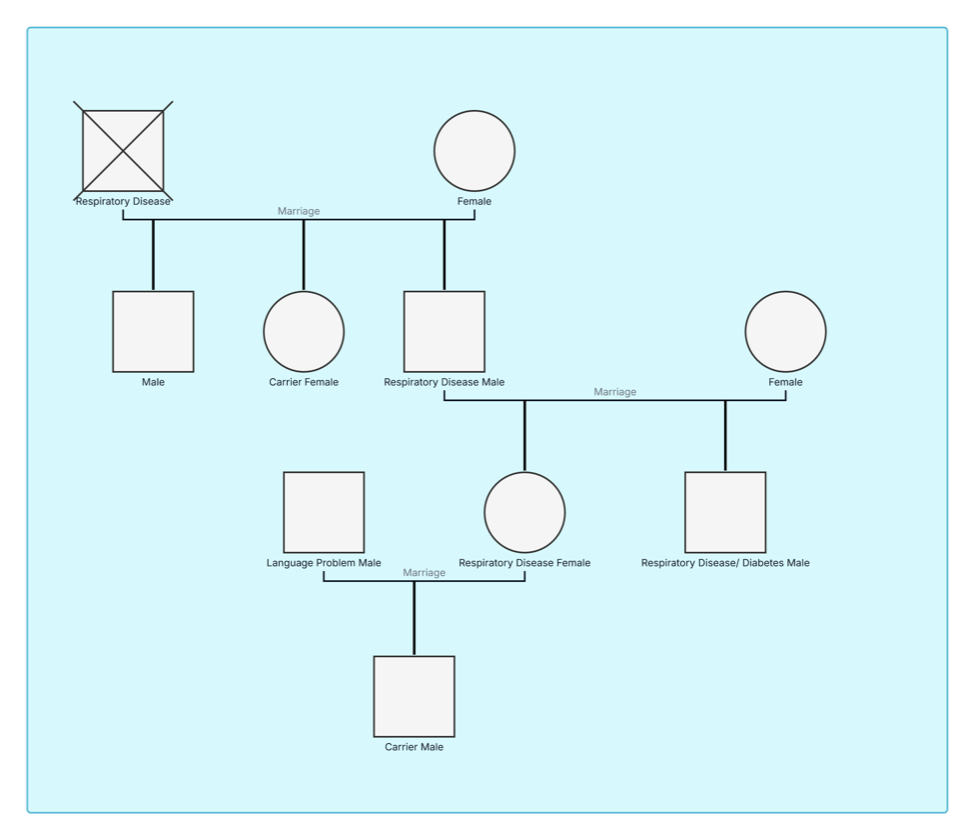
This respiratory disease genogram brings family structure and respiratory-health information into one multigenerational view for history-taking, pattern review, and informed clinical discussion.
The example contains 10 people across four generations. Four family members are labeled with respiratory disease, including one person who is also labeled with diabetes. Two other people are identified as carriers, and one relative has a language-problem note. The oldest affected person is marked deceased.
The red condition overlay and legend make respiratory-disease entries easy to identify throughout the family. Partner and descent lines organize the generations, while the carrier and additional-health labels provide context that users can expand with confirmed diagnoses, age of onset, symptoms, investigations, treatments, environmental exposures, and source documentation.
This respiratory disease genogram can help healthcare professionals, researchers, and families organize respiratory history and relevant context in one clear view.
Review diagnoses, symptoms, severity, treatment, hospitalizations, and family history.
Record confirmed carrier or test information separately from clinical conditions.
Add smoking, workplace, household, environmental, and allergen exposures.
Prepare a visual respiratory history for professional assessment or referral.
Standard family symbols establish the structure, while condition overlays and descriptive labels add medical and genetic context.
Male family member
Female family member
Deceased family member
Marriage or partner relationship
Parent–child relationship
Respiratory disease recorded in the legend
Diabetes recorded as an additional condition
Carrier information recorded for a family member
Additional information such as a language problem
Use this example when respiratory history and family context need to be reviewed together.
Add relatives across the generations needed for the review, including names or identifiers, ages, living status, and family relationships.
Add confirmed diagnoses, symptoms, age of onset, severity, investigations, hospitalizations, medications, and treatment history.
Record carrier or genetic-test information where relevant, together with smoking history, occupation, air quality, allergens, infections, and household exposures.
Confirm information sources, discuss the map with the appropriate care team, and add referrals, follow-up actions, or updated results over time.
Creately Clinical supports respiratory family-history workflows with medical fields, health-focused views, collaborative review, and report-ready outputs.
You can record asthma, chronic obstructive pulmonary disease, cystic fibrosis, pulmonary fibrosis, sleep-related breathing disorders, recurrent infections, allergies, and other conditions relevant to the review.
Useful details include the diagnosis, age of onset, symptoms, severity, testing method, treatment, hospitalizations, current status, exposures, and source of the information.
Yes. Add smoking or vaping exposure, workplace hazards, air pollution, allergens, housing conditions, pets, infections, and other factors relevant to respiratory health.
Health fields, notes, overlays, relationship markers, and reusable legends can keep family information organized. Shared editing, comments, version history, and exports support review, referral preparation, and coordinated updates.
Edit the genogram to add your family structure, define the respiratory-health legend, and create a practical visual for history-taking, assessment, education, or referral.