Pediatric Nursing Focus
Highlights pediatric nursing details alongside family health history.
Highlights pediatric nursing details alongside family health history.
Connects diagnoses, risks, and relevant medical notes across relatives.
Shows how health conditions or risks appear across family lines.
Leaves space for symptoms, screenings, and care notes.
Keeps parents, children, partners, and siblings easy to trace.
Supports quick review of conditions that may need follow-up.
Gives clinicians a clear visual for discussion and documentation.
Can be expanded as new relatives or health details are added.
Map a child’s family health history, caregivers, sibling relationships, and support connections using this pediatric nursing genogram on Creately Clinical.
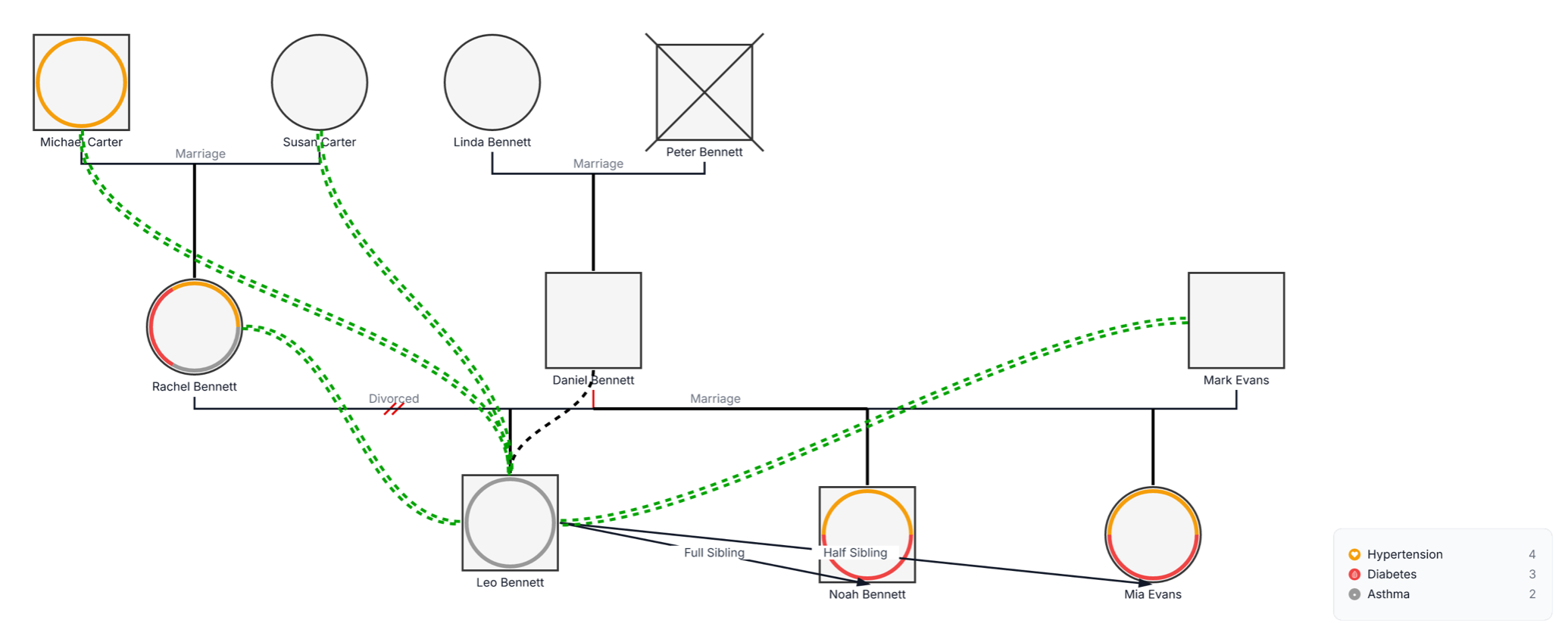
This pediatric nursing genogram combines family structure, health patterns, and supportive relationships to create a child-centered view for assessment and coordinated care.
The example maps 10 people across three generations of the Carter, Bennett, and Evans families. The oldest generation includes Michael and Susan Carter, and Linda and Peter Bennett. Rachel Bennett, Daniel Bennett, and Mark Evans appear in the adult generation, while Leo Bennett, Noah Bennett, and Mia Evans form the children’s generation. Peter Bennett is marked deceased.
The example includes a divorce and a current marriage, along with full- and half-sibling labels. Green relationship lines highlight close family connections. Colored health overlays correspond with the legend for hypertension, diabetes, and asthma, helping users view the child’s immediate care context alongside relevant family health history.
This pediatric nursing genogram can help care professionals and families organize a child’s health, caregiving, sibling, and support context in one clear view.
Review diagnoses, medications, allergies, development, treatment, and family health history.
Identify caregivers, households, siblings, communication routes, services, and support.
Create a shared view for assessment, discharge planning, referral, and follow-up.
Discuss the child’s routines, needs, support network, and care responsibilities with the team.
Standard person symbols establish the family structure, while labeled lines and health overlays add pediatric and caregiving context.
Male family member
Female family member
Deceased family member
Marriage or partner relationship
Divorced relationship
Full-sibling or half-sibling relationship
Close or supportive relationship
Condition recorded in the health legend
Hypertension, diabetes, and asthma categories
Use this example when pediatric care would benefit from seeing a child’s health history and family relationships together.
Enter names, ages, living status, parents, siblings, grandparents, household members, and other caregivers important to the child’s care.
Add diagnoses, age of onset, medications, allergies, treatment history, developmental milestones, and other relevant observations.
Show full and half siblings, household arrangements, close family connections, caregiving roles, communication routes, and availability.
Review family health patterns and support resources, then add education needs, referrals, responsibilities, and follow-up actions.
Creately Clinical supports pediatric nursing workflows with medical and social-work fields, health and service views, collaborative review, and report-ready outputs.
It is a visual map that combines a child’s family structure with relevant health history, caregiver relationships, sibling context, and sources of support. Nurses can use it to organize information for assessment and care planning.
You can add diagnoses, medications, allergies, immunization notes, developmental milestones, hospitalizations, specialists, daily routines, school information, and other details relevant to the child’s care.
Yes. Add parents, step-parents, guardians, grandparents, foster carers, relatives, and other adults involved in daily care, appointments, treatment decisions, or emotional support.
Health fields, notes, relationship markers, and visual categories can keep family and care information organized. Shared editing, comments, version history, and exports support team review, family communication, and coordinated updates.
Edit the genogram to add the child’s family, personalize the health legend, and build a useful visual for pediatric assessment, family education, and coordinated care planning.