Medical Focus
Highlights medical details alongside family health history.
Highlights medical details alongside family health history.
Connects diagnoses, risks, and relevant medical notes across relatives.
Shows how health conditions or risks appear across family lines.
Leaves space for symptoms, screenings, and care notes.
Keeps parents, children, partners, and siblings easy to trace.
Supports quick review of conditions that may need follow-up.
Gives clinicians a clear visual for discussion and documentation.
Can be expanded as new relatives or health details are added.
Map four generations of family structure and relationship context, then add verified conditions, ages, treatments, and care information using this medical genogram on Creately Clinical.
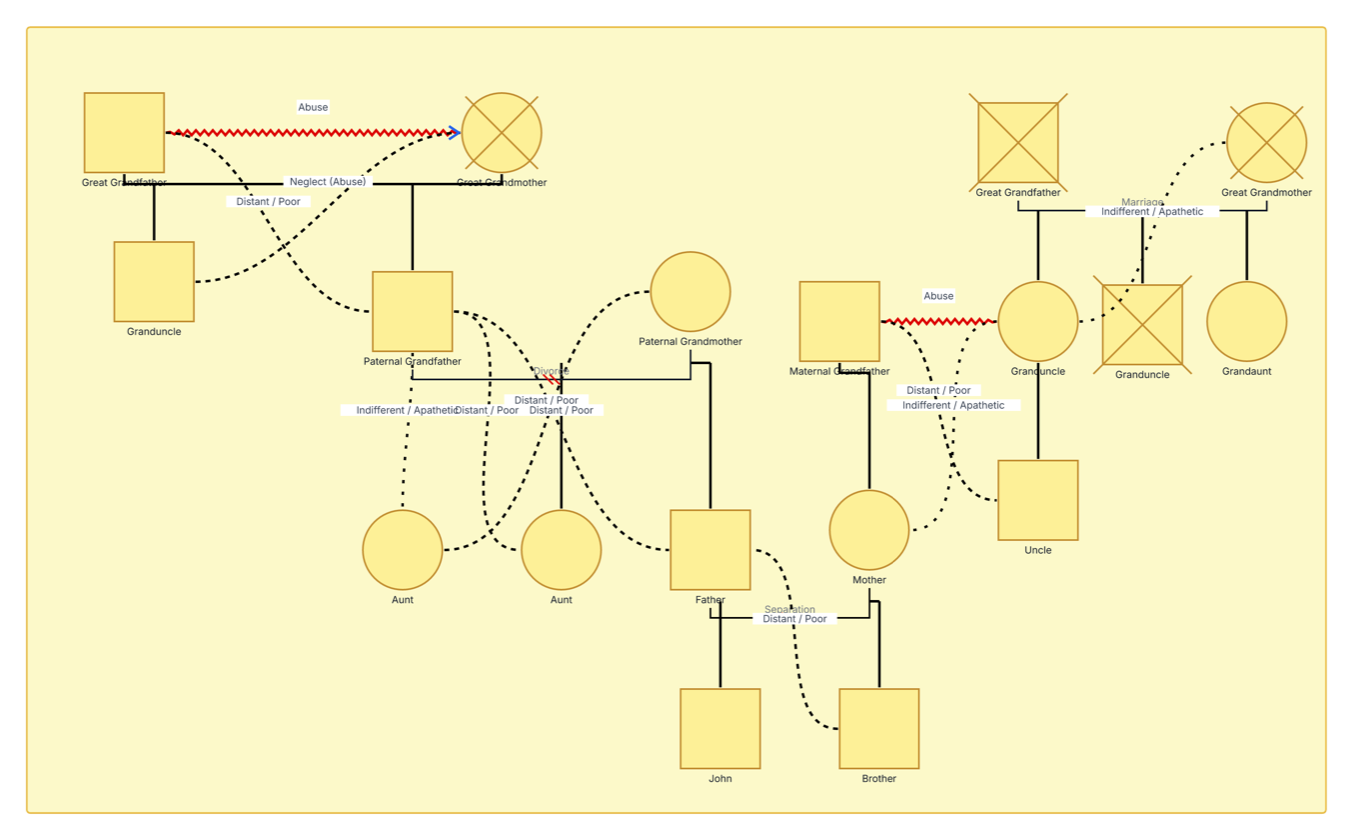
This medical genogram example maps an extended family across four generations and keeps important relationship context visible, providing a strong foundation for adding health history and care information.
The example includes 18 relatives from the great-grandparent generation through John and his brother. Four people are marked deceased. Marriage, divorce, and separation lines document changes in partner relationships, while dotted and zigzag connectors show emotional dynamics between selected relatives.
The visible relationship labels include abuse, neglect, distant or poor relationships, and indifferent or apathetic relationships. These connections can provide useful psychosocial context alongside medical information. In the editable example, users can add confirmed conditions, age or age of onset, medications, treatments, allergies, relevant behaviors, and data sources to the people already mapped.
The current example focuses on family and relationship context rather than displaying named medical conditions. Use the editable canvas to add the verified health information relevant to the review.
This medical genogram can help healthcare and care teams organize extended family structure, medical details, and relevant relationship context in one clear view.
Collect health history, conditions, onset, treatments, medications, allergies, and sources.
Review multigenerational patterns and prepare focused clinical or referral conversations.
Add relevant psychosocial relationships and support context alongside health information.
Practice comprehensive medical-genogram structure and documentation.
Use structural lines for family connections and labeled relationship lines for clinically relevant interpersonal context.
Male family member
Female family member
Deceased family member
Marriage or partner relationship
Parent–child relationship
Divorce or separation, as labeled
Distant, poor, indifferent, or apathetic relationship, as labeled
Abuse relationship, as labeled
Neglect relationship recorded in the example
Use this example when a medical or care review benefits from seeing health information within the wider family and relationship system.
Mark the person or household at the center of the review, then decide which family branches and generations are relevant.
Add partners, children, siblings, aunts, uncles, grandparents, and great-grandparents using consistent connection lines and status markers.
Record conditions, age or age of onset, medications, treatments, allergies, relevant behaviors, and sources according to the purpose of the genogram.
Label clinically relevant emotional relationships, confirm sensitive information, check the legend, and use comments or review notes to resolve gaps before sharing or exporting the diagram.
Creately Clinical supports medical-genogram workflows with structured health fields, clinical notation, health-focused views, collaborative review, and report-ready outputs.
They can preserve relevant family-system context alongside medical information. Include only information appropriate to the purpose of the review, and label each connection clearly.
Add verified conditions to the relevant person using the team’s chosen fields, markers, or notes. Include dates, age of onset, status, and source when those details support accurate interpretation.
Yes. Keep only the relatives and relationship details relevant to the current task, then expand the same canvas when additional context becomes useful.
The Medical & Genetic field pack can organize conditions, genetic information, medications, allergies, and related health details. Health-focused views, comments, collaboration, version history, and export options support ongoing review and documentation.
Edit the genogram to map the family system, add verified medical details, and create a clear working genogram for collaborative review and future updates.