Maternal & Child Health Focus
Highlights maternal & child health details alongside family health history.
Highlights maternal & child health details alongside family health history.
Connects diagnoses, risks, and relevant medical notes across relatives.
Shows how health conditions or risks appear across family lines.
Leaves space for symptoms, screenings, and care notes.
Keeps parents, children, partners, and siblings easy to trace.
Supports quick review of conditions that may need follow-up.
Gives clinicians a clear visual for discussion and documentation.
Can be expanded as new relatives or health details are added.
Map maternal health history, pregnancy outcomes, child health information, and relevant conditions across generations using this genogram on Creately Clinical.
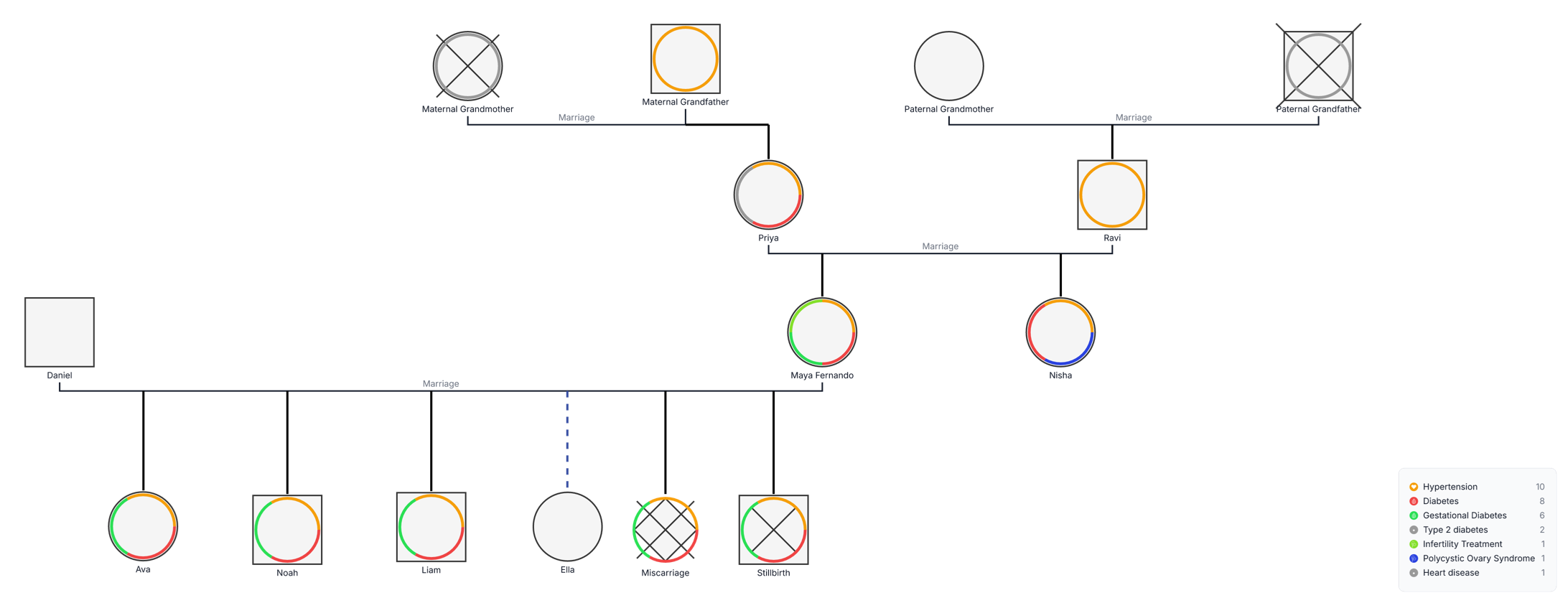
This maternal and child health genogram organizes family relationships, pregnancy outcomes, and relevant health information across four generational rows, helping care teams review important context in one structured visual.
The example maps both sides of a family. Priya and Ravi appear beneath their maternal and paternal parents. Their family extends to Maya Fernando and Nisha, while Daniel and Maya’s family branch includes Ava, Noah, Liam, Ella, a miscarriage, and a stillbirth. The deceased markers on the maternal grandmother and paternal grandfather keep vital status visible without separating it from the family structure.
Colored rings record the indicators defined in the example legend: hypertension, diabetes, gestational diabetes, type 2 diabetes, infertility treatment, polycystic ovary syndrome, and heart disease. Because several indicators can appear around one symbol, the example can show co-occurring health information without replacing the standard genogram shapes.
This example supports structured documentation and discussion; it does not calculate inherited risk or provide a diagnosis. Confirm clinical details, terminology, dates, and sources according to the organization’s approved workflow.
This maternal and child health genogram can help healthcare professionals and families organize pregnancy, reproductive-health, and child-health context in one clear view.
Review pregnancy history, outcomes, conditions, treatment, and family context.
Connect child-health information with both maternal and paternal family branches.
Create a shared visual for intake, case review, coordination, and follow-up.
Prepare and update relevant family health information for professional care conversations.
Use the standard family symbols for structure and the colored indicator rings for health information.
Male family member
Female family member
Deceased family member or recorded pregnancy loss, as labeled
Marriage or partner relationship
Parent–child or pregnancy connection
Miscarriage recorded in the pregnancy history
Stillbirth recorded in the pregnancy history
A health or reproductive-health indicator defined in the legend
Use this example when maternal history, pregnancy outcomes, child health, and cross-generational family information need to be reviewed together.
Add the central parent, partner, children, and current pregnancy information needed for the purpose of the review.
Add parents, grandparents, siblings, and other relevant relatives. Confirm each partner and descent connection so the family structure remains unambiguous.
Use consistent symbols and plain labels for live births, miscarriage, stillbirth, and other relevant outcomes. Add dates or gestational details only when they are known and appropriate to document.
Apply the legend consistently and record condition, onset, treatment, source, and review date where relevant. Use notes for context that cannot be communicated safely by a color marker alone.
Creately Clinical supports maternal-child health mapping with medical fields, health-focused views, collaborative review, version history, and report-ready outputs.
Begin with the central household, parent–child relationships, relevant pregnancies, and confirmed outcomes. Then extend the diagram to relatives whose health history adds useful context.
Yes. The example uses multiple colored ring segments around a person’s symbol. Keep the legend visible and add supporting notes so each marker remains understandable.
Use the symbols and labels established by the organization or clinical team, and apply them consistently. In this example, miscarriage and stillbirth are shown as separate labeled outcomes connected to the parental line.
The Medical & Genetic field pack can organize conditions, genetic information, medications, allergies, and related health details. Health-focused views, comments, collaboration, version history, and export options help teams review and update the same structured genogram over time.
Edit the genogram to map the family, document pregnancy outcomes, and organize maternal and child health information in a clear visual that can grow with the care record.