Genetic Disorder Focus
Highlights genetic disorder details alongside family health history.
Highlights genetic disorder details alongside family health history.
Connects diagnoses, risks, and relevant medical notes across relatives.
Shows how health conditions or risks appear across family lines.
Leaves space for symptoms, screenings, and care notes.
Keeps parents, children, partners, and siblings easy to trace.
Supports quick review of conditions that may need follow-up.
Gives clinicians a clear visual for discussion and documentation.
Can be expanded as new relatives or health details are added.
Organize family health history, condition patterns, and genetic-risk information across three generations using this medical genogram on Creately Clinical.
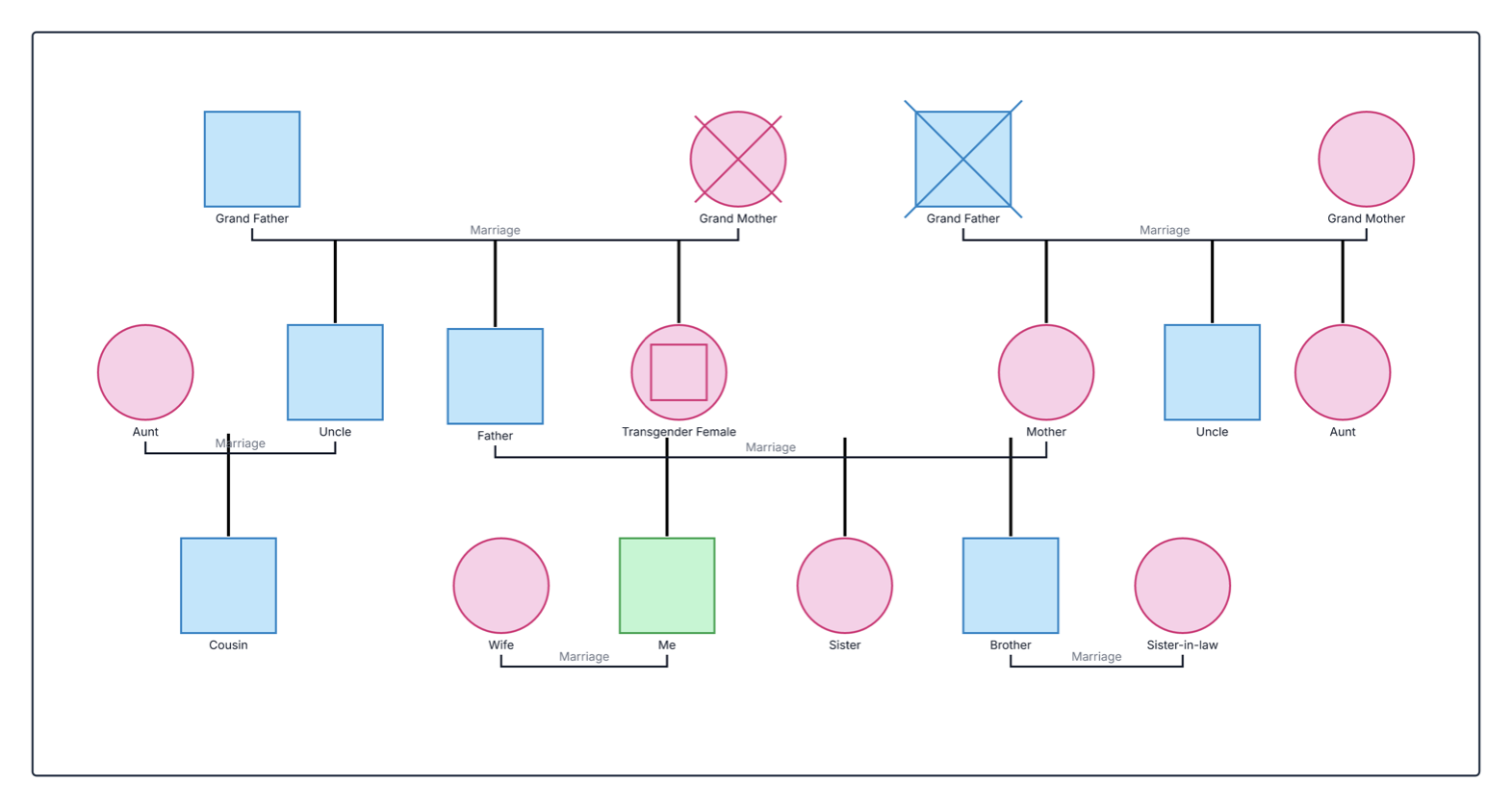
This genetic disorder genogram organizes family health information across three generations, helping healthcare professionals and families see where documented conditions occur and prepare focused questions for clinical or genetic counseling conversations.
The example maps 17 relatives across maternal and paternal branches. Its legend records eight heart disease tags, seven diabetes tags, and one obesity tag. Condition markers appear across several generations, while crossed symbols identify two deceased grandparents. The diagram also includes an inclusive transgender female symbol and keeps partners, siblings, aunts, uncles, and a cousin visible in the wider family context.
Heart disease, diabetes, and obesity are often complex conditions influenced by multiple genetic, environmental, and behavioral factors. This example therefore presents them as family health patterns—not proof that a condition has a particular inheritance pattern or that another relative will develop it.
This genetic disorder genogram can help healthcare professionals, genetics teams, learners, and families organize family health patterns in one clear view.
Collect family history, distinguish tested status from conditions, and prepare focused risk conversations.
Review diagnoses, onset, current status, supporting records, and relevant family branches.
Practice interpreting medical pedigrees and complex condition patterns.
Organize known health information to review with qualified healthcare or genetics professionals.
Use a visible legend and record the source of each health detail so every condition marker can be interpreted correctly.
Male family member
Female family member
Transgender female family member
Deceased family member
Marriage or partner relationship
Parent–child connection
Health condition identified by the diagram legend
Counts the displayed heart disease, diabetes, and obesity tags
Use this example when a multigenerational family health history can make a medical or genetic conversation more focused and easier to understand.
Add the identified person, siblings, parents, aunts, uncles, cousins, and grandparents. Include partners where they help explain the family structure, while keeping biological connections clear for health-history review.
Add the specific diagnosis, age at diagnosis or onset, current status, and information source when known. Keep confirmed diagnoses, family reports, suspected conditions, and genetic test results distinct.
Assign one visual marker to each condition and define it in the legend. If genetic testing has identified a relevant variant, record its tested status separately from the medical condition.
Check the information for gaps, update it as records become available, and share the completed family history with an appropriate healthcare professional or genetic counselor. Use permission controls when collaborating on sensitive health information.
Creately Clinical supports medical-genogram workflows with structured condition and genetic fields, health-focused views, collaborative review, and report-ready outputs. For this example, the Medical & Genetic field pack keeps diagnoses, tested status, and supporting clinical details connected to the family structure.
No. A recurring family pattern can be useful evidence for professional review, but it does not by itself establish a genetic cause or predict an individual's outcome. Many common conditions reflect a combination of genetic, environmental, and behavioral factors.
When available, record the exact diagnosis, affected relative, age at diagnosis or onset, current status, test results, and source of the information. Clearly mark unknown, unconfirmed, or family-reported details.
No. It is a tool for organizing family health history. A genetic counselor or other qualified healthcare professional can assess the history, explain possible risk, and help determine whether genetic testing may be useful.
The Medical & Genetic field pack supports condition tags, genetic markers, medications, allergies, screening status, and other structured details. Health view can highlight conditions across the family, while AI-assisted pattern detection, evidence-gap review, real-time collaboration, and PDF or DOCX reports support professional workflows.
Edit the genogram to map your family health history, apply clear condition markers, and create a structured visual you can review with healthcare or genetics professionals.