Family Health History Focus
Highlights family health history details alongside family health history.
Highlights family health history details alongside family health history.
Connects diagnoses, risks, and relevant medical notes across relatives.
Shows how health conditions or risks appear across family lines.
Leaves space for symptoms, screenings, and care notes.
Keeps parents, children, partners, and siblings easy to trace.
Supports quick review of conditions that may need follow-up.
Gives clinicians a clear visual for discussion and documentation.
Can be expanded as new relatives or health details are added.
Record medical conditions and family health patterns across three generations using this genogram on Creately Clinical.
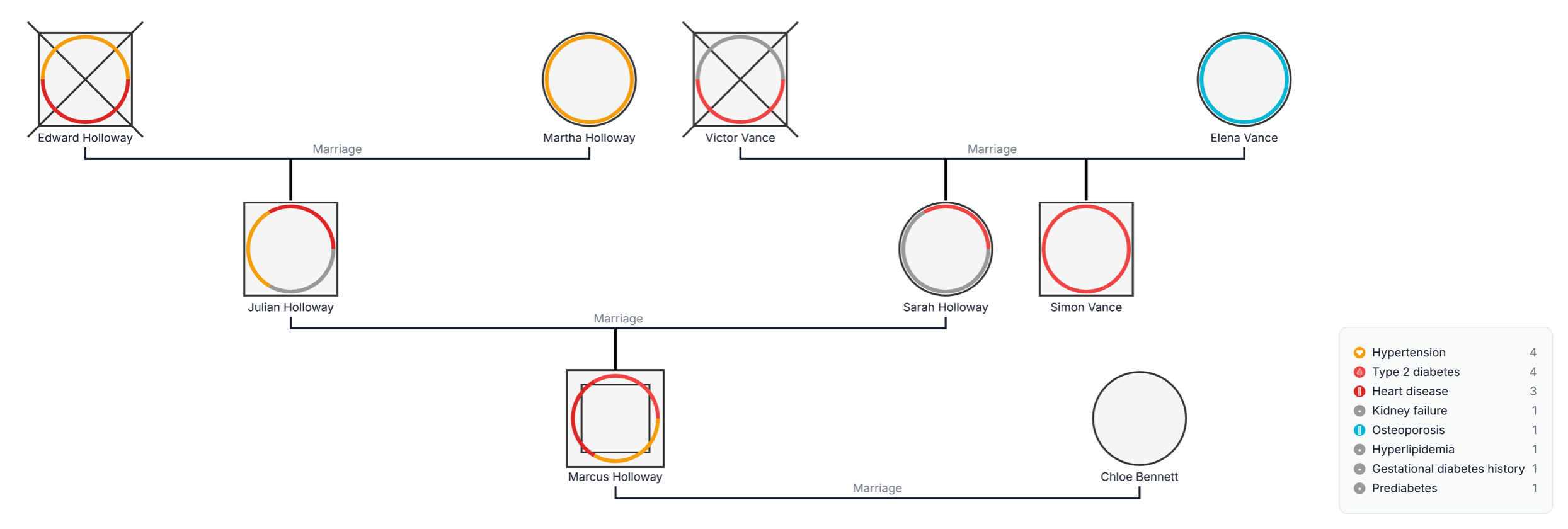
This family health history genogram combines relationships and medical-condition tags in one view, helping families and healthcare professionals organize health information and prepare more informed conversations about care and screening.
The example maps nine people across three generations. Edward and Martha Holloway form one grandparent branch, while Victor and Elena Vance form the other. Their children, Julian Holloway and Sarah Holloway, are married; Simon Vance appears alongside Sarah in the second generation. Marcus Holloway and his partner, Chloe Bennett, form the third-generation branch.
Colored arcs around the person symbols correspond to eight condition categories in the legend. The example records hypertension for four people, type 2 diabetes for four, heart disease for three, and one entry each for kidney failure, osteoporosis, hyperlipidemia, gestational diabetes history, and prediabetes. Deceased markers preserve the history of Edward and Victor.
This family health history genogram can help healthcare professionals, researchers, and families organize multigenerational medical information in one clear view.
Review conditions, diagnosis timing, treatments, screening history, and information sources across family branches.
Organize relevant health history and confirmed genetic findings for informed clinical conversations.
Study family health patterns using consistent medical-genogram notation.
Prepare and maintain a visual health-history record to discuss with qualified healthcare professionals.
Standard genogram notation establishes the family structure, while colored health arcs and a matching legend identify the documented conditions for each person.
Male family member
Female family member
Deceased family member
Connects married partners
Connects a child to the relevant parental union
Identifies a condition assigned to that person using the legend
Show that more than one condition or health-history item is recorded for a person
Matches each color with a named condition and displays the number of tagged people
Use this example when individuals, families, clinicians, nurses, genetic counselors, or researchers want to organize a multigenerational health history in a clear visual format.
Add the focus person, parents, siblings, children, grandparents, aunts, uncles, nieces, and nephews when their information is relevant and available. Connect each person to the appropriate family branch.
Add major medical conditions, age or year at diagnosis, current age, and age and cause of death for deceased relatives when known. Record the information source and distinguish confirmed details from family recollection.
Use the Medical & Genetic fields to tag each condition and add relevant medications, surgeries, screening information, or genetic test results. Keep the legend visible so every colored arc is easy to interpret.
Switch to the Health viewpoint to scan the family information by condition. Update the genogram when new details become available and share it with a qualified healthcare professional for personalized interpretation and next-step recommendations.
Creately Clinical supports structured family health-history work with medical fields, health-focused views, collaborative review, and report-ready outputs. For this example, the Medical & Genetic field pack and Health view help teams record several conditions consistently across the same family.
Record major medical conditions, the age or approximate age at diagnosis, and the age and cause of death for deceased relatives when available. Dates, sources, treatments, screening history, and relevant test results can add useful context.
Each arc corresponds to one condition in the legend. Several arcs around one person mean that multiple conditions or health-history items have been recorded for them.
No. Family history can help a healthcare professional build a fuller picture of potential risk, but it does not determine an individual outcome. Personal health, environment, behavior, age, and other factors may also matter.
Creately’s Medical & Genetic fields capture conditions, markers, medications, allergies, surgeries, immunizations, screening, and medical notes. The Health viewpoint and condition focus make patterns easier to review, while AI-assisted detection, collaboration, and PDF or DOCX export support clinical workflows.
Edit the genogram, replace the Holloway–Vance example with your family, and add confirmed conditions and diagnosis details using consistent health tags. Keep the legend clear, update the history as information changes, and share the completed view with an appropriate healthcare professional.