Cardiovascular Disease Focus
Highlights cardiovascular disease details alongside family health history.
Highlights cardiovascular disease details alongside family health history.
Connects diagnoses, risks, and relevant medical notes across relatives.
Shows how health conditions or risks appear across family lines.
Leaves space for symptoms, screenings, and care notes.
Keeps parents, children, partners, and siblings easy to trace.
Supports quick review of conditions that may need follow-up.
Gives clinicians a clear visual for discussion and documentation.
Can be expanded as new relatives or health details are added.
Document hypertension diagnoses and relevant cardiovascular history across four generations with an editable medical genogram.
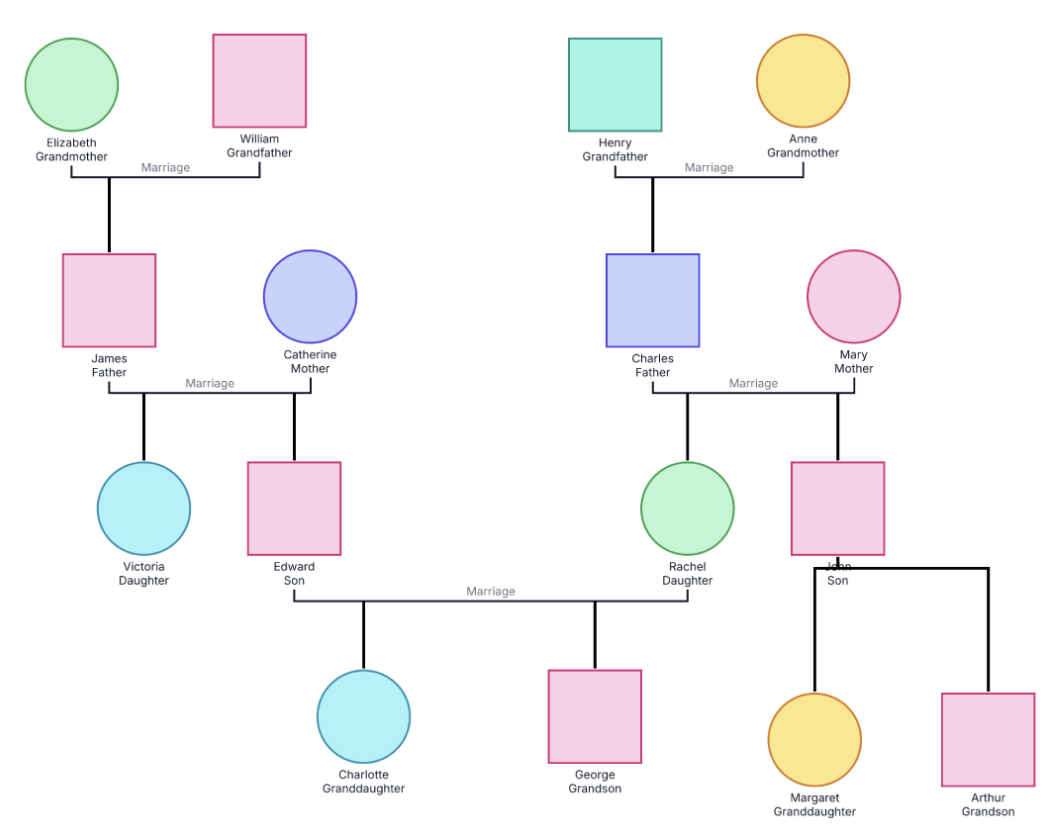
This example provides a clear four-generation view for recording hypertension and related cardiovascular history, making family patterns easier to organize and discuss.
The example contains 16 people across two family branches. Edward and Rachel’s marriage brings those branches together. Their children are Charlotte and George, while John’s branch includes Margaret and Arthur. The upper rows contain the parents and grandparents for each side.
Customize the diagram with a health legend, diagnosis tags, ages at diagnosis, relevant outcomes, and supporting notes. This makes it easy to explore how hypertension clusters within the family while keeping genetic, health, behavioral, environmental, and social influences in view.
This cardiovascular disease genogram example helps healthcare professionals, learners, and families organize hypertension and related family-health information in one clear view.
Review diagnoses, ages at diagnosis, outcomes, and relevant health context before or during care
Explore multigenerational patterns and identify family-history questions for follow-up
Practice combining standard family notation with a written medical legend
Prepare and update a family cardiovascular history for discussion with a healthcare professional
Squares, circles, and family lines establish the structure. A customized health legend can use fills, borders, tags, or notes to make hypertension and related information easy to scan.
Male family member
Female family member
Connects married partners
Connects a child to the relevant parental union
Records a confirmed diagnosis when its source is known
Shows when hypertension was first diagnosed, if known
Records death separately from any cardiovascular diagnosis
Highlights a defined diagnosis, status, or category according to the customized legend
Use this example when a clinician, genetic counselor, nurse, or patient needs an organized family history of hypertension or related cardiovascular conditions. It brings family context into clinical and educational conversations in a format that is easy to review together.
Add names, family relationships, birth years, and living or deceased status for the relevant relatives. Mark information that still needs confirmation so it can be followed up easily.
Add hypertension and any relevant cardiovascular diagnoses to the appropriate people. When possible, record age at diagnosis, current status, information source, and review date.
Assign a consistent tag, fill, or border treatment to hypertension and explain it in writing. Give other cardiovascular conditions or risk factors their own indicators so the family history remains easy to understand.
Look for family clustering, early diagnoses, and information to follow up while considering genetic and non-genetic influences. Use the completed visual to guide questions, screening conversations, and shared review.
Creately Clinical supports medical family-history workflows with structured health fields, a dedicated Health view, automatic person markers, AI-assisted pattern review, collaboration, and clinical reporting.
For this example, the Base and Medical & Genetic field packs are the most relevant capability set. The medical pack can record conditions, genetic markers, medications, allergies, and substance-use information, while the Health view color-codes people by documented medical condition to make family patterns easier to review.
Choose a consistent fill, border, or health tag for hypertension and explain it in the legend. You can then add age at diagnosis and supporting notes to each relevant person's record.
The four-generation view makes clusters and early diagnoses easier to notice. Common hypertension is multifactorial, so the example also gives teams room to consider family history alongside age, health conditions, lifestyle, environment, and social factors.
Clinicians, nurses, genetic counselors, educators, and individuals gathering a family health history can use it. The visual is especially helpful for preparing and supporting conversations with a healthcare professional.
Creately's Medical & Genetic field pack can record conditions, genetic markers, medications, allergies, and substance-use information. The Health viewpoint and pattern-analysis tools help reviewers explore documented conditions across generations and identify useful follow-up questions.
Edit the genogram, personalize the four-generation family structure, and add a clear health legend. Record hypertension and related cardiovascular details, then use Creately's Health viewpoint to explore patterns and prepare for a more informed conversation with a healthcare professional.