Blended Family with Minor Children Legal Legal View
Shows the relatives and relationships involved in the legal matter.
Shows the relatives and relationships involved in the legal matter.
Clarifies parents, children, partners, guardians, heirs, or caregivers.
Highlights relationship lines that matter for review or documentation.
Leaves room for roles, responsibilities, and relevant legal notes.
Connects family branches so the case context is easier to follow.
Supports notes for deceased, separated, contested, or dependent relatives.
Gives teams a shared visual before deeper case details are added.
Can be updated as new parties, facts, or documents are confirmed.
Map spouses, former partners, adult children, beneficiaries, and jointly owned assets in one editable estate-planning genogram.
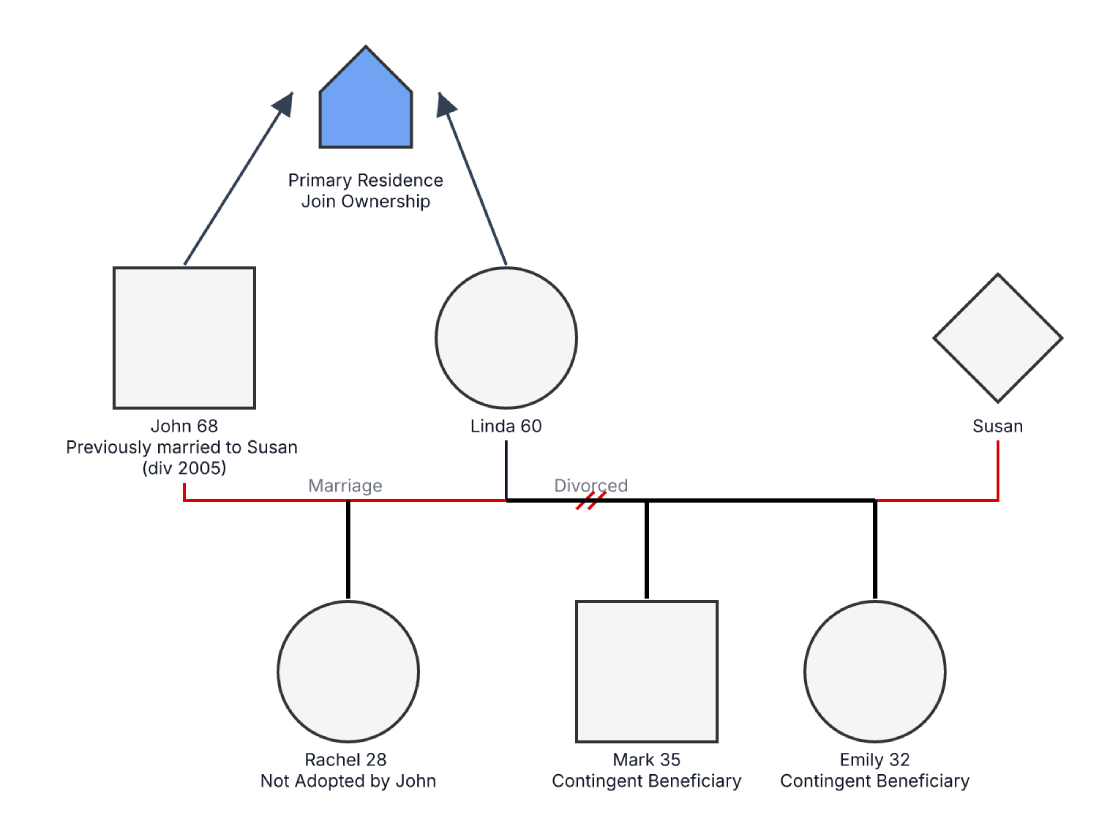
This example combines a blended-family map with estate-planning information, including a former marriage, a current spouse, adult children, a stepchild, contingent beneficiaries, and joint ownership of a primary residence.
The example identifies John, age 68, and Linda, age 60, alongside John’s former spouse Susan. It also shows Rachel, age 28, as not adopted by John, and Mark, age 35, and Emily, age 32, as contingent beneficiaries. A house symbol records joint ownership of the primary residence.
The note panel highlights six areas for legal review: elective-share exposure, beneficiary-designation conflicts, adult children’s expectations, stepchild status, capacity or undue-influence concerns, and file documentation. These are issue-spotting prompts, not conclusions. The applicable rules depend on the jurisdiction, the type and title of each asset, plan documents, beneficiary forms, marital agreements, and the facts of the matter.
This blended family estate planning genogram helps legal and financial professionals organize family relationships, beneficiary roles, assets, and review questions in one clear view.
Map current and former spouses, children, stepchildren, beneficiaries, and ownership questions during intake
Add family context to beneficiary designations, jointly owned assets, and planning discussions
Review family roles, documents, decision-making authority, and issues requiring verification
Prepare a visual overview for a qualified estate-planning professional
Use relationship lines for family structure and structured fields or notes for legal facts. The diagram should not imply that a beneficiary label, asset arrow, or family connection establishes a legally valid right by itself.
Male person
Female person
Person whose sex or gender is unspecified in the diagram
Current legal marriage
Dissolved marriage, shown with slash marks
Primary residence identified as jointly owned
Records the stated absence of a legal parent–child adoption
Records a secondary beneficiary designation that must be verified against the controlling document
Use this example as a visual intake and issue-spotting aid when a blended family's estate plan involves a current spouse, former spouse, adult children, stepchildren, beneficiary designations, or jointly titled property.
Use this example as a blended family with adult children: the people shown are 28, 35, and 32. Add John's current marriage to Linda and his prior marriage and divorce from Susan as separate unions, then connect each child to the relevant parent or parental union.
Confirm names, ages, marriage and divorce dates, biological or adoptive parentage, and any step relationships. Do not infer legal parentage, inheritance rights, or gender from placement, surname, or symbol alone.
Record how the residence and other assets are titled; identify wills, trusts, retirement plans, insurance policies, payable-on-death accounts, marital agreements, powers of attorney, trustees, executors, and primary or contingent beneficiaries. Cite the source and review date in the working record.
Compare the visual against the governing documents and applicable law. A licensed professional should assess spousal rights, beneficiary rules, stepchild treatment, capacity, undue influence, tax consequences, and whether the plan carries out the client's intentions.
Creately Clinical supports legal and estate-planning workflows with structured family notation, legal fields, asset and role documentation, controlled collaboration, and professional report export.
For this example, the Base and Legal & Estate field packs are the most relevant capability set. The Legal & Estate pack can record legal status, powers of attorney, will and trust information, assets, debts, and related planning details while the genogram keeps the blended-family structure visible.
The example shows John and Linda, John's former spouse Susan, and three adult children: Rachel, age 28; Mark, age 35; and Emily, age 32. It also records a non-adopted stepchild relationship, contingent beneficiary roles, and a jointly owned residence.
Do not state this as a universal rule. Distribution depends on the asset, controlling contract or plan, the designation on file, applicable law, and possible spousal rights. The relevant documents and account rules should be reviewed together by qualified counsel.
That depends on the jurisdiction and the governing estate documents. The diagram's “not adopted” note is relevant, but it does not determine the result. Confirm whether the person is expressly included in a will, trust, beneficiary designation, or other controlling instrument.
No. It is a visual organization and issue-spotting tool. It does not establish title, beneficiary status, testamentary capacity, inheritance rights, or the validity of any document. Legal conclusions require document review and advice from a qualified professional in the relevant jurisdiction.
Edit the genogram, map the current and former relationships, and add the relevant assets, documents, fiduciary roles, and beneficiary designations. Then verify the visual against appropriate records and review the matter with qualified legal counsel.