Weasley Family Structure
Shows the main family members and relationships in this example.
Shows the main family members and relationships in this example.
Connects couples, parents, children, and siblings in a readable layout.
Places relatives across generations so patterns are easier to see.
Leaves room for names, roles, dates, and family notes.
Supports markers for marriage, separation, loss, conflict, or support.
Keeps the visual focused on the family story shown in the hero image.
Helps teams discuss the same structure before adding deeper notes.
Can be extended as new relatives or relationship details are added.
Explore a familiar fictional family while learning how genograms represent relatives, generations, partnerships, and emotional bonds.
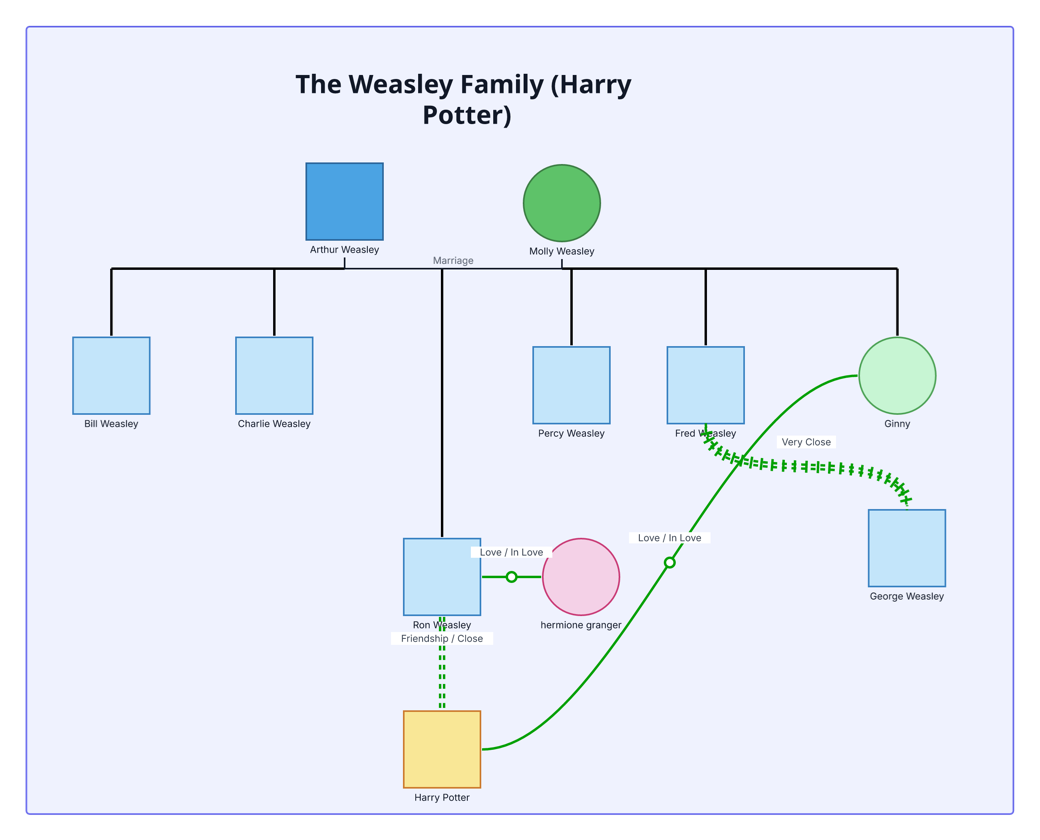
This Weasley family genogram turns a familiar fictional family into an approachable example of how relatives, generations, partnerships, and emotional bonds can be represented in one visual map.
Arthur and Molly Weasley form the parent couple, with Bill, Charlie, Percy, Fred, George, Ron, and Ginny arranged as their seven children. Hermione Granger and Harry Potter extend the relationship view beyond the immediate household.
The example highlights Ron and Hermione’s loving relationship, Harry and Ginny’s loving relationship, Ron and Harry’s close friendship, and the very close bond between Fred and George. These examples show how an editable genogram can document both family membership and meaningful emotional connections.
This fictional-family genogram gives learners and facilitators an approachable example for practicing family structure and emotional relationship notation.
Learn standard family symbols and relationship notation through a recognizable example.
Practice arranging a family system before working with sensitive real-life information.
Demonstrate how structural and emotional connections can appear in the same map.
Explore character relationships or adapt the layout to another fictional family.
The example uses standard person shapes and structural lines alongside labeled green connections for emotional relationships.
Male person
Female person
Marriage or romantic partnership
Connects children within the same family group
Connects parents with a child
Love or mutual romantic connection
Friendship or close emotional bond
Especially strong bond, shown between Fred and George
Use this example when you want an engaging way to introduce family mapping and emotional-relationship notation.
Keep the Weasley example for a learning activity, or replace the names with people from another fictional or real-life family.
Add parent or partner pairs first, then arrange children and siblings beneath them so the generations remain easy to scan.
Connect partners, friends, siblings, or other significant people and label each bond with terms such as love, friendship, close, or very close.
Adjust colors, notes, labels, and relationship styles to suit the story, lesson, discussion, or family context you want to explore.
Creately Clinical makes this fictional example easy to adapt into a structured learning exercise or a more detailed family map. Standardized person shapes and relationship subtypes help learners move from a familiar example to consistent genogram notation.
It includes Arthur and Molly Weasley, their seven children—Bill, Charlie, Percy, Fred, George, Ron, and Ginny—plus Hermione Granger and Harry Potter.
The example highlights Arthur and Molly’s marriage, Ron and Hermione’s love, Harry and Ginny’s love, Ron and Harry’s friendship, and the very close bond between Fred and George.
Yes. The layout is fully editable, so you can replace names, add relatives, change relationship labels, recolor symbols, and adapt the structure to your own family or another fictional group.
Drag-and-drop shapes, smart connectors, relationship labels, notes, and reusable styling make it easier to organize a family clearly. Shared editing, comments, version history, and exports also support teaching, discussion, and collaborative review.
Edit the genogram to explore the Weasley family example, practice genogram notation, or transform the layout into a custom family and relationship map.