Foster-to-Adopt System Structure
Shows the main family members and relationships in this example.
Shows the main family members and relationships in this example.
Connects couples, parents, children, and siblings in a readable layout.
Places relatives across generations so patterns are easier to see.
Leaves room for names, roles, dates, and family notes.
Supports markers for marriage, separation, loss, conflict, or support.
Keeps the visual focused on the family story shown in the hero image.
Helps teams discuss the same structure before adding deeper notes.
Can be extended as new relatives or relationship details are added.
Map a child’s foster household, birth-family connections, supportive relationships, and permanency planning using this genogram on Creately Clinical.
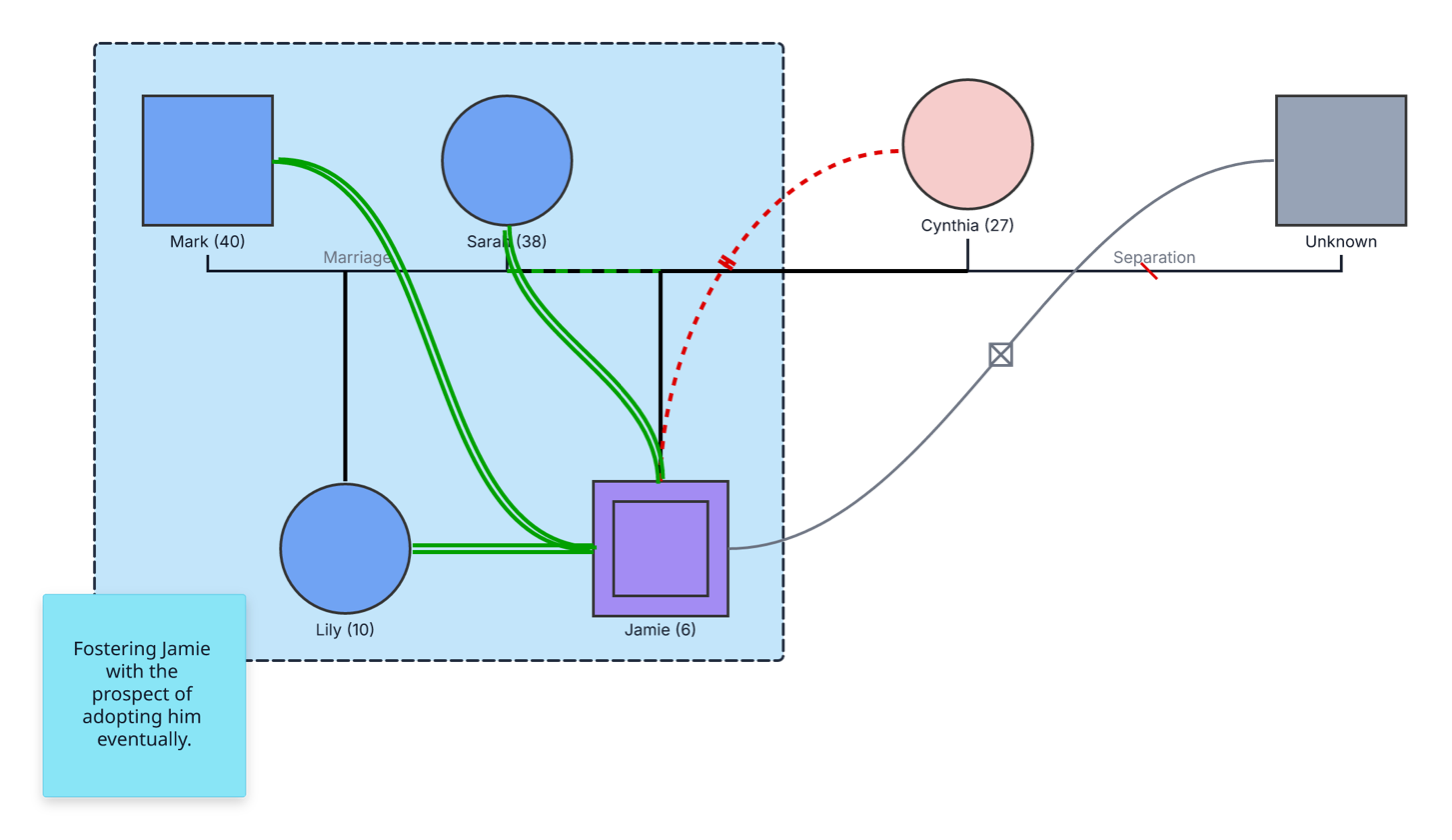
This foster-to-adopt system genogram brings a child’s current household, birth-family connections, supportive relationships, and permanency goal into one clear visual for collaborative planning.
The example centers on six-year-old Jamie, whose double-bordered square identifies him as the index child. Jamie appears within a household frame with foster caregivers Mark and Sarah and their ten-year-old daughter, Lily. A note states that the family is fostering Jamie with the prospect of adopting him in the future.
Jamie’s connections to Cynthia and an unidentified parent remain visible outside the household frame. Cynthia and the unidentified parent are shown as separated. Green relationship lines highlight supportive bonds between Jamie and Mark, Sarah, and Lily, keeping the child’s current sources of connection easy to see.
This foster-to-adopt system genogram can help child-welfare professionals, caregivers, and multidisciplinary teams organize a child’s placement and important relationships in one clear view.
Document placement, birth-family connections, contact arrangements, services, and permanency planning.
Map the current household, supportive bonds, practical roles, and the child’s wider family system.
Keep meaningful relationships visible during child-centered counseling and life-story work.
Review verified placement, guardianship, legal-status, and service information with authorized participants.
Standard person and partner symbols establish the family system, while the household frame, index marker, relationship lines, and planning note add placement context.
Male family member
Female family member
Identifies Jamie as the index child or primary subject of the map
Connects married partners
Records Cynthia and the unidentified parent as separated
Distinguishes a current foster placement from biological, adoptive, and step relationships
Groups Mark, Sarah, Lily, and Jamie within the current foster household
Highlights a close or supportive relationship identified in the example
Records the family’s prospective adoption goal without presenting it as finalized
Use this example when child-welfare professionals, foster families, adoption teams, counselors, or multidisciplinary partners need a shared, child-centered view of placement and family connections.
Add the child as the index person and record age, current placement, and other essential information. Use language that reflects the child’s current legal and placement status.
Add foster caregivers, children, relatives, and other people living in the home. Use a household frame and the correct biological, foster, adoptive, or step relationship type for every connection.
Add birth parents, siblings, extended family, previous caregivers, schools, faith communities, and other meaningful people or groups when relevant. Record contact and relationship information according to the child’s case circumstances and authorized plan.
Add placement dates, visitation or family-time arrangements, services, support networks, court or agency milestones, and the current permanency goal. Review updates with authorized participants and revise the genogram as decisions and relationships evolve.
Creately Clinical supports child-centered system mapping with distinct parent–child relationships, social-work and legal fields, collaborative review, and report-ready outputs. The same genogram can support placement, services, and legal-status reviews without separating the child’s important relationships from the case context.
Record it as the current goal or plan in a dated note, as the example does. Change the parent–child relationship to adoptive only after the adoption has been legally finalized and confirmed in the case record.
They provide important family-history and relationship context for the child. Where appropriate to the child’s circumstances and plan, the map can also support discussion of relationships with parents, siblings, extended family, community, culture, faith, and other meaningful connections.
Yes. Add an unknown-person symbol and record only the information currently available. Update the profile when authorized, verified details become known.
Creately distinguishes biological, foster, adoptive, and step parent–child relationships. Social Work fields can capture living arrangements, support networks, services, and case notes, while Legal fields can record guardianship and legal status. Risk & Services and Legal & Estate viewpoints help authorized users focus the same map for different reviews.
Edit the genogram, place the child at the center, and map the current household alongside the birth-family and other important connections. Add verified placement details, supportive relationships, and the current permanency goal, then use the map to support coordinated, child-centered review.