Dual-Household Co-Parenting Map Structure
Shows the main family members and relationships in this example.
Shows the main family members and relationships in this example.
Connects couples, parents, children, and siblings in a readable layout.
Places relatives across generations so patterns are easier to see.
Leaves room for names, roles, dates, and family notes.
Supports markers for marriage, separation, loss, conflict, or support.
Keeps the visual focused on the family story shown in the hero image.
Helps teams discuss the same structure before adding deeper notes.
Can be extended as new relatives or relationship details are added.
Visualize children, parents, household membership, and supportive relationships across two homes using this map on Creately Clinical.
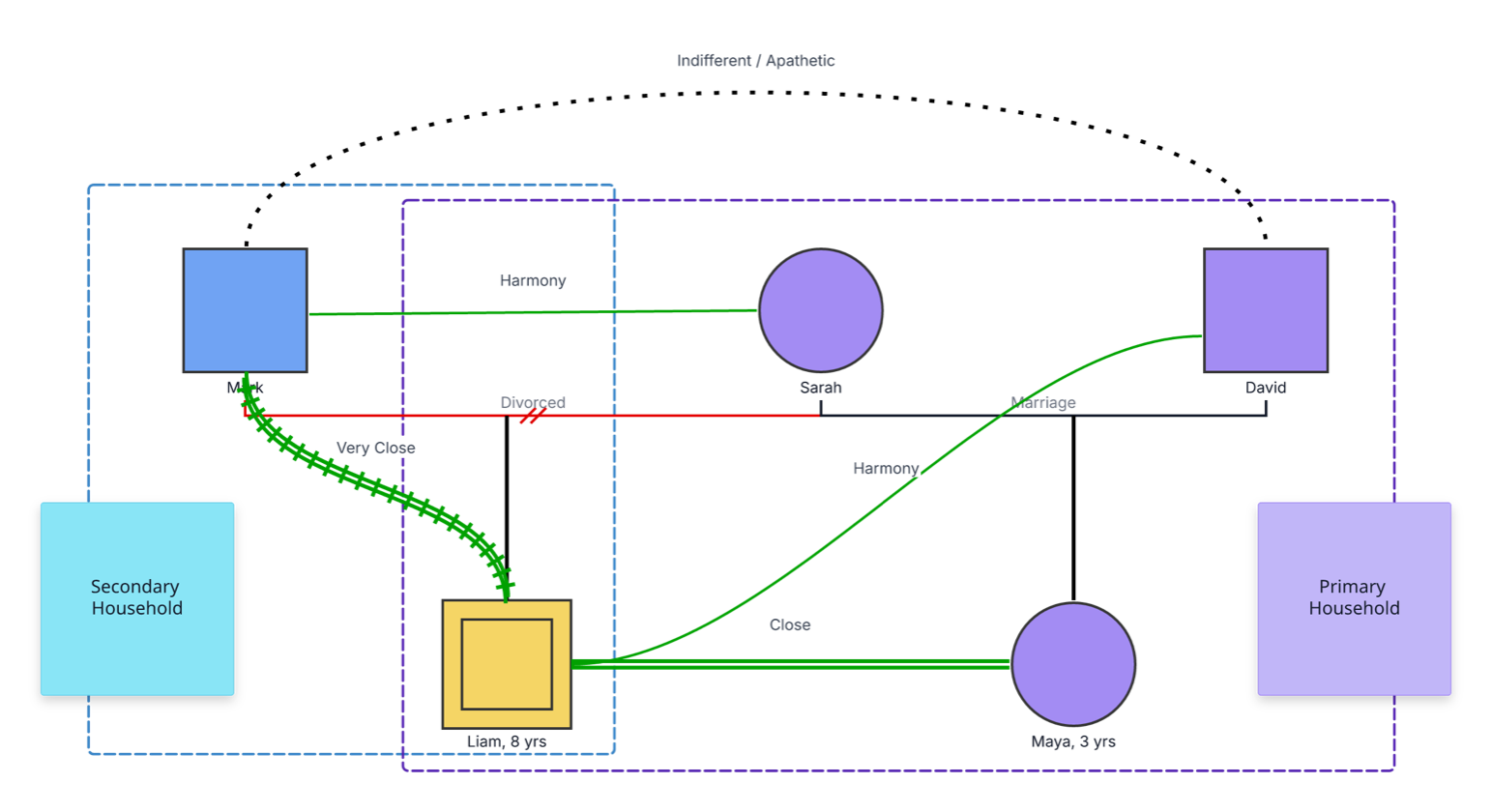
This dual-household co-parenting map brings parents, children, current partnerships, household membership, and supportive relationships into one visual, making shared family arrangements easier to understand and discuss.
The example maps five people across two household frames. Mark is associated with the secondary household. Sarah, David, and three-year-old Maya are shown within the primary household, while eight-year-old Liam sits in the overlapping area between both frames. Liam’s double-bordered symbol identifies him as the primary subject of the map.
The structure also preserves Mark and Sarah’s divorce and Sarah and David’s marriage. Green relationship lines highlight harmony between Mark and Sarah, a very close bond between Mark and Liam, harmony between Liam and David, and closeness between Liam and Maya. An “Indifferent / Apathetic” label is available as an additional relationship type that users can place where it accurately reflects the family’s description.
This dual-household co-parenting map can help families and professionals organize relationships, living arrangements, and support across two homes in one clear view.
Clarify household participation, routines, handovers, and the relationships supporting each child.
Explore transitions, stepparent and sibling bonds, and child-centered family dynamics.
Create a shared visual for practical co-parenting conversations and coordinated planning.
Document household context and support networks for collaborative case review.
Partner lines establish the family structure, while overlapping household frames and emotional relationship lines show how people connect across homes.
Male family member
Female family member
Identifies Liam as the index person or primary subject of the map
Connects currently married partners
Records a dissolved marriage while preserving the co-parenting connection
Groups people associated with the primary or secondary household
Show that a person belongs to or spends meaningful time in both household contexts
Represents a cooperative or harmonious relationship
Highlights the strength of a supportive emotional bond
Use this example when parents, families, counselors, mediators, or support professionals want a child-centered view of relationships across two homes.
Map previous and current partner relationships, then connect each child to the relevant parents. Add ages when they help clarify developmental needs or routines.
Add a labeled frame for each home and place the people associated with it inside. Position a child in the overlap when both homes are an active part of their routine, as the example does for Liam.
Add harmony, close, very close, or other relationship types based on how family members describe their connections. Include stepparent and sibling relationships that contribute to the child’s support system.
Use notes for schedules, handovers, school contacts, healthcare responsibilities, activities, and communication preferences. Review the map together and update it as household arrangements evolve.
Creately Clinical supports co-parenting maps with structured family relationships, therapy and social-work fields, collaborative editing, and report-ready outputs. Household frames, relationship types, and notes make it possible to keep family structure and practical arrangements in the same working view.
Create a frame for each household and place the child in the overlapping area, as shown with Liam. You can also add notes about schedules or routines when more detail is useful.
Yes. Add current partners and connect children to the appropriate parental unions. Creately supports biological, adoptive, foster, step, half-sibling, and step-sibling relationships.
Use them to record relationships as family members currently describe them. The example highlights harmony, closeness, and a very close bond; you can select other relationship types when they better match the family’s experience.
Creately provides distinct relationship types for marriage, divorce, parent–child connections, and emotional dynamics. Household frames and notes organize living arrangements and routines, while collaborative editing allows authorized family members or professionals to review updates together.
Edit the genogram, add the people connected to each home, and position children according to their household participation. Highlight the relationships that support them, add the routines that matter, and use the completed map to guide clear, child-centered co-parenting conversations.