Cullen Family Structure
Shows the main family members and relationships in this example.
Shows the main family members and relationships in this example.
Connects couples, parents, children, and siblings in a readable layout.
Places relatives across generations so patterns are easier to see.
Leaves room for names, roles, dates, and family notes.
Supports markers for marriage, separation, loss, conflict, or support.
Keeps the visual focused on the family story shown in the hero image.
Helps teams discuss the same structure before adding deeper notes.
Can be extended as new relatives or relationship details are added.
Explore the Cullen family structure and relationship bonds with an editable fictional-family genogram for learning and creative projects.
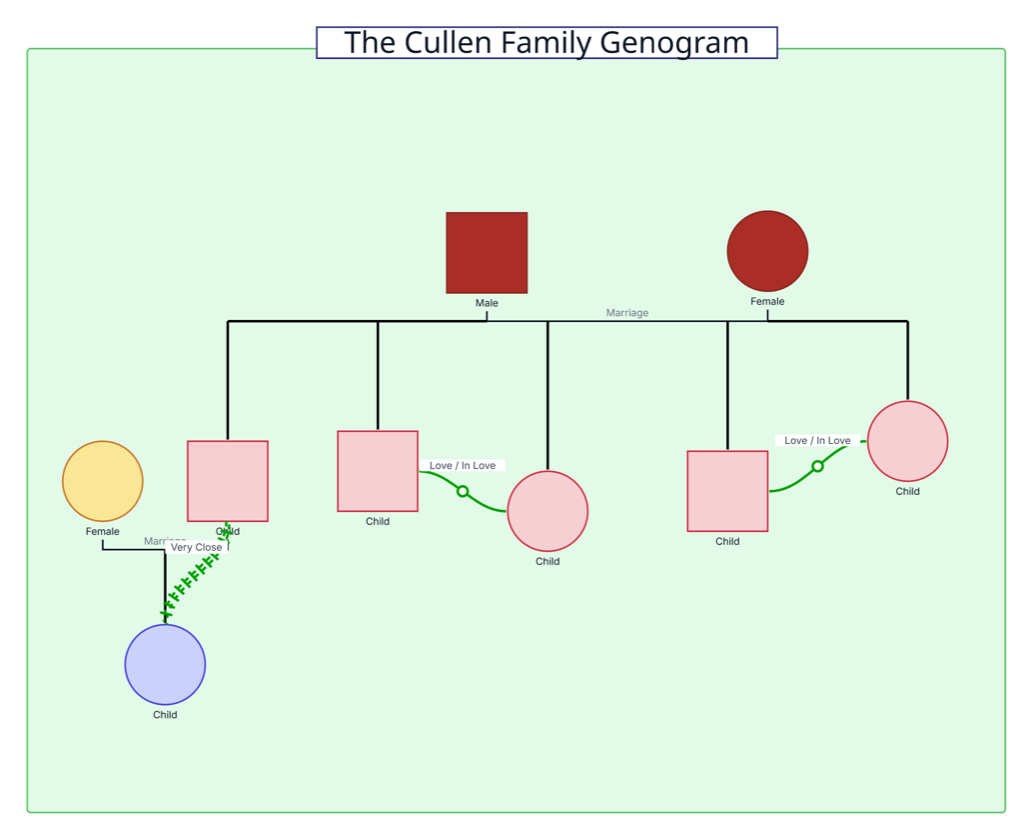
This Cullen family genogram turns a recognizable fictional family system into an approachable visual example, helping fans, students, and writers explore family structure and positive relationship bonds.
The example maps nine people across three generations. A parent couple appears at the top, connected to five children in the next generation. One of those children is shown with a partner and child, extending that branch into a third generation.
Three green emotional-relationship lines add depth to the structure. Two sibling connections are marked “Love / In Love,” while a “Very Close” bond links one second-generation family member with the third-generation child. The editable layout can be personalized with character names, additional relatives, relationship types, roles, and story notes.
This Cullen family genogram example helps learners, fans, and creative teams organize fictional family structure and important character bonds in one clear view.
Practice generational placement, family connectors, and emotional-relationship notation
Introduce genogram concepts without using private family information
Organize characters, family roles, close bonds, and story context during development
Build a visual reference for a selected Cullen family interpretation or continuity
Standard genogram symbols establish the family structure, while green relationship lines bring important character bonds into focus.
Male family member
Female family member
Connects married partners
Connects children to the relevant parental union
Organizes children who share the same parental connection
Highlights a loving emotional relationship between two people
Shows an especially close emotional bond
Add character names, roles, events, or story context to the family map
Use this example when you want an engaging fictional example for understanding genogram structure or exploring how relationships shape a character network.
Replace the generic labels with the relevant character names. Add titles, roles, or short descriptions when they help readers recognize each person.
Review the parent couple, five children, partner, and grandchild shown in the example. Adjust the people and connections to match the version of the family or story you want to explore.
Use Creately’s relationship types to represent close bonds and other important character dynamics. Add a short label when it helps explain the nature of a connection.
Add significant events, locations, affiliations, or notes, then invite collaborators to review the diagram. Use the completed genogram as a visual reference for discussion, teaching, or writing.
Creately Clinical supports fictional-family mapping with standard person notation, distinct family and emotional relationship types, collaborative editing, AI-assisted drafting, and flexible exports.
For this example, the Base field pack and standard genogram view provide the best fit. Notes and person fields can store character names, roles, events, locations, and story context, while relationship subtypes keep family structure separate from highlighted emotional bonds.
No. The labels are placeholders that make the structure reusable. Replace them with character names and add roles or notes that suit your Cullen family project.
Yes. Extend any branch with additional relatives, partners, or significant people. Creately can reorganize the layout as the character network grows.
They highlight emotional relationships. In this example, two connections are labeled “Love / In Love,” and another is labeled “Very Close.” You can keep these or choose other relationship types that better match your interpretation.
Creately provides standard person symbols, structured family connectors, and a broad relationship library. You can add notes, collaborate in real time, use AI-assisted drafting from a written family description, and export the finished character map for teaching or creative work.
Edit the genogram, add the Cullen character names and relationships you want to explore, and expand the map with story details that matter to your project. Use colors, notes, and relationship lines to create a clear visual reference for learning, discussion, or writing.