Blended Family Structure
Shows the main family members and relationships in this example.
Shows the main family members and relationships in this example.
Connects couples, parents, children, and siblings in a readable layout.
Places relatives across generations so patterns are easier to see.
Leaves room for names, roles, dates, and family notes.
Supports markers for marriage, separation, loss, conflict, or support.
Keeps the visual focused on the family story shown in the hero image.
Helps teams discuss the same structure before adding deeper notes.
Can be extended as new relatives or relationship details are added.
Map former and current partners, children, household arrangements, and shared financial responsibilities in one editable genogram.
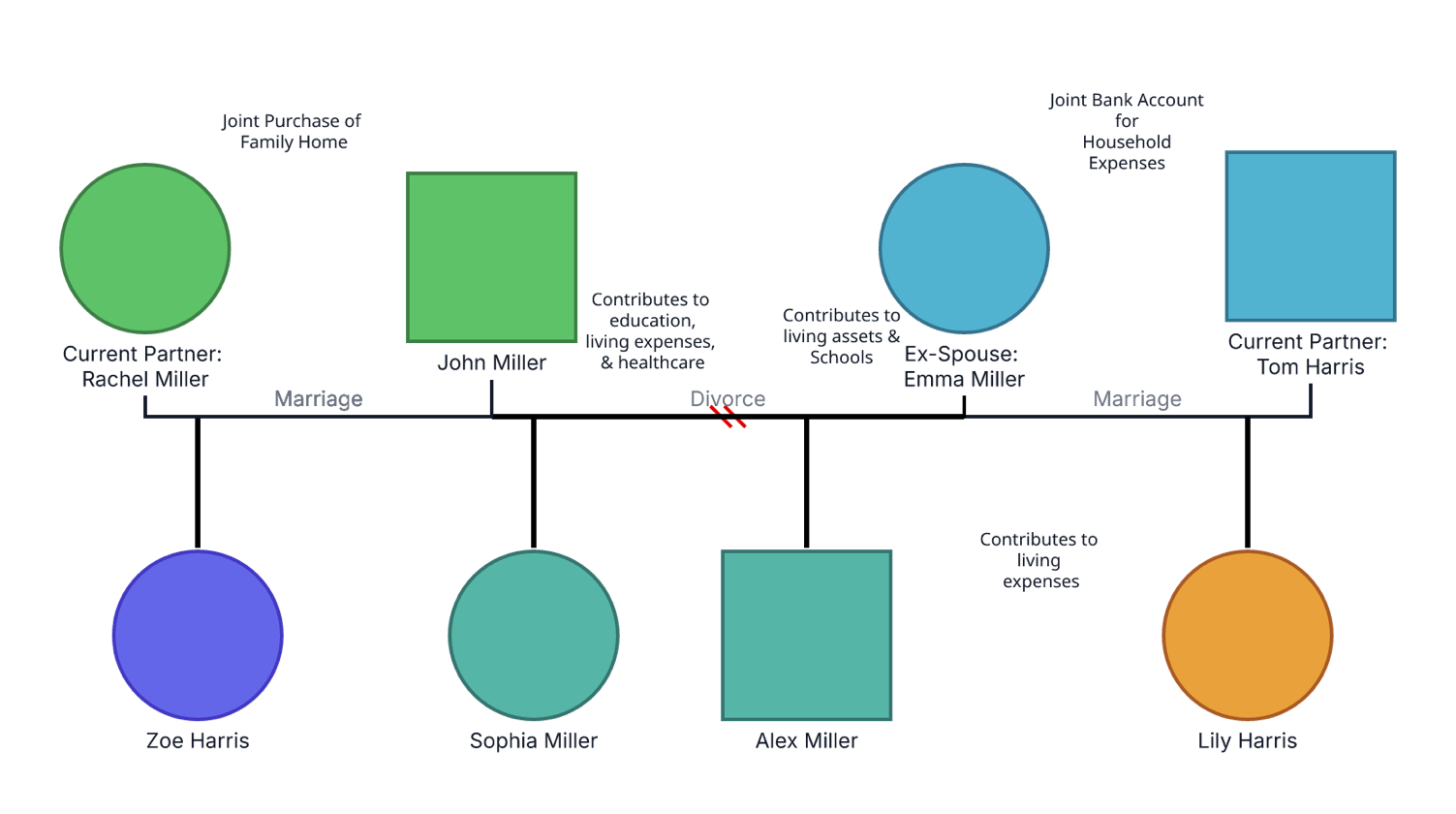
This blended family genogram places a former marriage between two current partnerships and adds practical notes about how the households share financial responsibilities.
The example centers on John Miller and Emma Miller, who are shown as divorced. John is now connected to Rachel Miller, and Emma is connected to Tom Harris. Four children—Zoe Harris, Sophia Miller, Alex Miller, and Lily Harris—are positioned beneath the adult relationships.
The notes emphasize household arrangements rather than emotional dynamics. They reference a jointly purchased family home, contributions to education, living expenses and healthcare, school-related costs, and a joint account for household expenses. The editable structure provides room to identify biological, adoptive, foster, step, and half-sibling relationships and to add a written legend for any custom colors.
This blended family genogram example helps professionals and families organize former and current unions, children, households, and shared responsibilities in one clear view.
Explore remarriage, stepfamily adjustment, co-parenting, and changing household roles
Document family members, residence, caregiving, support, and household arrangements
Add family context to discussions about custody, support, assets, or obligations
Create a shared visual of partners, children, step relationships, and practical responsibilities
The family lines should communicate legal and biological structure independently of names, surnames, placement, or color. Custom financial notes add context but are not standard genogram symbols.
Male family member
Female family member
Current legal marriage
Dissolved marriage, shown with slash marks
Connects a child to the relevant parental union
Identifies a current partner's existing child using the appropriate relationship subtype
Records a housing, education, healthcare, asset, account, or expense arrangement
Has no clear meaning in the supplied image unless a written legend is added
Use this example when a practitioner or family needs to clarify how former and current partnerships, children, households, and practical responsibilities fit together.
Add the former partners first and mark the relationship as divorced. Then add each person's current spouse or partner using the relationship type that accurately reflects the union.
Add each child beneath their biological, adoptive, or foster parents. Use explicit step-child and half-sibling relationships where appropriate so the family structure does not depend on surnames or proximity.
Add confirmed arrangements such as housing ownership, joint accounts, education costs, healthcare contributions, child support, or day-to-day expenses. Replace unclear wording such as “living assets & schools” with a precise description of the actual responsibility.
Confirm the structure and notes with the relevant people. Record dates or sources where useful, limit sensitive financial detail to what the purpose requires, and update the genogram when partnerships, custody, residence, or support arrangements change.
Creately Clinical supports blended-family workflows with distinct family relationship notation, structured social-work and legal fields, collaborative editing, and case-ready reporting.
For this example, the Base, Social Work, and Legal & Estate field packs are especially relevant. Creately provides distinct notation for marriage, divorce, biological children, adoptive children, foster children, stepchildren, and half-siblings, helping the family structure remain clear as practical details are added.
It distinguishes former and current unions and shows how children connect to different parental relationships. It may also document step relationships, half-siblings, custody, residence, caregiving, or financial responsibilities.
Connect each child to the relevant biological, adoptive, or foster parent or parental union. Add explicit stepchild and half-sibling relationship types where appropriate so the structure remains clear without relying on names or placement.
It can when household resources or responsibilities are relevant to the purpose of the genogram. Include only necessary information, use neutral factual wording, confirm it with appropriate sources, and apply suitable access controls.
Creately supports marriage, divorce, biological child, adoptive child, foster child, step-child, and half-sibling relationship types with distinct visual notation. Social Work and Legal & Estate fields can add relevant household, income, support, legal-status, and asset information.
Edit the genogram, confirm the former and current unions, and connect each child to the correct parents. Then replace the example financial notes with verified household responsibilities and add a legend for any custom colors.