Group Counseling Case View
Frames the family structure around the main counseling or therapy focus.
Frames the family structure around the main counseling or therapy focus.
Shows partners, parents, children, and siblings involved in the case.
Leaves room to note conflict, closeness, distance, or support.
Keeps discussion points visible for assessment and follow-up.
Connects current concerns with relevant family history.
Clarifies caregiving, custody, parenting, or support responsibilities.
Supports shared review before deeper clinical notes are added.
Can be extended as the conversation reveals more family context.
Map participant family units, relationship histories, and cross-group dynamics using this group counseling genogram on Creately Clinical.
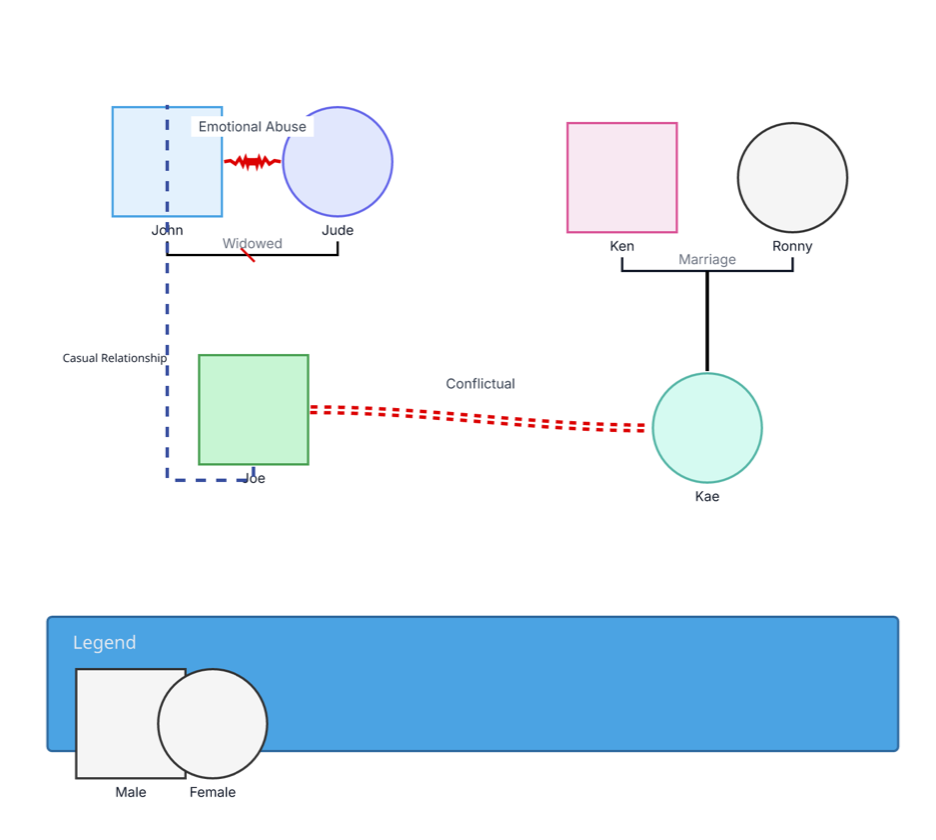
This group counseling genogram brings relevant family context and selected participant relationships into one structured view, helping facilitators prepare focused discussions and build a shared understanding of the systems surrounding the group.
The example maps six people across two family units. John and Jude are connected by a partner line labeled “Widowed.” Ken and Ronny are shown as married and connected to their child, Kae. Joe appears as an additional participant outside those two family structures.
The diagram also records three selected relationship dynamics: emotional abuse between John and Jude, a casual relationship between John and Joe, and a conflictual relationship between Joe and Kae. This combination shows how a facilitator can preserve relevant family context while adding only the participant-to-participant connections that support the group’s purpose.
The “Widowed” label should be confirmed when the example is customized. If one partner is deceased, add the standard deceased marker to that person; otherwise, select the relationship status that matches the confirmed history.
This group counseling genogram can help facilitators and professional teams organize relevant family context and selected participant relationships in one clear view.
Prepare focused discussions while keeping relevant family systems and participant connections visible.
Review group context, information sources, boundaries, and facilitation considerations together.
Share a controlled visual for coordinated case discussion where appropriate.
Practice group-focused structural and emotional notation with de-identified examples.
Use the same meaning for each line throughout the diagram, and record whether sensitive information was reported, observed, or otherwise verified.
Male person
Female person
Marriage or partner relationship
Parent–child relationship
Casual relationship between John and Joe
Conflictual relationship between Joe and Kae
Emotional abuse between John and Jude, as labeled in the example
Partner status that should be paired with a confirmed deceased-person marker
Use this example when a counseling group benefits from seeing how relevant family context and selected participant relationships connect to the topic being explored.
Decide what the group needs to understand, obtain the appropriate consent, and include only information that supports that purpose.
Add each participant and the partner, caregiver, or parent–child relationships needed to explain their family context.
Connect participants where the relationship is relevant to the group. Label closeness, conflict, abuse, or other dynamics clearly, and distinguish reported information from facilitator observations.
Confirm names, statuses, line meanings, and privacy choices. Use role-based permissions or a de-identified copy when the diagram is shared for supervision, teaching, or group discussion.
Creately Clinical supports group counseling preparation with therapy-focused fields, relationship views, controlled collaboration, and report-ready outputs.
A family genogram usually centers on one family system. This example can place multiple relevant family units and selected relationships between participants on one canvas, making it useful for group preparation and facilitated discussion.
Share only the information participants have agreed can be viewed in that setting and that aligns with the organization’s privacy practices. Creately Clinical’s role-based permissions can limit the diagram to appropriate viewers or editors, while a de-identified copy can support teaching or supervision when suitable.
Use a clearly defined line and neutral label, and note whether the information was reported, observed, or confirmed through another source. Follow the safeguarding, documentation, and escalation procedures that apply to the professional setting.
The Family Therapy field pack supports emotional bonds, attachment style, communication style, coping strategies, family roles, trauma history, mental health treatment, and treatment goals. The Relationship Dynamics viewpoint, threaded comments, real-time collaboration, role-based permissions, and PDF or DOCX reports support controlled professional review.
Edit the genogram to map the relevant family units, add the relationships that support the group’s purpose, and prepare a clear visual for facilitation or professional review.