Social Services Community Network
Shows the people, groups, and organizations connected to the case.
Shows the people, groups, and organizations connected to the case.
Clarifies who provides support, services, influence, or coordination.
Keeps family members visible within the wider community system.
Maps how help, referrals, and relationships move through the network.
Identifies schools, healthcare, faith, nonprofit, or social-service links.
Leaves room to mark strong, weak, or strained connections.
Helps teams discuss the same community picture during planning.
Can be updated as services, roles, or contacts change.
Map family members, community professionals, social-service groups, participation, and support pathways using this community genogram on Creately Clinical.
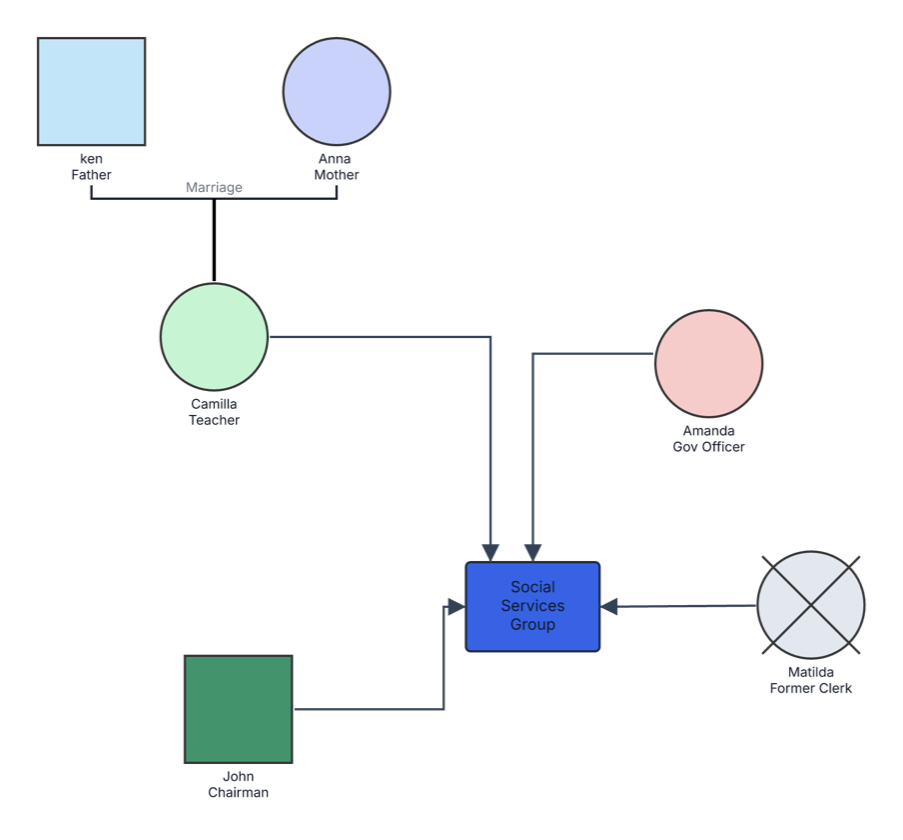
This social services community genogram places a Social Services Group at the center of a small support network, making professional roles, community participation, and family context easy to see together.
The example contains six people and one service group. Ken and Anna are shown as a married couple. Camilla is identified as a teacher, Amanda as a government officer, Matilda as a former clerk, and John as a chairman. Matilda is also marked deceased.
Directional lines connect Camilla, Amanda, Matilda, and John with the central Social Services Group. This hub-based structure gives users a practical starting point for adding clients, caregivers, case workers, agencies, schools, healthcare providers, nonprofits, public services, and other community resources.
This social services community genogram can help social-work and community teams organize people, services, and support connections in one clear view.
Map family context, providers, referrals, responsibilities, and service status.
Coordinate agencies, schools, healthcare, housing, legal support, and informal resources.
Clarify roles, participation, communication routes, and follow-up.
Review formal and informal support around the household or community project.
Person symbols represent individuals, the central rectangle represents the service group, and directional connectors show participation or support relationships.
Male family or community member
Female family or community member
Deceased person
Marriage or partner relationship
Professional, public-service, or community responsibility
Social-service team, agency, group, or community program
Participation, service, communication, referral, or support connection
Visual identifier that can be customized for roles, groups, or categories
Use this example when family context and community-service relationships need to be viewed together.
Enter the individual or family receiving support, household members, caregivers, relatives, and other people relevant to the case or community project.
Include social-service teams, schools, healthcare providers, government agencies, nonprofits, housing services, legal support, and community groups.
Record the role, service, referral, participation, funding, communication, or care responsibility represented by each connector.
Include the contact person, relationship owner, eligibility, consent, service status, start date, review date, priority, and next action for each connection.
Creately Clinical supports social-service mapping with structured case fields, service-focused views, labeled connectors, collaboration, and report-ready outputs.
You can add family support, child and adult services, housing, benefits, healthcare, education, legal aid, safeguarding, employment, food support, transport, and other local resources.
Yes. Add relatives, neighbors, friends, volunteers, faith communities, and local groups alongside agencies and professionals, then use labels or colors to distinguish each type of support.
Yes. Add the referral source, receiving service, purpose, consent, date, status, responsible person, review point, and outcome in the relevant nodes or connector notes.
Custom fields, notes, connectors, and visual categories can keep roles, referrals, and resources organized. Shared editing, comments, version history, and exports support collaborative review and coordinated updates.
Edit the genogram to add your family, professionals, service groups, and community resources, then create a practical shared view for support planning and coordination.