School & Community Intervention Network
Shows the people, groups, and organizations connected to the case.
Shows the people, groups, and organizations connected to the case.
Clarifies who provides support, services, influence, or coordination.
Keeps family members visible within the wider community system.
Maps how help, referrals, and relationships move through the network.
Identifies schools, healthcare, faith, nonprofit, or social-service links.
Leaves room to mark strong, weak, or strained connections.
Helps teams discuss the same community picture during planning.
Can be updated as services, roles, or contacts change.
Map a student’s family, school staff, community programs, support pathways, and referrals using this intervention genogram on Creately Clinical.
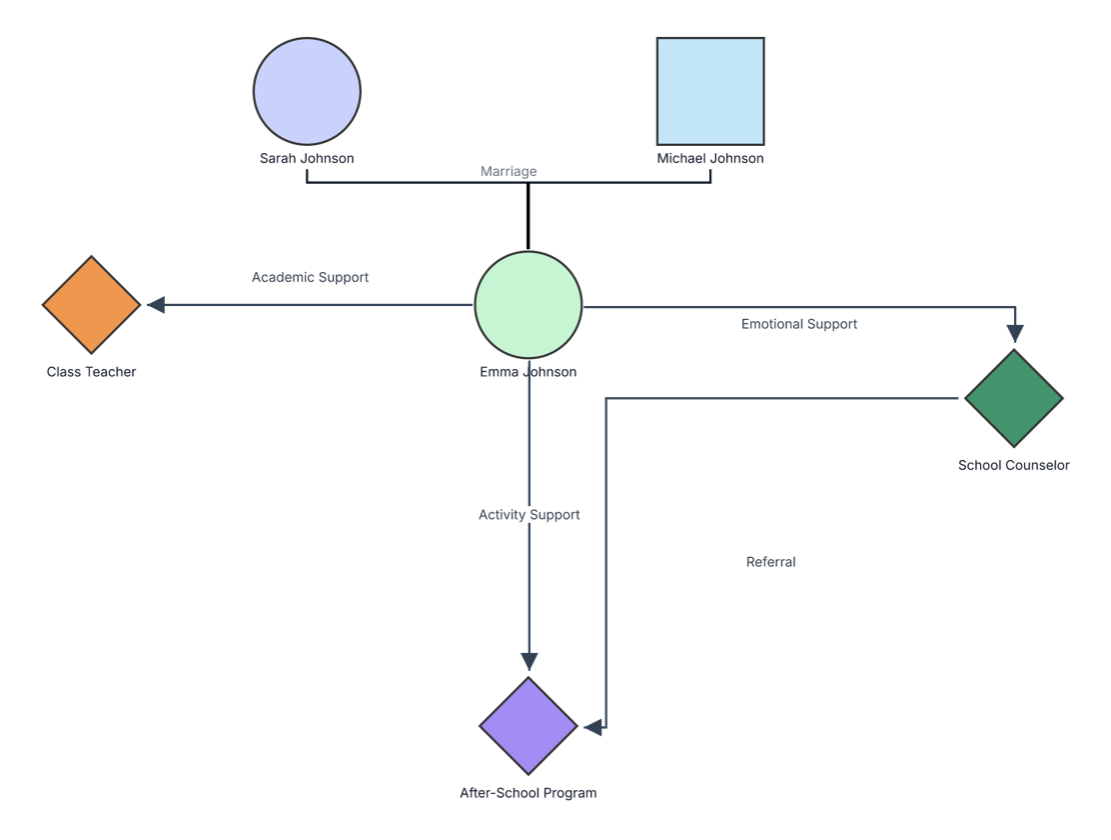
This school and community intervention genogram places the student at the center of a coordinated support network, connecting family context with academic, emotional, activity, and referral pathways.
The example contains three family members and three support resources. Sarah and Michael Johnson are shown as a married couple, with Emma Johnson as the student at the center of the intervention network. The external supports are a class teacher, school counselor, and after-school program.
Four labeled connectors show how the intervention can work in practice. Emma connects with her class teacher through Academic Support, with the school counselor through Emotional Support, and with the after-school program through Activity Support. A Referral pathway links the counselor and after-school program, helping users see how services can coordinate around the student.
This school and community intervention genogram can help education and care teams coordinate family, school, and community support around one student.
Connect academic needs with responsible staff, goals, and classroom support.
Coordinate emotional, health, attendance, safeguarding, and family-support pathways.
Clarify referrals, activities, responsibilities, consent, and intended outcomes.
Review one shared intervention map and track coordinated next actions.
Family symbols establish the student’s immediate context, while diamond-shaped resource nodes and directional connectors show the intervention network.
Male family member
Female family member or student
Marriage or partner relationship
School professional, service, or community program
Support, communication, participation, or referral pathway
Learning, classroom, or attainment-focused help
Counseling, wellbeing, or social-emotional help
Structured participation through a program or activity
Connection from one professional or service to another
Use this example when a student’s support plan involves family, school staff, and community resources.
Enter the student, caregivers, household members, and family relationships relevant to the intervention or support plan.
Include teachers, counselors, nurses, specialists, clubs, after-school programs, healthcare providers, nonprofits, and other useful services.
Record the type of support or referral, its purpose, responsible person, frequency, start date, consent status, and intended outcome.
Add goals, progress notes, review dates, communication arrangements, barriers, strengths, and the next action assigned to each participant.
Creately Clinical supports intervention planning with social-work and family fields, service-focused views, labeled pathways, collaboration, and report-ready outputs.
You can add tutoring, classroom adjustments, counseling, mentoring, attendance support, healthcare, transport, food support, clubs, after-school activities, family services, and other relevant interventions.
Yes. Use a directional connector between the referring person or service and the receiving resource, then add the referral date, purpose, consent status, owner, and outcome in its notes.
Yes. Add each agency or program as a separate node and use colors, labels, or grouped areas to keep school, healthcare, social services, nonprofit, and community roles clear.
Custom fields, notes, connectors, and visual categories can keep goals, responsibilities, referrals, and progress organized. Shared editing, comments, version history, and exports support collaborative review and coordinated updates.
Edit the genogram to add your student, family, school team, and community services, then build a coordinated visual plan for support, referral, and follow-up.