Healthcare Community Network
Shows the people, groups, and organizations connected to the case.
Shows the people, groups, and organizations connected to the case.
Clarifies who provides support, services, influence, or coordination.
Keeps family members visible within the wider community system.
Maps how help, referrals, and relationships move through the network.
Identifies schools, healthcare, faith, nonprofit, or social-service links.
Leaves room to mark strong, weak, or strained connections.
Helps teams discuss the same community picture during planning.
Can be updated as services, roles, or contacts change.
Map family relationships, healthcare professionals, patients, and a shared care organization using this healthcare community genogram on Creately Clinical.
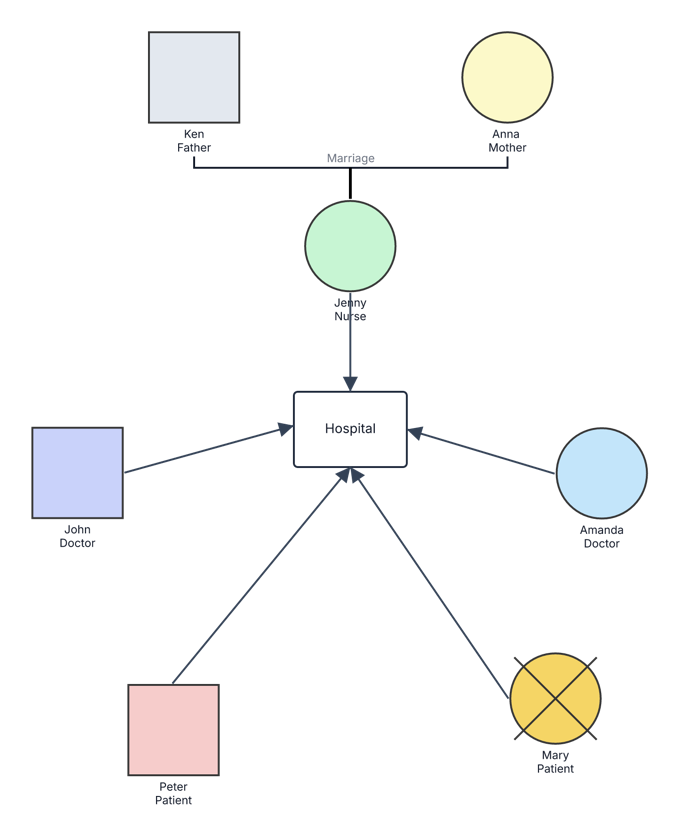
This healthcare community genogram combines a small family structure with professional and patient connections to a central hospital, giving care coordinators and multidisciplinary teams a clear view of the people and organization involved.
The example begins with Ken and Anna, a married couple connected to their daughter Jenny, who is identified as a nurse. Jenny is then linked to the hospital. John and Amanda are identified as doctors, while Peter and Mary are identified as patients; each also has a directional connection to the same hospital.
Mary’s circle contains an X, indicating that she is deceased. Keeping her connection visible can help teams preserve relevant historical care context while clearly distinguishing current and past participants. The example can be expanded with service types, referral details, care-team responsibilities, community resources, and verified health information.
This healthcare community genogram can help care teams and community-health professionals organize family context and service connections in one clear view.
Map patients, family members, clinicians, organizations, referrals, and care responsibilities.
Create a shared visual for consultation, discharge planning, and service handoffs.
Connect households with providers, programs, and community resources.
Demonstrate how a family genogram can extend into a wider healthcare-system map.
Use consistent labels for people, organizations, and connection types so viewers can distinguish family structure from healthcare-community relationships.
Male person
Female person
Deceased person
Marriage between Ken and Anna
Parent–child connection from Ken and Anna to Jenny
Hospital or healthcare organization
Connection to the healthcare organization; the exact service, employment, or care relationship can be labeled in the editable version
Identifies a person as a nurse, doctor, or patient in this example
Use this example when a care or community-health discussion needs family context and organizational connections in the same visual.
Add the individual or household at the center of the assessment, then connect relevant partners, parents, children, or caregivers.
Include the clinicians, patients, organizations, agencies, or community resources that support the purpose of the map. Label each person’s role clearly.
Add arrows or relationship lines and label them as employment, treatment, referral, consultation, caregiving, or another verified connection. Include dates or status where useful.
Confirm the information with authorized participants, identify the next coordination steps, and use appropriate permissions when sharing sensitive family or health information.
Creately Clinical supports healthcare-community mapping with medical and social-work fields, service-focused views, collaborative review, and report-ready outputs.
A standard family genogram concentrates on relatives and their relationships. This example keeps that family context while adding clinicians, patients, and a healthcare organization, making the wider care community visible in the same view.
They indicate that each person has a connection to the hospital. Customize each arrow with a specific label—such as works at, receives care from, refers to, or coordinates with—so viewers understand the relationship without relying on assumptions.
Yes. Add each organization as a separate node, then use labeled connections to show referrals, treatment, employment, communication, or support. Color or group related services consistently to keep the map easy to scan.
The Medical & Genetic and Social Work field packs can organize relevant health, insurance, support-network, service, and risk information. Health and Risk & Services viewpoints, comments, real-time collaboration, role-based permissions, and PDF or DOCX reports support coordinated professional review.
Edit the genogram to map the family, healthcare professionals, patients, and service organizations involved, then label each connection for a clear and actionable care-community view.