Family-Community Relationship Network
Shows the people, groups, and organizations connected to the case.
Shows the people, groups, and organizations connected to the case.
Clarifies who provides support, services, influence, or coordination.
Keeps family members visible within the wider community system.
Maps how help, referrals, and relationships move through the network.
Identifies schools, healthcare, faith, nonprofit, or social-service links.
Leaves room to mark strong, weak, or strained connections.
Helps teams discuss the same community picture during planning.
Can be updated as services, roles, or contacts change.
Map a family’s connections with healthcare, neighborhood, faith, and community resources using this genogram on Creately Clinical.
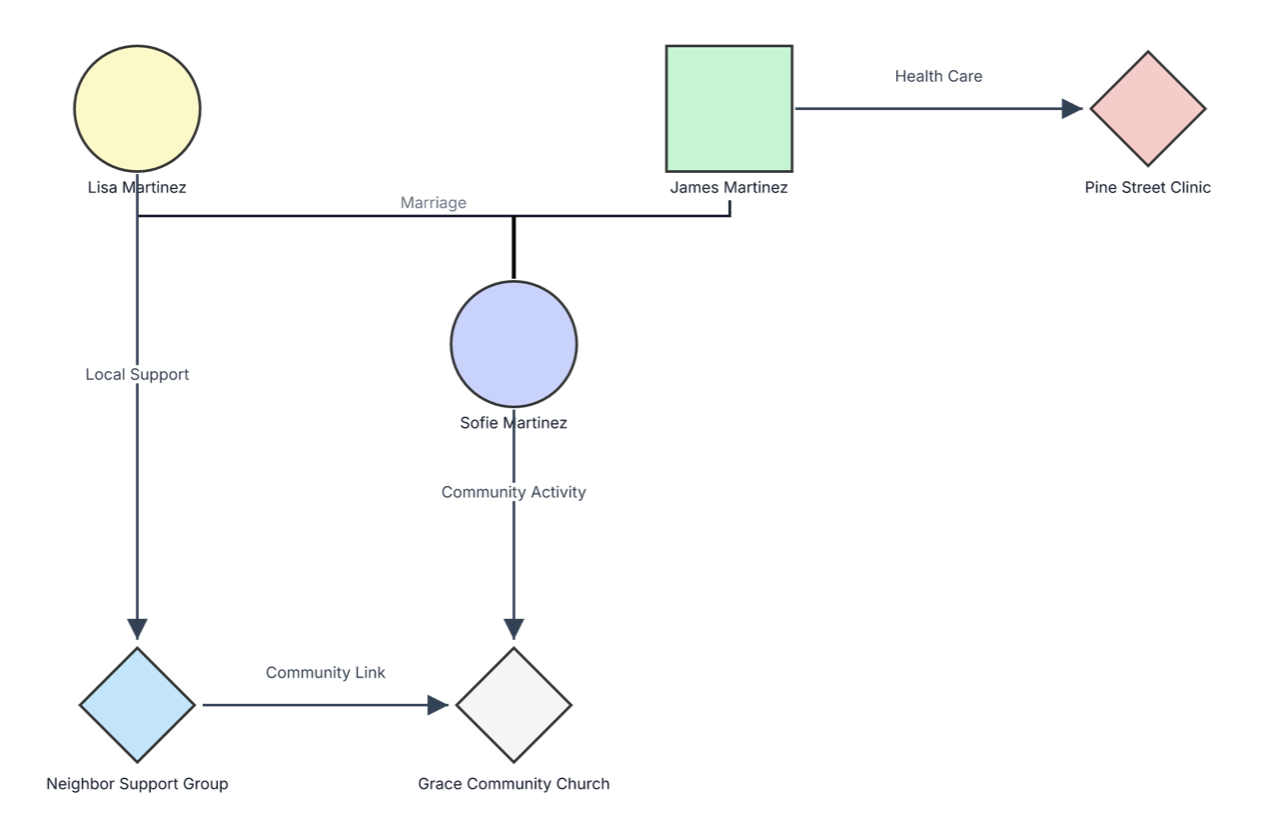
This family-community relationship genogram places relatives and community resources in one shared view, helping families and professionals recognize where healthcare, local support, social participation, and community partnerships are already available.
The example begins with Lisa and James Martinez and their daughter, Sofie. It then adds three external resources: Pine Street Clinic, Neighbor Support Group, and Grace Community Church.
Four labeled arrows clarify how the connections work. James is connected to Pine Street Clinic through healthcare, Lisa receives local support through the neighborhood group, and Sofie participates in a community activity at Grace Community Church. A community link between the neighborhood group and church shows that resources can also support one another.
This family-community relationship genogram can help professionals, community teams, and families organize formal and informal support connections in one clear view.
Document services, referrals, support networks, and resource coordination around a family.
Connect family members with clinics, public services, and other health or wellbeing resources.
Map participation, partnerships, and practical pathways of support.
Create a visual record of the organizations and groups they rely on and update it together.
Standard person symbols map the family, while diamonds and labeled arrows represent the external resources and connections used in this example.
Male family member
Female family member
Connects married partners
Connects Sofie with Lisa and James’s parental union
External community resource or institution in this example
Shows the direction of a support, service, participation, or referral connection
Describes the purpose of the connection, such as Health Care, Local Support, or Community Activity
Shows coordination or connection between two community organizations
Use this example when a family, social worker, case manager, counselor, community-health professional, or educator wants to see family and community supports together.
Add the people at the center of the assessment and connect their relevant family relationships. Include ages, roles, or household details when they support the purpose of the map.
Place clinics, schools, support groups, faith communities, nonprofits, public services, clubs, and other meaningful organizations around the family. Use one consistent resource shape and label each organization clearly.
Draw arrows between each person and the relevant organization. Add short labels such as healthcare, counseling, education, childcare, local support, community activity, or referral so the purpose of every link is easy to understand.
Add connections between organizations when they coordinate or refer people to one another. Use the completed view to recognize existing strengths, clarify roles, plan referrals, and support coordinated follow-up.
Creately Clinical supports family-community mapping with structured social-work fields, flexible connectors, collaborative review, and report-ready outputs. For this example, the Social Work field pack and Risk & Services view help teams connect family structure with support networks and services received.
Include any organization or group that is meaningful to the family, such as healthcare providers, schools, childcare services, support groups, faith communities, nonprofits, recreation programs, public agencies, or cultural organizations.
In this example, diamonds represent external community resources rather than people. Keep this convention consistent and include a legend if you introduce additional resource shapes.
Yes. The example links the Neighbor Support Group with Grace Community Church. Similar links can show referrals, shared programs, information exchange, or another form of collaboration.
Creately’s Social Work fields can record support networks and services received, while notes and labeled connectors add resource details. The Risk & Services viewpoint helps teams focus on services and support, and real-time collaboration enables authorized professionals to review the map together.
Edit the genogram, replace the example family and organizations with the people and resources relevant to your situation, and label how each connection helps. Use the completed map to recognize existing support, coordinate community partnerships, and identify practical next steps together.