Community Health Assessment Network
Shows the people, groups, and organizations connected to the case.
Shows the people, groups, and organizations connected to the case.
Clarifies who provides support, services, influence, or coordination.
Keeps family members visible within the wider community system.
Maps how help, referrals, and relationships move through the network.
Identifies schools, healthcare, faith, nonprofit, or social-service links.
Leaves room to mark strong, weak, or strained connections.
Helps teams discuss the same community picture during planning.
Can be updated as services, roles, or contacts change.
Connect a family with healthcare, school, and community services using an editable community health assessment genogram.
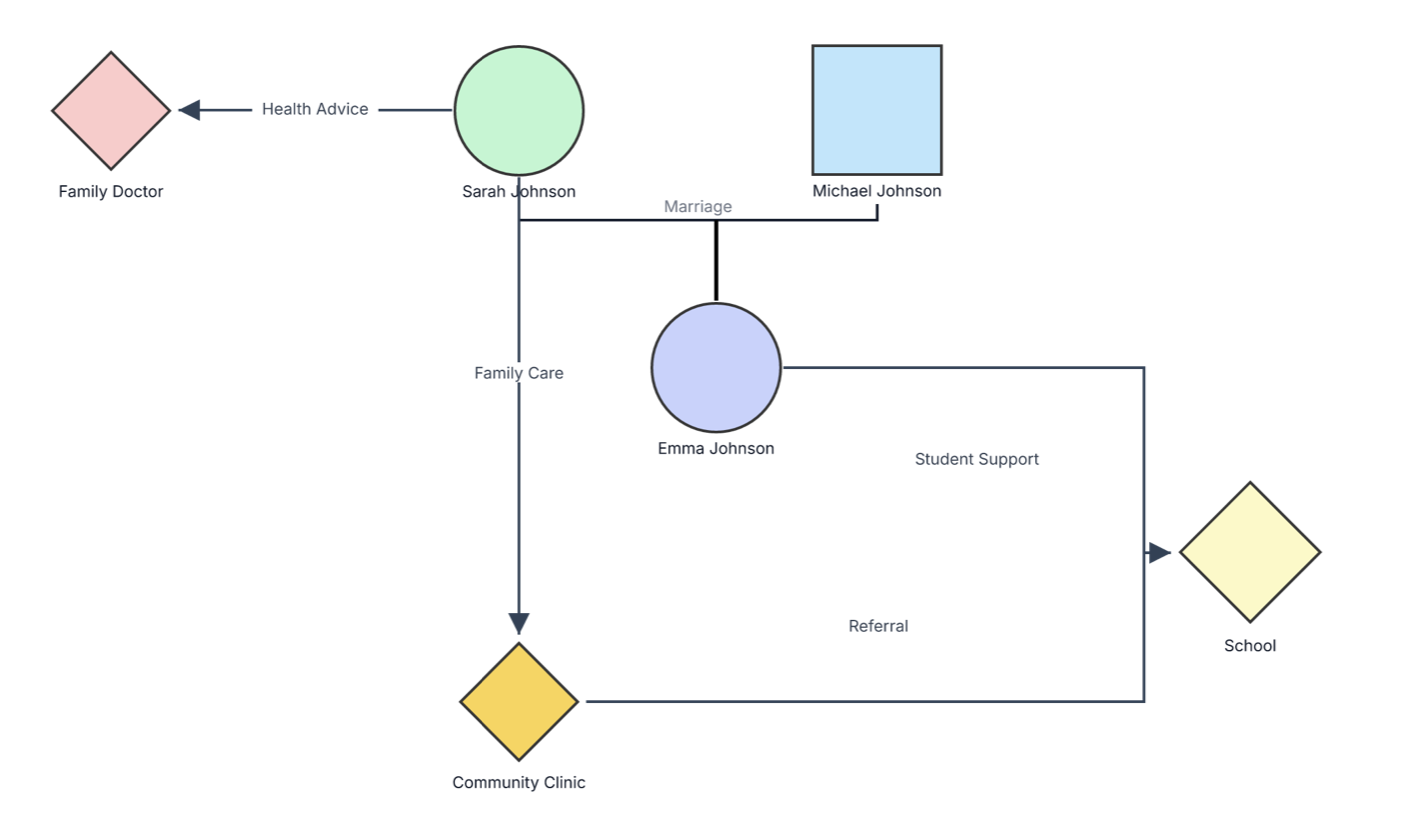
This community health assessment genogram places a family and its community resources in one view, making care relationships, support pathways, and service coordination easier to understand.
The example begins with Sarah and Michael Johnson and their child, Emma. Three external resources—the family doctor, community clinic, and school—surround the household so users can see how family and community systems work together.
Four labeled connections explain the support flow. Sarah receives health advice through the family doctor, the community clinic contributes to family care, Emma connects with student support through the school, and a referral pathway links the clinic and school.
This community health assessment genogram helps multidisciplinary teams organize a family, community resources, and support pathways in one clear view.
Connect family-health needs with providers, clinics, and follow-up services
Map services, referrals, support networks, and practical coordination responsibilities
Show how education and health resources connect around a child or household
Build a shared visual of available services and how support moves through the network
Family symbols establish the household, while resource shapes and labeled arrows show the surrounding community support system.
Male family member
Female family member
Connects married partners
Connects a child to the relevant parental union
Represents a healthcare, education, or community organization in this example
Shows the direction of advice, care, support, or referral
Names the service or support exchanged through the relationship
Helps readers distinguish the family doctor, clinic, and school at a glance
Use this example when a public health, healthcare, school, or social-service team needs a shared family-level view of community resources and referral pathways.
Add the family members relevant to the assessment and connect partners, parents, children, caregivers, and other significant household members.
Place healthcare providers, clinics, schools, community programs, faith organizations, social services, or other resources around the family. Use clear names and consistent resource shapes.
Draw directional connections and describe what they provide, such as health advice, primary care, student support, referral, transportation, food assistance, counseling, or financial guidance.
Review the map with the family and relevant team members. Add contact details, services received, follow-up dates, and responsible people so the visual can support practical coordination.
Creately Clinical supports coordinated community-health workflows with structured social-work fields, labeled service relationships, shared editing, notes, and case-ready outputs.
For this example, the Base and Social Work field packs are the most relevant capability set. Social Work fields can record housing, employment, income, insurance, support networks, services received, and risk factors while the visual map keeps family and community connections together.
It combines the relevant family structure with healthcare providers, schools, agencies, programs, and other resources. Labeled connections show how advice, care, support, and referrals move through the network.
Yes. Add any resource that contributes to family wellbeing, including schools, housing services, food programs, transportation, counseling, community groups, faith organizations, and financial-support services.
Arrows make the flow of support easy to follow. They can show who provides a service, who receives it, and how one organization refers the family to another resource.
Creately's Social Work fields can record housing status, employment, income sources, insurance, support networks, services received, and risk factors. The Risk & Services viewpoint, collaborative editing, comments, and shareable reports help multidisciplinary teams review the same family and service map together.
Edit the genogram, replace the Johnson family and example resources with your own case, and label the support pathways that matter most. Invite healthcare, education, and community partners to contribute and turn the map into a shared plan for coordinated support.