When it comes to quality improvement, most of us are probably aware of some of the most effective tools, namely the control chart, run chart, histogram, scatter diagram and flowchart. But IMO the father of quality management, Dr. Kaoru Ishikawa, has to be credited with the mother of all quality improvement tools – the Ishikawa diagram, which falls under the larger cause and effect diagram umbrella. It has been famously stated that Mazda used the Ishikawa diagram to design its popular MX-5 Miata sportscar, which has had the privilege of been called the “best-selling two-seat convertible sports car in history” by the Guinness Book of World Records in 2000. Talk about the power of diagramming! We’ve done up three templates that you can click and edit in Creately. But before you do, have a read of this post to see some of the basics when it comes to Ishikawa diagrams.
A diagramming solution for every problem?
While Ishikawa diagrams are used to solve problems at a very high level, this need not always be the case. The basic outline of a template would be like the diagram below. Looking like the skeleton of a fish (hence they are also sometimes called a fishbone diagram), the various primary or secondary causes can be identified, which leads to the identification and solution of a problem.

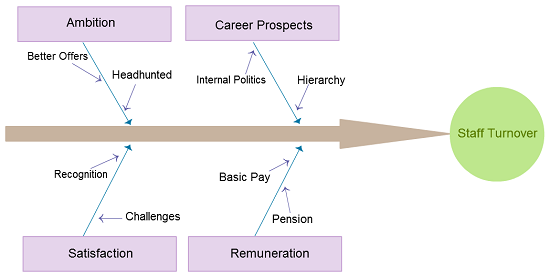
What I really like about the Ishikawa diagram is that you can use it in any industry or field to solve problems that may either be behavioural or technical. Consider an issue like high employee turnover in a financial investment company. The diagram would probably look something like the one below. Of course, the various reasons could increase depending on how many can be identified.
Brainstorming the way Ishikawa wanted you to
Getting your hands dirty with an Ishikawa diagram does involve quite a bit of input. Remember – the focus is on WHAT the problem is and WHY it happens. The good thing about working on a diagram of this nature is that you need to collate everyone’s thoughts and try to come up with a solution to the problem at hand. Say you are an Operations Manager in a retail clothes company. You have identified along with the rest of the company’s middle-levels managers that sales have been dropping across all your stores. Now it’s a matter of following these steps.
1. Identifying and indicating the cause categories on the branches can at times be a source of confusion. If this is the case, using the 4 M’s (Machine, Man, Methods, Material) as categories would be good enough.
2. Conduct the session using these basic guidelines:
a) Ask each participant just once to identify the cause of the problem
b) Every cause that is identified should be hung on the category branch it belongs to
c) The session will go on till everyone has exhausted giving causes to the problem
3. The final step would be the process of interpretation. While there are many ways to do this, the quickest and most accepted method is to identify the main five causes on the diagram and to give them a rank, based on the data that is available. Finally it is a matter of investigating these causes and utilizing techniques to eliminate the problems identified.
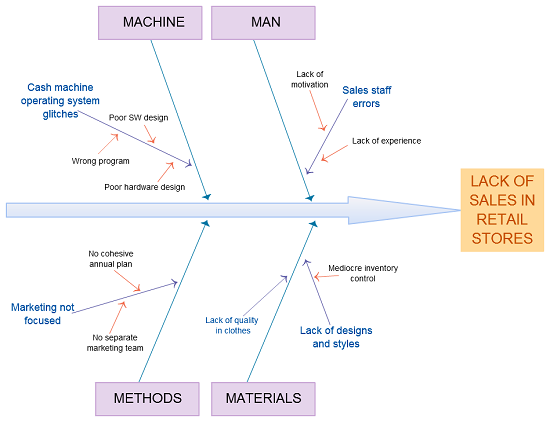
The conventional way you would attack such a problem would be to get all relevant team members into one location to have a brainstorming sessions. But with your laptop transforming into your virtual office along with diagramming apps that give you collaborative features, there’s no reason why you can’t solve problems whether you are at home, at office or on the road.



With over 3 decades of experience, I can honestly say that the Ishikawa diagram is one of the most misunderstood of business management tools, just beneath the most misunderstood, abused and misused, that being Root Cause analysis.
Perhaps the failure to use these tools properly stems from the misconstrued use of Deming’s PDSA which was change do PDCA. Both Deming and Ishikawa intended their tools to be useful in studying the variation present in a given process. They assumed that users would understand that a process is not singular in its function and that it can include many Tasks with each task having the possibility of contain many Actions (or Inactions). This is why the Ishikawa diagram indicates several possible causes for any one effect. The idea is not to define a single root cause, because that is most likely not possible related to a complex process of tasks and actions. The idea is to address all of the possible causes and Study which ones are the most probable contributors to the effect.
One may never be able to recreate the events which combined together to become the ultimate cause of the event, however with this tool one can discover the most probable common causes of variation, and even determine some special causes of variation and determine if adequate controls are in place to detect the occurrence of the common or special causes of variation identified as a result of the exercise.
Whatever one decides concerning this tool, its best to avoid the trap of “Root Cause” when using it for solving process issues/problems.