Creately is an easy to use Online Diagramming software - purpose built for team collaboration. Powerful features and an intuitive interface make Creately ideal for teams working together on everything from Business Diagrams, Strategy Maps, Flowcharts, Web Mockups to UML designs.
Here we share our experiences and lessons learnt building a web-company.
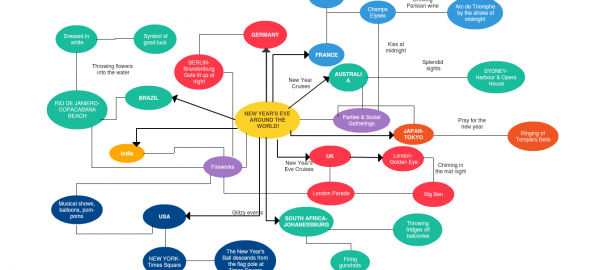
We’re about to step into the New Year and the whole world is waiting to celebrate the New Year’s Eve with loads of elation. And I’m here sitting on the couch sipping on my cup of tea, trying to draw a Concept Map.
New Year’s Eve is just like a monsoon that sweeps away all the negative experiences and helps us start afresh. Old Year’s Night will be celebrated on December 31, 2009, throughout the World with parties, social gatherings and firecrackers - to cherish the beautiful moments of the year. The year that will soon be just a memory in one’s life!!
Yes, it’s New Year’s Eve in a few days and you must want to know what’s happening around the World. Check out our Concept Map. We’ve put together a simple diagram to capture how NYE is celebrated around the world and whats the most happening location for this New Year.
Working with designers, developers, clients and other stakeholders in designing a website can be a challenge, especially when working with external vendors. Its challenging enough to grok your client’s exact requirements and you want to make sure these requirements are clearly understood by the entire project team. As part of a web design project, its essential to develop a sitemap or website navigation plan in order to clearly communicate the intent and scope of your website to stakeholders and the project team.
Web site navigation plans should include all the web pages within your site and preferably be easy to navigate, update and share. But an ideal navigation plan, should allow you to easily link your sitemap to your webpage mockups - so clients can visualize and explore the entire website design even before a single line of HTML code is written.
Interactive Sitemaps with Creately
This 2-min video demonstrates how to create interactive Sitemaps and Website Navigation Plans with Creately that user’s can click-thru to review the underlying webpage mockups. With ready made easy-start templates and a fully interactive interface, Creately makes it easy to create and collaborate on sitemaps, mockups and wireframes for all your design projects.
Ever heard of people go on and on about Graphic Organizers? Ever wondered the importance of them?
As the name implies, graphic organizers are visual learning tools which facilitate the students’ ability to learn and understand better. However, the effectiveness of these graphic organizers depend on the involvement of the teachers and their responsibilities in explaining to students how to use such tools. Graphic organizers are suitable for students in all age groups; it helps them organize complex information into concise visual maps. Is that all? No, they have a great potential for fostering learning in a variety of different areas in education, particularly comprehension, reading and vocabulary skills.
We, at Creately studied the importance of these graphic organizers, and designed a number of easy to use graphic organizer templates. After doing extensive research on the popularity of specific graphic organizers, we designed templates for Storyboards, Fishbone Diagrams, T Charts, Y Charts, Cycle Diagrams, Venn Diagrams, ISP (Information, Source, Page) Charts, Persuasion Maps, KWL (Know- Wonder- Learn) Charts, and much more.
You can see a few of our worked examples and template samples below -
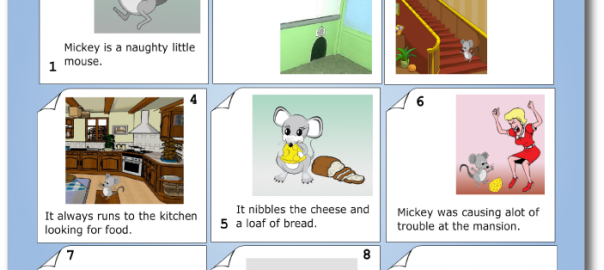
StoryBoards - Storyboarding is a great technique for discussing books and literature. With Creately’s StoryBoard Graphic Organizer Templates, you get a web-based visual organizer which helps students work together on writing to better understand the story. It’s great for discussing story structures and exploring the varied ways in which the author works with time.
KWL Chart - A KWL Chart or ‘Know-Wonder-Learn’ chart is an excellent visual graphic organize. Creately is loaded with great KWL chart templates that you can put to use immediately in your classroom. With Creately, your students can work in groups on a KWL chart online then share with you to submit their work as an assignment.
SWOT Analysis - SWOT Analysis is a tool for auditing an organization and its environment. You can now brainstorm on SWOT analysis with your students using our online SWOT Analysis templates and organizers. From the classroom to the boardroom, a SWOT graphic organizer is a useful tool and can be lots of fun with Creately.
Persuasion Map - This is a very effective tool which helps students map out their arguments for a persuasive debate or essay. In Creately the Persuasion Map templates are completely customizable and accessible online anytime.
Cluster/ World Web - In Cluster/ World Web templates, the students are expected to write the topic in discussion in the centre circle and the details in the smaller circles. Now you can work on the fine Cluster/ World Web templates in Creately.
ISP Chart - ISP Chart is also known as the ‘Information- Sources- Page’ Chart. These chart templates in Creately would come in handy for students who are trying to compile the list of references for any project/ assignment/ thesis they are working on.
What a glorious month its been… We received fantastic news just a couple of days ago that Creately (and Cinergix) have been named in the Top 50 Coolest Company awards by Anthill Magazine, then we moved into our brand spanking new offices in Sri Lanka and now we have a Creately release packed with features you’ve been asking for.
New Release Highlights
This week’s release is focused on making your experience with Creately a whole lot better. We’ve now made it possible to use your own local machine fonts in all diagrams, made significant performance improvements, fixed many UML bugs as well as introduced new templates for project managers and business users.
All the Fonts you can Eat
A few months ago, we added 10 open-source fonts to Creately to let you create professional looking diagrams. But guess what? Once our users tasted the forbidden fruit, everyone was clamoring for more. So as our legal team (read Founders) tried to figure out a way to get around the copyright issues of embedding fonts in Creately, the Dev team came up with a beautiful solution.
Why not let users load and use their local machine fonts in their diagrams! Hmm… sounds great but what happens when someone uses a font in a shared diagram that another user does not have installed on their computer? That’s where font notifications and substitution come in. We’ve devised a method of notifying users when there’s a missing font in a diagram and automatically providing a substitute font.
Unresponsive software sucks. Nobody wants to use software that freezes up or slows down. So here at Creately, we’ve kept a close eye on the performance of the application to make sure it exceeds your expectations. Lately though, as our customers have started working on very large and complex diagrams, some users have reported a degradation in UI performance. We decided we’ll have none of that and neither will our customers, so the team set about analyzing the issues and have made significant improvements to the codebase to improve the ‘feel’ of the User Interface. We’re not through yet, but are pleased with the improvements we’ve made this week.
Here’s a short list of what you can expect:
Selecting Multiple Objects and Select All (Ctrl-A) is much faster making Copy-and-Paste much smoother.
Significantly less lag when moving Container Objects or other objects into Containers.
Faster cursor and mouse response as we’ve optimized all the redraws that happen when you move your mouse cursor over the drawing canvas.
No more waiting to download fonts (which can be upto 2MB in size) cos we’ll automatically load the fonts installed on your computer.
Watch this space, we’ll be doing more performance related improved over the coming weeks. Let us know, if there’s anything else troubling you.
Resizable Drawing Canvas - ‘Cos you asked for it
We’ve gone from a fixed canvas size, to a customizable size in the last 3 months. But you said that wasn’t enough - You wanted to be able to change the size of the Canvas as your diagram grew - making this the 2nd most requested feature on our Community Support Site.
So we’re gone and done it. Now you can click on the Page Properties tab (click on the Canvas, then open the Properties Tab on the right-side) to change the size of your diagram page anytime. Simple.
Better UML designs with Creately
We’ve had a renewed focus on the UML modeling and design space. We’ve found that our users love Creately for UML. This week, we revisited all our UML shapes and have fixed many little issues in the UML KObject shape sets for Class, Object, Collaboration and Deployment diagrams. More info on these UML fixes can be found in this blog post.
New Business Templates
We are always adding new Templates to Creately. This week, you’ll find new templates for Work Breakdown Structures, Ansoff Matrix, Value Stream Maps and more.
We’ve had support for UML designs and diagrams for a while here at Creately. And we’ve found that many of our users really like collaborating on UML designs with their Teams through Creately. With built-in commenting, easy embeds for your project wiki and PDF exports, Creately is perfectly suited for almost all types of software and design documentation.
Little Niggly Issues
Unfortunately, there were a few issues and limitations with our UML support. Little niggly things that were marring your experience with Creately. So we’re spent the last forth-night going through all the reported issues with a fine tooth comb to make Creately for UML an easy to use and perfectly functional UML modelling software. This is just the beginning. Expect a whole lot more from Creately for UML in the coming weeks.
What have we Improved?
Without going into too much detail, I’ll list out some of the fixes we’re included in this release of Creately UML.
Resizing UML shapes - Previously, when you resize a UML shape like a Class or Package, the new size is not correctly saved, resulting in diagrams getting a little messy when they are re-opened later. This fix was particularly challenging for UML objects, as they support Filtering data properties in the diagram - making them dynamic shapes that resized as you added more Attributes and Members. Issue Fixed.
Copy & Pasting a UML shape resulted in the copied shape being resized to its default size. This has been fixed, so the next time you make a copy of any UML object, you’ll get an exact copy. Issue Fixed.
Limit on the size of the Attributes and Operations you can enter into a Class and Object Shape. We’ve removed this now, so you can model large classes with no problems. Issue Fixed.
Adding more attributes and operations to UML shapes, didn’t always automatically resize the shapes, resulting in a muddled image. Now all UML objects will automatically resize to fit all visible data properties. Issue Fixed.
When working with Filters on UML shapes, turning on the attributes or properties in a small shape would cause the text to spill out of the shape. Now all shapes automatically re-size to accommodate filtered text. Issue Fixed.
We’re working very hard to make Creately an ideal solution for all you software and design teams out there. So watch this space as we introduce new features and fixes that will make your team’s life a whole lot easier when it comes to working on UML designs, Mockups,Wireframes and Sitemaps.